
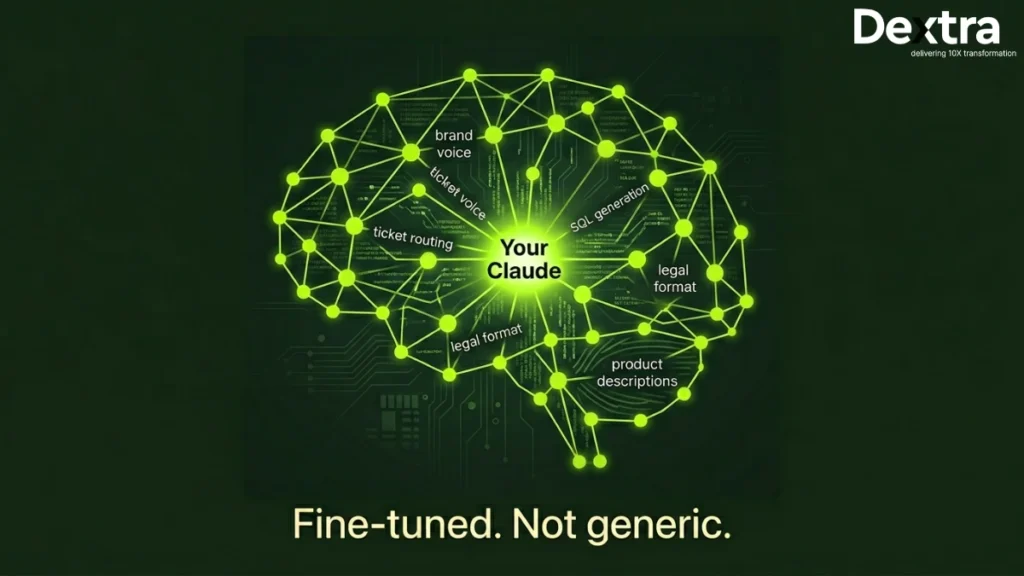
Yes, you can fine-tune Claude. But not the way most teams expect and not for every model. Today, the most reliable path is through Amazon Bedrock Claude fine-tuning, which allows enterprises to customize Claude models for specific tasks.
If the question is “can you fine tune claude?”, the answer is simple: yes, but with the right setup, data and expectations.
In this step-by-step Dextra Labs’ guide to fine-tuning Claude, you will learn how to fine-tune Claude 3 Haiku using Amazon Bedrock when it makes sense, how to prepare your data and how to evaluate results in a real-world enterprise environment.
The results can be powerful. One enterprise deployment reported a 73% increase in positive feedback after using a fine-tuned Claude model. In another case, a fine-tuned Claude 3 Haiku achieved an F1 score of 91.2% compared to 76.3% for the base Claude 3.5 Sonnet, at a much lower cost.
However, “fine-tuning LLM for enterprise” is not a replacement for everything. There is still a need for prompt engineering, RAG and system prompts. To get a better overview of the system, you might want to look at best Claude Code Alternatives.

Dextra Labs — Claude AI Consulting for Enterprises
From fine-tuning Claude on Amazon Bedrock to building fully autonomous agentic workflows, Dextra Labs helps enterprises unlock the full value of Claude — with expert guidance at every step of the implementation.
Explore Claude consulting servicesIs Fine-Tuning Claude Right for Your Use Case?
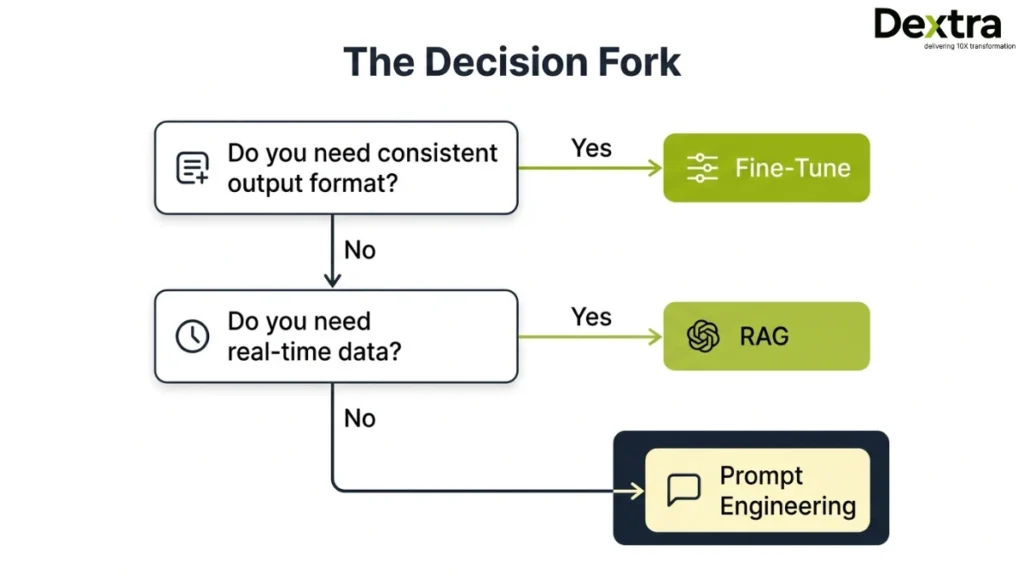
It is very important to take a step back before going into the specifics of how to fine-tune Claude. A question to be asked here is: “Is fine-tuning the right approach for you?”
Most teams are eager to fine-tune the LLM for enterprise projects without first determining whether fine-tuning is the right approach. Although fine-tuning is a good option, it is not the only option. In fact, it is not the most cost-effective option.
Fine-tuning can be best utilized when you are working on an application where consistency is the key. When you are working on an application where the tone of the output has to be consistent, the output has to be produced in a specific format, or the language has to be consistent in the output of the application, then fine-tuning can be the best option.
It is also the best approach when you have reached the limits of prompt engineering. In applications where latency is key, you may also consider fine-tuning.
When fine-tuning works best:
- You need a consistent tone, format, or brand voice
- You are solving classification or structured output tasks
- Prompt engineering is no longer improving accuracy
- You want lower latency without retrieval steps
- You have 100+ high-quality labeled examples
However, fine-tuning is not suitable for every scenario. If your use case depends on real-time or frequently updated information, it may not perform well because fine-tuning “locks in” knowledge at training time. Similarly, if your dataset is large and constantly changing, or if you have limited labeled examples, other approaches may be more effective.
When to use RAG or prompting instead:
- You need real-time or frequently updated data
- Your dataset is large and dynamic
- You have fewer than 50 examples
- You need complex reasoning across multiple documents
- For a broader understanding of deployment options, explore best Claude Code Alternatives.
Comparison Table
| Dimension | Fine-Tuning (Claude on Bedrock) | Prompt Engineering / RAG |
| Approach | Fine-tuning on Bedrock | Prompt engineering / RAG |
| Best for | Consistent style, format and domain | Factual grounding, retrieval |
| Training Data | 50–1,000+ labelled examples | No training data needed |
| Cost Structure | One-time training + inference | Per-query retrieval cost |
| Latency | Low (no retrieval step) | Higher (retrieval adds latency) |
| Maintenance | Retrain when domain shifts | Update knowledge base |
| Privacy | Data stays in your AWS account | Depends on the retrieval setup |
Also, choosing the right model matters. Learn more about Claude 3 Opus vs Sonnet vs Haiku before deciding.
Which Claude Models Can You Fine-Tune?
If you are exploring fine tune claude bedrock, it is important to know that not all models support fine-tuning. Currently, Claude 3 Haiku is the primary model available for Amazon Bedrock Claude fine-tuning, supported in the US West (Oregon) region. It is the most practical option for enterprise use cases today.
What About Claude Sonnet?
A common question is: Can you fine-tune Claude Sonnet? The answer is no, not yet for direct fine-tuning. However, teams can use Sonnet or Opus to generate high-quality training data and then use that data to fine tune claude with Haiku. This is a widely used and effective workaround.
Why Haiku Is Preferred?
For Claude’s fine-tuning enterprise needs, Haiku offers:
- Lower cost
- Faster response times
- Strong performance on structured tasks
Infrastructure Note:
All fine-tuning LLMs for enterprise workflows are currently handled through Amazon Bedrock, with more advanced capabilities expected soon.
Step 1: Define Your Enterprise Use Case with Precision
The first and most critical step in any Claude fine-tuning enterprise project is defining your use case clearly. Many projects fail because the goals are too vague. “Improve customer service” is not a goal. Fine-tuning without a well-defined goal is the #1 reason for failures of enterprise projects.
Strong Use Case Examples
High-quality use cases are specific, measurable and actionable.
- Customer support routing: Classify incoming tickets into 12 categories >95%.
- Legal document summarization: Generate a one-page summary of a document in a fixed format.
- SQL generation from natural language: Map natural language queries to your database schema.
- Financial Q&A: Answer questions accurately from tabular data from earnings reports.
- Brand voice enforcement: Ensure all output is consistent in tone, style and register.
Define Success Metrics
Before writing a single training example, clarify:
- Which metric matters? (F1 score, BLEU, accuracy, human preference rating)
- What is your baseline performance?
- What does success look like for the project?
Use Case Checklist
- Task type
- Input/output format
- Evaluation metric
- Baseline performance
- Success threshold
Real insight: SK Telecom’s fine-tuning project was successful because they clearly defined the KPI, agent response quality scores. Result: 73% improvement in terms of positive feedback, 37% improvement in KPIs.
Defining your use case clearly ensures that every step of the way is perfectly aligned with the business objective.
Step 2: Prepare a High-Quality Dataset
When learning how to fine-tune Claude, the quality of your dataset matters far more than sheer size. A well-structured, accurate dataset is the backbone of any successful enterprise fine-tuning project.
Recommended Dataset Size
- Minimum: 32 examples (required by Amazon Bedrock)
- Ideal: 100–500 high-quality examples for meaningful performance gains
Example Training Record (JSONL)
Bedrock expects a JSONL format with a system message plus user/assistant message turns:
{

 "system": "You are a customer support agent. Be concise.",

 "messages": [

   {"role": "user", "content": "What is your return policy?"},

   {"role": "assistant", "content": "You can return items within 30 days."}

 ]

}
This structure ensures the model understands context, role and response formatting consistently.
Dataset Format Requirements
To ensure your fine-tuning job runs successfully, your JSONL dataset should follow a consistent structure. Here’s a quick reference:
| Field | Type | Required | Description | Example |
| system | String | Yes | Defines assistant behavior | “You are a support agent.” |
| messages | Array | Yes | Conversation turns | [{“role”: “user”, …}] |
| role | String | Yes | Speaker role | “user” / “assistant” |
| content | String | Yes | Message text | “What is your policy?” |
Each line in the JSONL file should contain one complete training example.
Data Quality Checklist
- Accuracy: All facts should be verified and domain-appropriate
- Edge cases: Include uncommon or challenging examples
- Consistency: Maintain tone, style and persona across all records
- Balance: Ensure classes or categories are evenly represented (for classification tasks)
Best Practices
- Use larger models like Claude 3.5 Sonnet or Opus to generate and refine training examples, then fine-tune Haiku
- Include a separate validation split to enable early stopping and prevent overfitting
- Store all training data in Amazon S3 within the same AWS region as your Bedrock fine-tuning job
Common Mistake: Even a single malformed JSON record can fail the entire fine-tuning job. Always validate your JSONL before uploading.
This careful preparation ensures your fine-tuned Claude model learns the right patterns, avoids hallucinations and performs reliably in production.
Step 3: Launch Fine-Tuning on Amazon Bedrock
This is the execution phase where you run your fine-tuning job using Amazon Bedrock, either via console or API.
Prerequisites
Before starting, ensure you have:
- AWS account with Bedrock access
- Access to Claude 3 Haiku (US West – Oregon)
- Training data uploaded to S3
- IAM role with required permissions
How to Launch
Via Console:
Go to Bedrock → Model Customization → Create Job → Select Haiku → Upload dataset → Set output locationVia API (Boto3/CLI):
Define model, S3 paths and hyperparameters → Run job → Track status programmaticallyKey Settings:
- Epochs: 1–3
- Batch size: Default
- Learning rate: Lower for small datasets
- Enable early stopping
Monitoring & Cost
Track training loss for performance.
- Typical Cost: $10-$50
- Typical Time: 30-90 minutes
Pro Tip: Do a test run first to avoid costly mistakes.
Step 4: Evaluation of Your Fine-Tuned Model
It is imperative to evaluate your fine-tuned model to ensure it is better suited for real-world applications. Skipping this step often leads to poor production results.
Key Metrics
- Classification: F1 score, precision, recall
- Generation: BLEU, ROUGE, human ratings
- Structured Outputs: Exact match, schema validation
- Latency: P50/P95 (should improve without RAG)
Best Practices:
- Compare against base model + prompt baseline
- Test outputs in Bedrock playground
- Run A/B testing with ~10% traffic
Real Benchmarks
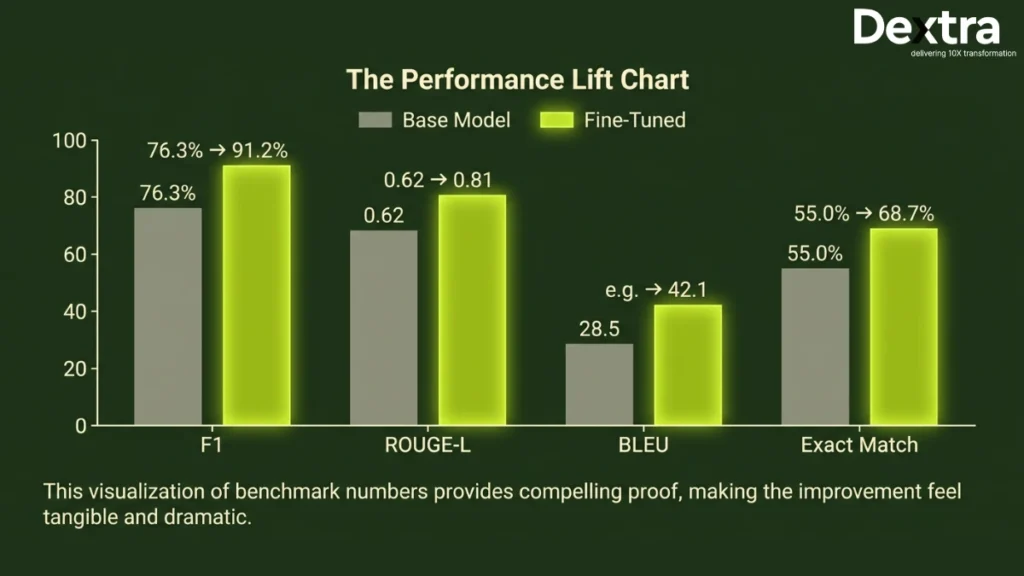
Typical improvements include:
- F1: 76.3% → 91.2%
- ROUGE-L: 0.62 → 0.81
- BLEU: 0.58 → 0.74
- Exact Match: 68% → 89%
If gains are below 5%, improve your dataset.
When to Retrain
Retrain when your data, policies, or domain changes to maintain accuracy and consistency.
Step 5: Deploy to Production with Provisioned Throughput
Fine-tuned Claude models on Amazon Bedrock cannot run on demand. They require Provisioned Throughput, meaning reserved compute capacity for production use.
Key Deployment Steps:
- Create a Provisioned Throughput configuration in the Bedrock console
- Attach your fine-tuned model
- Use the model ARN in API calls (via the standard Bedrock InvokeModel API or Python/Boto3)
Cost & Planning:
- Billed per Model Unit per hour, regardless of actual usage
- Options: 1, 6, or 12-month commitments (longer commitments reduce hourly rates; short-term testing is more expensive)
- Scaling: One Model Unit handles a defined request throughput, estimate traffic carefully
Best Practices:
- Test thoroughly before committing to a long-term term
- Plan TCO based on training, provisioned throughput and expected usage
- Ensure usage aligns with enterprise throughput and latency requirements
Pro Tip: A small pilot deployment helps catch misconfigurations and ensures predictable costs before committing to a 6–12 month provision.
Moving a fine-tuned Claude model from Bedrock experimentation into a reliable enterprise environment requires more than configuring Provisioned Throughput. Teams also need to align the deployment with their architecture, security requirements, performance targets, cost model, and ongoing evaluation process. Claude consulting services can help enterprises plan, implement, and optimize Claude deployments across these production requirements.
Step 6: Iterate and Improve
This is where actual performance improvements take place. Fine-tuning is not a one-time process but an iterative process of learning, correcting and improving.
Simple Iteration Loop
Start small, learn fast and improve constantly:
v1 model → detect failure cases → add 20-50 new cases → retrain → v2 modelThis process helps you build an even better model with increasing accuracy and reliability for real-world applications.
Few-Shot + Fine-Tuning (Hybrid Approach)You can take your model’s performance to the next level by using a few-shot prompt along with fine-tuning, especially for edge cases.
Example:
| Input | Output |
| Refund after 45 days | Apology + policy explanation + exception |
| Wrong product received | Apology + replacement steps |
Adding just 2–3 such examples in your prompt can significantly improve responses for rare or tricky cases.
Best Practices:
- Review 10–20% of synthetic data to avoid errors
- Maintain clear versioning (v1, v2, v3)
- Continuously feed failure cases back into training
- Track improvements using consistent evaluation metrics
Going Beyond Fine-Tuning
For more advanced, automated workflows, explore
Explore building AI Agents with Claude to create fully autonomous AI workflows.
Enterprise Considerations: Security, Compliance and Cost
Before scaling Claude fine-tuning on Amazon Bedrock, enterprises should carefully evaluate security, compliance and cost implications.
Security & Data Privacy
- Data stays within AWS training data is never used to improve base models
- Controlled via your VPC and IAM permissions
Compliance & Data Residency
- Supports AWS certifications: SOC 1/2/3, ISO 27001, HIPAA, PCI DSS
- Fine-tuning is currently available in the US West (Oregon); monitor AWS region rollouts for additional options
Cost Model & ROI
- Training cost: One-time compute charge for fine-tuning jobs
- Provisioned Throughput: Hourly cost for production inference
- Iteration cost: Budget for 2–3 fine-tuning cycles to achieve optimal performance
- ROI: High-volume use cases can recoup costs quickly, e.g., replacing 50% of Sonnet-level calls with fine-tuned Haiku
Conclusion: Fine-Tuning Claude as a Competitive Advantage
With fine-tuning Claude on Amazon Bedrock, enterprises can develop highly specialized AI models that match their requirements. A highly effective approach in six steps enables enterprises to obtain improved results in terms of precision, response time and cost savings.
When implemented in actual scenarios, fine-tuning Claude 3 Haiku can yield superior results compared to other standard models, such as Sonnet. This can be achieved by utilizing high-quality information, proper evaluation and constant improvements.
Recap of the Process:
Define goals → prepare dataset → launch training → evaluate → deploy → iterate
Key Takeaways:
- Select the right model based on your use cases
- Continuously refine with new information and failure cases
- Make use of advanced workflows along with fine-tuning for better outcomes
With the right strategy and execution, fine-tuning can be an effective tool for businesses.
Need help fine-tuning Claude for your enterprise?
Dextra Labs is an AI consulting agency specializing in deploying and customizing Claude for enterprise use cases, including fine-tuning strategy, dataset preparation, Bedrock configuration and evaluation frameworks. Skip the trial and error and get it right the first time.
Start With a Free AI ConsultationFAQs:
Can you fine-tune Claude?
Yes. Claude 3 Haiku can be fine-tuned using Amazon Bedrock (US West – Oregon). Direct fine-tuning via Anthropic’s API is not yet available for general users. LoRA and RLHF-based APIs are in public beta.
Can I fine-tune Claude Sonnet?
Not yet fully available. Claude Sonnet can be used to generate high-quality synthetic training data, which can then be used to fine-tune Haiku.
How much data is required?
Amazon Bedrock requires a minimum of 32 examples. For meaningful results, 100–500 high-quality examples are recommended.
What does it cost?
For small Haiku fine-tuning jobs (~500 examples), costs typically range between $10 and $50, depending on epochs and dataset size.
Is my data secure?
Yes. Training data remains within your AWS account and is subject to your AWS security and compliance controls. Bedrock does not use your data to improve base models.
When should I use RAG instead of fine-tuning?
Use RAG for dynamic, frequently updated, or large datasets. Fine-tuning is best for consistent tone, structured outputs, domain-specific vocabulary, or classification tasks.