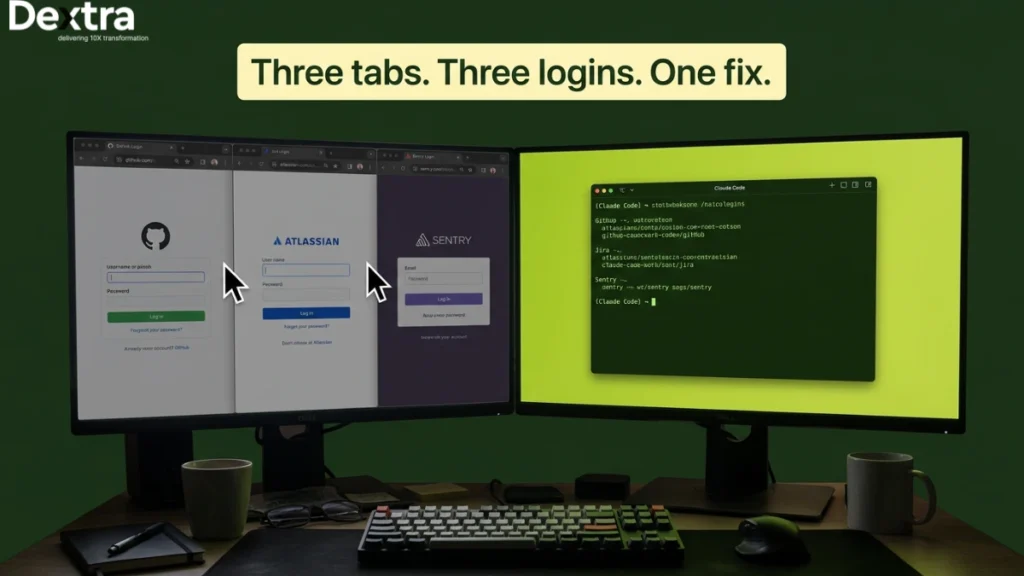
Claude Code becomes significantly more useful when it can work with the systems your engineering team already uses.
A coding assistant can review a pull request, explain a codebase, or suggest a fix, but many real development tasks require information that lives outside the repository. The relevant errors may be in Sentry, requirements in Jira, designs in Figma, deployments in CI/CD systems, or operational data in internal APIs and databases.
The Model Context Protocol (MCP) provides a standardized way for AI applications to connect with external tools, data sources, and workflows. Developed as an open standard by Anthropic, MCP defines a common interface through which AI applications can discover and use capabilities exposed by MCP servers, reducing the need for fragmented, one-off integrations.
For Claude Code, this means an AI-assisted development workflow can extend beyond the codebase. With the right MCP servers, Claude Code can interact with repositories, issue trackers, monitoring platforms, databases, documentation systems, and internal services, subject to the permissions and controls you configure.
But connecting Claude Code to more systems also expands the security and governance surface.
A local MCP server used by one developer is very different from an enterprise MCP platform connecting AI agents to production databases, source-code repositories, deployment systems, and internal APIs. Enterprises need to think about identity, least-privilege access, credential management, tool permissions, data boundaries, audit logging, monitoring, and approval workflows before MCP integrations reach production.
The MCP ecosystem is also evolving quickly. For remote MCP servers, Streamable HTTP is now the recommended transport for new implementations, while the older HTTP+SSE transport is maintained primarily for backwards compatibility.
This is where an enterprise-focused approach becomes important. Dextralabs helps organizations design and implement production-grade AI architectures where integrations are not only useful, but also secure, observable, and governed. Its AI agent development services can support organizations building AI agents that need to interact with internal systems and enterprise workflows.
In this guide, we’ll explain what MCP is, how Claude Code connects to MCP servers, how to configure local and remote integrations, which enterprise use cases make sense, how to build custom MCP servers, and how to govern MCP safely as adoption scales.
What is the Model Context Protocol (MCP)?
The Model Context Protocol (MCP) is an open-source protocol developed by Anthropic that allows for seamless Claude MCP integration with external systems, databases and APIs. In essence, Claude Code MCP can be defined as a universal interface that allows AI agents to interact with your entire development stack.
It standardizes how AI applications access resources, execute functions and utilize prompts. This simplifies how AI applications can be managed because it reduces the complexity of managing disconnected tools. If you’re wondering how to use MCP with Claude Code, it starts with understanding this unified communication layer.
How Claude Code MCP Works (Architecture Overview)?
At its core, Claude Code MCP follows a simple three-part architecture:

Client → MCP Server → External Tools- Client (Claude Code): The AI agent that initiates requests and interacts with tools
- MCP Server: The central layer that processes requests, manages authentication and maintains context
- External Tools: Systems like databases, APIs, or file storage that execute tasks and return results
This architecture allows developers to work across multiple tools without losing context. For example, Claude Code can query a PostgreSQL database, update a Jira ticket and check Sentry errors. All of this can happen within a single workflow using a connected Claude Code MCP server.
What are the Core Capabilities of MCP?
The power of Model Context Protocol comes from three core capabilities:
- Resources: Structured data for AI to read/write, such as CSV and JSON files, or internally generated documents
- Tools: Functions that Claude is capable of executing, such as triggering the CI/CD pipeline or sending alerts
- Prompts: Predefined templates that standardize tasks like reporting, debugging, or code reviews
These capabilities make Claude MCP integration flexible and scalable across different use cases.
Transport Methods in MCP
| Transport | Best For | Security | Enterprise Use |
| stdio | Local tools, filesystem access | Process isolation | Developer workstations |
| HTTP | Remote/cloud services | OAuth 2.0 for access authentication (token-based). | Enterprise deployments |
| SSE (deprecated) | Legacy systems | Limited security | Migration recommended |
A key part of the Claude MCP config is choosing the right transport method. MCP supports multiple transport options, each suited for specific environments:
- HTTP transport is recommended for most teams due to its secure, scalable setup
- stdio is useful for local development and testing
- SSE is outdated and should be phased out
Why MCP Matters for Enterprises?
For organizations, Claude Code MCP is more than just a technical feature. It is the foundational layer for AI integration.
Instead of creating and managing multiple custom connectors, the MCP approach allows for the creation of a standard platform where AI agents can interact with each other while keeping context. This is particularly relevant for the enterprise deployment of the MCP for Claude.
With the MCP, enterprises can:
- Eliminate fragmented integrations
- Enable AI agent orchestration across systems
- Centralized control & auditability.
- Scale AI workflows securely across teams
Key Insights
By using the Model Context Protocol, you can change the way your AI interacts with your systems. Whether you are just starting to look at how to add the MCP to Claude Code or are looking to implement the MCP on a grand scale, the MCP is the foundation for efficient, connected and intelligent workflows.
How to Add MCP Servers to Claude Code (Step-by-Step)?
Adding MCP servers to Claude Code is essential if you want to connect your AI workflows with external systems like GitHub, Jira, databases and other internal tools. This guide will show you all the steps on how to add the MCP servers to Claude Code.
1. Prerequisites
Before adding MCP servers, make sure your environment is ready:
- Claude Code installed globally:
npm install -g @anthropic-ai/claude-code- Node.js version 20+
- Claude API key configured: Store it as an environment variable for secure access
Meeting these requirements ensures Claude Code MCP commands can communicate with remote or local MCP servers safely.
2. Adding Your First MCP Server
The most common method is adding an HTTP-based MCP server, ideal for remote or cloud-hosted services.
Command:
claude mcp add <name> --transport http <url>Example with GitHub MCP server:
Claude mcp add github -- transport http https://mcp.github.com/serverThis registers the GitHub MCP server, enabling Claude Code to monitor PRs, issues and CI/CD triggers directly.
JSON configuration for multiple servers:
Claude mcp add-json github.json
Example github.json:
{

 "name": "github",

 "transport": "http",

 "url": "https://mcp.github.com/server",

 "auth": {

   "token": "${GITHUB_API_TOKEN}"

 }

}
Using JSON ensures a reproducible Claude MCP config across projects and teams.
3. Adding a Local MCP Server (stdio)
Local MCP servers use stdio transport, perfect for testing, offline workflows, or project-scoped tools.
Example:
npx @modelcontextprotocol/server-filesystem

Claude MCP add local-files --transport stdio
This allows Claude Code to access local files and resources without a network connection.
4. Understanding Configuration Scopes
MCP servers can be registered under different scopes to control availability:
| Scope | Description | Command Example |
| Local (default) | Available only to the current project | claude mcp add <name> –scope local |
| Project | Shared across team via .mcp.json in repo | claude mcp add <name> –scope project |
| User | Global access across all projects | claude mcp add <name> –scope user |
Tip: For enterprise teams, use project scope for shared servers and local scope for personal credentials.
5. Environment Variables & Secrets
Do not store API keys or credentials in a hard-coded format. Always use environmental variables for security & ease of data rotation.
Example:
export GITHUB_API_TOKEN="your_token_here"

claude mcp add github --transport http https://mcp.github.com/server --env GITHUB_API_TOKEN
This keeps sensitive data secure while maintaining a reproducible Claude MCP config.
6. Verifying Your Setup
After adding MCP servers, verify they are registered and working:
- List all MCP servers: Claude MCP list
- Test in Claude Code session: /mcp
This opens the MCP interface, allowing you to interact with servers, run tool calls and confirm access to resources.
Best Practices for MCP Integration
- Start with 1–2 servers to avoid context overload
- Use HTTP transport for team deployments, stdio for local testing
- Keep all sensitive tokens in environment variables
- Maintain project-scoped .mcp.json for team standardization
- Regularly verify servers and credentials to avoid access problems
These steps will guarantee that developers can add MCP servers to Claude Code in an efficient, safe and scalable manner for personal projects and even large-scale enterprises.
Top 10 MCP Servers for Enterprise Development Teams:
MCP servers enable development teams to integrate Claude Code and access essential systems directly within their environment. The following list includes a comprehensive set of the top 10 MCP servers that are essential for productivity and efficiency within the enterprise environment. Each server includes setup commands and examples to help illustrate the importance and applications of each server.

1. GitHub MCP
Use Case: PR reviews, issue management and CI/CD triggers.
Setup Command:
claude mcp add github --transport http <url>Description & Example:
The GitHub MCP server enables Claude Code to monitor pull requests, issues and repository events directly.
However, during the process of using these developer tools in the browser, the developers will also have the chance to carry out code review activities like commenting on the code, creating a PR without closing the tab and even running the CI/CD process within the same tab. This can be very helpful to businesses in speeding up the software development process by reducing the amount of human effort needed to carry out the task.
Prompt Example:
“Fetch all open PRs in the ‘main’ branch and summarize pending reviews.”
2. PostgreSQL / Supabase MCP
Use Case: Direct database queries, schema exploration.
Setup Command:
Claude mcp add-json postgres '{...}'Description & Example:
PostgreSQL or Supabase MCP servers let Claude Code query structured data, analyze schemas and perform operations safely. Suitable for reporting, analysis and automating data-related activities for data-oriented teams to gain quick insights on data in real-time.
Example:
“Fetch top 10 customers based on revenues from sales databases and create a summary report.”
3. Sentry MCP
Use Case: Production error monitoring and stack trace analysis.
Setup Command:
claude mcp add sentry --transport http <url>Description & Example:
Sentry MCP provides real-time error monitoring directly within Claude Code.
Developers can use the feature to fetch the latest errors, debug errors and create reports without having to switch from their IDE. This can aid programmers in debugging and resolving errors efficiently.
Example:
“List all unresolved errors in the payment service from the last 24 hours and have a severity > high.”
4. Figma MCP
Use Case: Design-to-code workflows, UI mockup generation.
Setup Command: Via Cursor/Claude Desktop config
Description & Example:
Figma MCP combines design tools with development tools, allowing for the use of artificial intelligence to automatically extract components, style guides and UI assets. This helps bridge the gap between designers and developers, allowing for quicker UI implementation and consistency across enterprise applications.
Prompt Example:
“Please generate React code for the login page based on the Figma mockup.”
5. Jira / Atlassian MCP
Use Case: Ticket management and sprint automation.
Setup Command: Via Docker MCP Toolkit
Description & Example:
Jira MCP helps Claude Code to automatically create, edit and track issues and sprints. This helps project managers to automatically update the status and generate reports, thereby making the process of sprint planning easier.
Prompt Example:
“Create a new sprint for team Alpha and assign all pending issues from the backlog.”
6. Slack MCP
Use Case: Channel monitoring and team notifications.
Setup Command: Via Zapier AI Actions MCP
Description & Example:
Slack MCP allows AI-based monitoring of channels, sending messages automatically and notifying teams of critical events. This helps in efficient communication and quick decision-making for distributed teams in enterprises.
Prompt Example:
“Notify the DevOps channel when a new PR is merged into production.”
7. Docker MCP Toolkit
Use Case: One-click containerized server deployment.
Setup Command: Docker Desktop integration
Description & Example:
Docker MCP allows enterprises to deploy and manage MCP servers in isolated, reproducible containers. This simplifies scaling and ensures consistent environments across teams.
Prompt Example:
“Deploy a new MCP server for testing microservices in a containerized environment.”
8. Playwright MCP
Use Case: Browser automation and end-to-end testing.
Setup Command:
Claude mcp add playwright ...Description & Example:
Playwright MCP integrates automated browser testing into AI workflows. Tests can be performed and screenshots taken automatically.
Prompt Example:
“Run end-to-end login tests on all supported browsers and summarize failures.”
9. Filesystem MCP
Use Case: Local file access and directory management.
Setup Command:
npx @modelcontextprotocol/server-filesystemDescription & Example:
Filesystem MCP provides secure access to local files and directories. Useful for scripts, configuration management, or reading/writing project files directly.
Prompt Example:
“List all CSV files in the project folder and generate a summary of sales data.”
10. Sequential Thinking MCP
Use Case: Complex reasoning and multi-step task breakdown.
Setup Command:
npx mcp-sequentialthinking-toolsDescription & Example:
Sequential Thinking MCP enables Claude Code to handle multi-step workflows, reasoning tasks and decision chains efficiently.
Prompt Example:
“Plan the full deployment workflow for the new feature, including testing, staging and production rollout.”
Summary
These top 10 MCP servers enable enterprise teams to streamline development, automate operations and unite AI workflows across tools. By integrating them with Claude Code, organizations can increase productivity, resolve issues faster and enhance collaboration across distributed engineering teams.
Enterprise MCP Deployment From Developer Laptops to Production Governance
While individual developers can quickly set up Claude Code MCP servers, enterprise adoption introduces a new layer of complexity. What starts as a productivity boost at the developer level can quickly turn into an unmanageable system without proper governance. For CTOs and engineering managers, the challenge is not just enabling MCP. It involves controlling, securing and scaling Claude MCP integration across the organization.
1. The Shadow MCP Problem
In typical enterprise environments, MCP adoption often begins organically. A few developers experiment with Claude Code MCP servers, such as GitHub MCP, Sentry MCP, or PostgreSQL MCP. Within weeks, this can scale to dozens of developers managing hundreds of MCP connections, each configured locally with different credentials, scopes and access levels.
This creates what can be called the “Shadow MCP Problem.”
- No centralized visibility into which MCP servers are active
- No audit trail of which tools AI agents are accessing
- Credentials scattered across local machines
- Inconsistent configurations across teams
In the absence of governance, the MCP sprawl can lead to a security and compliance risk. The sensitive systems can be compromised and the organization can no longer control access to the AI-based workflow.
2. Centralized Configuration with .mcp.json
The first step toward enterprise readiness is standardizing MCP configurations using a shared .mcp.json file.
Instead of each developer manually configuring servers, teams can:
- Check .mcp.json into version control
- Define a standard set of MCP servers per project
- Ensure consistent configurations across all environments
This introduces two key layers of control:
- Project scope: Shared configuration across teams via .mcp.json
- Local scope: Individual credentials and overrides for developers
By separating shared infrastructure from personal credentials, organizations can maintain consistency while preserving flexibility. This approach also improves onboarding, as new developers can instantly inherit pre-configured Claude Code MCP servers and environments.
3. MCP Gateway Architecture
As MCP usage grows, enterprises need a central control layer to manage all MCP traffic. This is where the MCP Gateway Architecture comes into play.

Instead of Claude Code connecting directly to external tools, all MCP requests are routed through a centralized gateway. All MCP traffic is routed through this centralized gateway before reaching external systems. This gateway handles:
- Authentication and authorization
- Request logging and monitoring
- Access control policies
- Rate limiting and security enforcement
A common enterprise pattern involves integrating:
- API gateways (e.g., Azure API Management)
- Identity providers (e.g., Entra ID for OAuth-based Authentication)
This ensures that every MCP interaction is authenticated, logged and governed. The enterprises can deploy the Claude Code MCP servers at scale while maintaining the security, governance and control within the organization.
4. Credential Management
Another significant risk in an unmanaged MCP scenario is that of credential sprawl. The developers prefer to keep their API keys, personal access tokens and database credentials on their machines. This is not possible in an enterprise environment.
Instead, credentials should be:
- Stored securely in the MCP gateway or a centralized secrets manager
- Never exposed on developer devices
- Rotated automatically based on policy
The gateway will authenticate on behalf of the user. This eliminates the need to keep credentials locally. In addition, enterprises can also make use of SCIM-based provisioning and deprovisioning to ensure that:
Immediate revocation of access in case of employee turnover
- Role-based access control (RBAC)
- Security standards compliance
This model significantly reduces the risk of credential leaks and unauthorized access.
5. Desktop Extensions for Enterprise
Enterprises can further streamline Claude Code MCP deployment with managed desktop extensions. This model allows organizations to:
- Pre-install approved MCP servers on developer machines
- Maintain an admin-controlled allowlist
- Push updates centrally across all systems
Benefits include:
- Only approved MCP servers are accessible
- Developers don’t install unverified or insecure integrations
- IT teams maintain full control over Claude MCP integration
6. Managed Permissions with managed-mcp.json
For system-wide governance, enterprises can implement managed permissions using managed-mcp.json. This file defines:
- Which MCP servers are allowed or restricted
- Access levels for different teams or roles
- Security policies for tool usage
With managed permissions, organizations can prevent unauthorized Claude Code MCP servers, enforce compliance and standardize access across departments.
Dextralabs Enterprise CTA
At this stage, MCP is no longer just a developer tool. It becomes a core part of enterprise AI infrastructure. Implementing enterprise MCP deployment for Claude, centralized governance, secure credential management and controlled deployment requires technical expertise.
Dextralabs helps enterprises deploy governed Claude Code MCP servers that connect AI agents to internal systems with centralized authentication, audit logging and compliance controls built in. Explore our approach to enterprise AI agent integrations to build scalable, secure MCP-powered workflows.
Why Enterprise MCP Governance Matters?
Without governance, MCP can cause fragmentation and risk. With the appropriate architecture, it can function as a strong integration platform that connects AI agents with all parts of the enterprise stack.
Organizations that invest in governed MCP deployments benefit from:
- Improved developer productivity without compromising security
- Centralized visibility across all AI tool interactions
- Scalable infrastructure for future AI agent orchestration
- Strong compliance and audit readiness
As enterprises move toward AI-driven development, governed MCP deployment is no longer optional. It is a strategic advantage.
Building Custom MCP Servers for Internal Tools
Pre-built integrations are available for common scenarios, but the majority of enterprises have internal systems, proprietary APIs and domain workflows that are not supported. This is where Claude Code MCP truly shows its flexibility.
By building a custom Claude Code MCP server, organizations can extend standard Claude MCP integration and connect AI directly to internal tools. This allows for the development of safe, scalable and automated workflows with the Model Context Protocol without the requirement for third-party connectors.
When to Build Custom MCP Servers?
Not every use case requires customization, but in enterprise environments, building your own Claude Code MCP server becomes essential in scenarios like:
- Internal APIs: Proprietary services not supported by default integrations
- Private databases: Custom schemas requiring controlled access
- Domain-specific workflows: Finance, healthcare, logistics, etc.
- Legacy systems: Older infrastructure without the latest integration layers
In such cases, understanding how to add MCP servers to Claude Code or even how to add MCP to Claude Code at a deeper level becomes critical. Custom servers allow secure interaction with otherwise inaccessible systems while maintaining compliance.
MCP Server Architecture Overview
A custom MCP server acts as a bridge between Claude Code MCP and your internal systems. It follows a standardized architecture built on the Model Context Protocol specification.
At a high level, the server:
- Exposes tools (functions Claude can call)
- Provides resources (data sources Claude can access)
- Defines prompts (pre-configured instructions for repeatable workflows)
Most MCP servers are built using:
- TypeScript SDK (for Node. js-based environments)
- Python SDK (for data-heavy or ML-driven workflows)
The communication will happen using the JSON-RPC 2.0 protocol. This protocol will ensure structured and predictable communication between Claude Code (the client) and the MCP server.
This approach will enable enterprises to standardize the way AI interacts with their internal systems, irrespective of the underlying technologies.
Minimal Custom MCP Server (TypeScript Example)
Below is a simple example of a custom MCP server written in TypeScript. This server exposes an internal API endpoint as a tool that Claude Code can call.
import { createServer } from "@modelcontextprotocol/sdk";

const server = createServer({

  name: "internal-api-server",

  tools: [
{
name: "getUserData",
description: "Fetch user data from internal API",
parameters: {
type: "object",
properties: {
userId: { type: "string" }
},
required: ["userId"]
},
execute: async ({ userId }) => {
try {
if (!process.env.API_TOKEN) {
throw new Error("Missing API token");
}
const response = await fetch(
`https://internal.api/users/${userId}`,
{
headers: {
Authorization: `Bearer ${process.env.API_TOKEN}`
}
}
);
if (!response.ok) {
throw new Error(`API request failed: ${response.status}`);
}
const data = await response.json();
return { result: data };
} catch (error) {
console.error("API error:", error);
return { error: "Failed to fetch user data" };
}
}
}
]
});
server.listen(3000);Once deployed, this server allows Claude Code to call getUserData as a tool, enabling real-time interaction with internal systems.
OpenAPI-to-MCP Conversion
For enterprises with existing REST APIs, building MCP servers from scratch is not always necessary.
Instead, you can:
- Import your OpenAPI specification
- Automatically generate MCP-compatible tools
- Expose endpoints to Claude Code without writing custom logic
This approach greatly reduces the time taken for development and ensures consistency in the integrations. This approach is particularly useful for enterprises that have a large API ecosystem. In such cases, creating the MCP server manually will be time-consuming.
Using the OpenAPI to MCP conversion approach will enable enterprises to quickly convert their existing services to AI-enabled services.
Testing and Debugging Custom MCP Servers
After building a custom MCP server, thorough testing is essential to ensure reliability and security.
Verification inside Claude Code:
- Use /mcp to view available servers and tools
- Trigger tool calls to validate responses
Common debugging steps:
- Check server logs for errors or failed requests
- Verify transport configuration (stdio vs HTTP)
- Ensure correct API endpoints and authentication settings
Common issues:
- stdio failures: Often caused by incorrect runtime setup (Node.js/Python issues)
- HTTP connection errors: Usually due to invalid URLs or missing authentication
- Permission errors: Misconfigured access policies or missing environment variables
These practices will allow teams to effectively utilize custom MCP servers in terms of reliability in development and production environments.
Enabling Enterprise-Grade MCP Integrations
Custom MCP servers allow Claude Code to reach its full potential by providing an opportunity to integrate it directly into internal systems, APIs and workflows. However, developing these custom servers in an enterprise requires proper planning, architecture and governance. This is particularly significant in enterprises that need to effectively manage complex internal systems.
Additionally, for enterprises aiming to deploy production-grade LLM deployments with custom MCP integrations, it is essential to consider custom server development in conjunction with control, monitoring and compliance.
Why Custom MCP Servers Matter?
Custom MCP servers are not just a technical enhancement. They are a strategic capability. They allow organizations to:
- Extend AI capabilities into proprietary systems
- Enable complex and domain-specific workflows with automation
- Have complete control over data access and security
- Create a scalable AI infrastructure that is customized according to business needs
As organizations are becoming more inclined to adopt AI technologies, the ability to create and manage custom Claude Code MCP servers will determine the success of the Model Context Protocol in the organization.
For enterprises building these integrations, the challenge often extends beyond developing the MCP server itself. Teams need to determine how Claude should interact with internal systems, what data and tools it can access, and how those connections should be secured and governed. Our Claude consulting team helps organizations design and implement Claude-powered integrations around their existing systems, APIs, and business workflows.
The Dextralabs MCP Maturity Model for Enterprises
As organizations begin adopting Claude code mcp, the journey rarely follows a structured path.
Most teams begin small by experimenting with a handful of integrations before scaling up usage across projects and departments. However, without a clear framework in place, this leads to fragmented Claude MCP integrations, inconsistent configurations and even security risks.
Dextralabs introduces the proprietary MCP Maturity Model for Enterprises. The framework is a four-level model intended to assist businesses in evaluating their current state as well as move forward in an evolutionary fashion to fully governed AI-enabled integration ecosystems. This is not only clear but also serves as a strategy for scaling MCP usage from individual experimentation to enterprise-wide orchestration.
Level 1: Individual Adoption
Stage: Early experimentation
At this stage, developers independently install and configure Claude code MCP servers based on immediate needs. Many rely on basic setups while learning how to add MCP to Claude Code or testing different integrations like GitHub or local file systems.
Although this facilitates rapid productivity improvements, there is limited to no central oversight. Credentials are stored locally, configurations differ by developer and there is limited visibility into active MCP connections. Even when using commands like claude mcp list.
Characteristics:
- Self-installed MCP servers
- No centralized governance
- Credentials stored in local environments
- Inconsistent Claude MCP config across teams
Dextralabs Recommendation: Conduct a comprehensive audit of current MCP usage. Identify how teams are approaching how to add MCP servers to Claude Code, catalog all active integrations and document how configurations and credentials are being managed.
Level 2: Team Standardization
Stage: Structured collaboration
As adoption grows, teams begin standardizing their Claude MCP config. Shared .mcp.json files are introduced to ensure consistency across projects and a core set of MCP servers is defined for common workflows like Claude MCP GitHub or database integrations.
Characteristics:
- Shared configurations via .mcp.json
- Consistent server setup within teams
- Improved onboarding and reproducibility
- Manual credential handling is still in place
Dextralabs Recommendation: Implement project-scoped configurations and create a repeatable MCP server configuration tutorial for internal teams. Standardize on 5–7 essential MCP servers to build a stable foundation.
Level 3: Enterprise Governance
Stage: Controlled scale and security
At this level, enterprise MCP deployment for Claude becomes a priority. MCP evolves into a managed infrastructure layer where organizations introduce centralized governance, secure authentication and policy-driven access control.
Teams move beyond basic usage of the Claude MCP add command and begin managing MCP at scale, including policies for Claude code to add MCP globally across environments.
Characteristics:
- Centralized MCP gateway for all traffic
- OAuth and SCIM-based authentication
- managed-mcp.json policies for access control
- The desktop extension allows for approved servers
- Audit logging and monitoring
Dextralabs Recommendation:
Deploy a centralized MCP gateway and integrate it with your identity provider (IdP). This ensures secure, compliant and scalable Claude code mcp usage across the organization.
Level 4: Agentic Orchestration
Stage: AI-driven automation at scale
At the highest level of maturity, Claude code mcp evolves from a connectivity layer into a foundation for intelligent automation. Claude Code operates as both a client and server, enabling advanced workflows across systems.
Organizations at this stage fully understand how to add a server, optimize integrations like Claude MCP file systems and APIs and build multi-agent orchestration environments.
Characteristics:
- Claude Code as both the MCP client and the server
- Multi-agent workflows across systems
- Cross-platform automation and orchestration
- Custom MCP servers powering internal tools
Dextralabs Recommendation: Implement an agent-to-agent MCP architecture and develop a custom orchestration layer. This facilitates complex capabilities such as autonomous workflows, cross-system decisions and enterprise-wide AI automation.
Why the MCP Maturity Model Matters?
The difference between fragmented MCP usage and a fully governed AI ecosystem lies in maturity. Organizations that systematically improve their Claude MCP integration strategy gain not only productivity benefits but also long-term scalability, security and operational control.
By aligning adoption with a structured maturity model, teams can move beyond simply learning how to add an MCP server to Claude Code and instead build a fully optimized, enterprise-grade AI integration ecosystem.
Assess Your MCP Readiness
Not sure where your organization falls? Dextralabs offers a free MCP readiness assessment for enterprises deploying Claude at scale.
Explore how your team can move from experimentation to enterprise-grade AI integration with confidence.
Troubleshooting & Best Practices
As Claude code mcp adoption scales across development and enterprise environments, teams often encounter configuration issues, performance bottlenecks and security concerns. Whether you’re learning how to use MCP with Claude Code or managing large-scale enterprise MCP deployment for Claude, addressing these challenges proactively ensures stable, secure and efficient workflows built on the model context protocol.
Common MCP Errors and Fixes
Even well-configured setups of a Claude code mcp server can fail due to environment mismatches or authentication issues. Below are the most common errors and how to resolve them effectively.
- “Connection closed” error (Windows environments): This issue typically occurs due to how Windows handles subprocess execution. It may appear when running a Claude MCP add command or starting a local server.
Fix: Wrap the command using:
cmd /c <your-command>This ensures proper process handling and prevents unexpected connection termination.
- stdio transport failures:
These failures are often caused by incorrect runtime configurations when setting up local integrations or testing how to add MCP servers to Claude Code.
Fix:
- Verify Node.js (v20+) or Python installation
- Ensure dependencies are correctly installed
- Confirm the MCP server process starts without errors
- HTTP authentication failures:
These occur when API tokens or OAuth credentials are invalid or missing, especially during remote Claude MCP integration.
Fix:
- Recheck token validity and expiration
- Ensure environment variables are properly set
- Validate OAuth scopes and permissions
Context Optimization with Tool Search
As more integrations are added, especially when scaling Claude code mcp across teams, context usage increases and may impact performance. Claude Code provides a Tool Search feature that helps optimize this.
- Tool Search dynamically selects only the relevant MCP tools required for a task
- Reduces unnecessary context loading from unused servers
- Can reduce MCP token usage by up to 46.9%, improving response efficiency
How to enable Tool Search:
- Configure Tool Search within your Claude MCP config
- Limit the number of exposed tools per server
- Group related tools logically for better retrieval
This approach ensures that Claude interacts only with the necessary tools, improving both speed and cost efficiency. Especially useful when managing multiple integrations like Claude MCP GitHub, or Claude MCP file systems.
Security Best Practices
MCP introduces powerful integrations, but without proper controls, it can expose sensitive systems. Follow this essential security checklist:
- Never use –dangerously-skip-permissions in production
This bypasses critical safety checks and can expose systems to unauthorized access - Always require tool approval mechanisms
Ensure that sensitive actions (e.g., database writes, deployments) require explicit approval - Monitor the MCP server logs continuously
Track tool usage, API calls and anomalies to detect potential misuse or breaches - Use environment variables for all credentials
Avoid hardcoding tokens in configurations or code
Performance Optimization Tips
Efficient configuration is essential when scaling Claude code MCP across projects and teams.
- Start with 2–3 MCP servers initially
Ideal for teams learning how to add MCP to Claude Code without overwhelming context - Add servers incrementally
Expand based on real use cases rather than adding all integrations at once - Regularly audit active MCP servers
Use commands like claude mcp list to identify and remove unused servers - Understand context cost
Each integration contributes to prompt size, impacting latency and token usage - Standardize setup processes
Create an internal MCP server configuration tutorial to ensure consistency across teams
By following these troubleshooting steps and best practices, teams can ensure that their Claude MCP integration remains stable, secure and scalable. A well-optimized approach not only improves developer productivity but also helps organizations confidently expand AI-driven workflows without compromising performance, governance, or security.
Final Words
The Model Context Protocol (MCP) transforms Claude Code from a standalone coding assistant into a true enterprise integration hub. Instead of working in silos, AI can now connect with repositories, databases, monitoring tools and internal systems through a unified interface. This shift enables developers and enterprises to understand how to use MCP with Claude Code and unlock real, execution-driven workflows powered by AI.
At an organizational level, the real advantage of MCP comes from governance and standardization. While individual adoption improves productivity, enterprises that implement structured MCP architectures create a scalable and secure foundation. This includes centralized gateways, secure credential management and policy-driven access. This ensures that AI-driven interactions remain compliant, auditable and aligned with business objectives.
As adoption matures, the impact compounds. Teams that standardize MCP early benefit from reduced duplication, faster onboarding and consistent workflows across projects. Over time, this evolves into advanced capabilities such as multi-agent orchestration, cross-system automation and intelligent decision-making. Therefore, MCP becomes more than a technical protocol. It becomes a strategic layer for enterprise AI transformation.
Key Takeaways
- MCP turns Claude Code into a centralized integration layer for enterprise systems
- Governed MCP deployment ensures security, compliance and scalability
- Standardization across teams leads to faster development and reduced operational friction
- Early adoption creates a long-term competitive advantage through compounding productivity gains
- MCP enables the transition toward multi-agent, AI-driven enterprise workflows
For enterprises ready to move beyond experimentation, the right implementation strategy is critical. Dextralabs specializes in building production-grade Claude MCP architectures for enterprises. From initial setup to governed multi-agent deployment, we help organizations progress from Level 1 to Level 4 on the MCP Maturity Model. Explore our approach to enterprise AI agent integrations and discover how we enable production LLM deployment with MCP.
FAQs:
What is MCP in Claude Code?
MCP (Model Context Protocol) is an open-source standard by Anthropic that allows Claude Code to connect with external tools, databases and APIs through a unified protocol. It acts as a universal adapter between AI systems and your development stack, enabling seamless integrations without custom connectors.
How do I add an MCP server to Claude Code?
Run the command: claude mcp add <server-name> –transport http <server-url> to connect to a remote server. For local servers, use: claude mcp add <name> — npx <package> and verify the setup using claude mcp list.
How do I add an MCP server globally in Claude Code?
Use the –scope user flag: claude mcp add <name> –scope user –transport http <url>. This makes the MCP server available across all your projects instead of limiting it to a single directory.
What are the best MCP servers for enterprise teams?
Popular MCP servers include GitHub (repositories and PRs), Sentry (error monitoring), PostgreSQL (database access), Jira/Atlassian (project management), Docker MCP Toolkit (containerized deployment) and Playwright (browser testing). These integrations help teams centralize workflows and automate development processes.
Is Claude MCP secure for enterprise use?
Yes, MCP is secure when implemented with proper governance. Enterprises should use centralized MCP gateways, OAuth 2.0 authentication, managed-mcp.json policies for server control and admin-managed desktop extensions to enforce security and compliance.
Can Claude Code act as an MCP server itself?
Yes, Claude Code can act as an MCP server using the command claude mcp serve. This allows its built-in tools (like file operations and command execution) to be accessed by other MCP clients, enabling advanced agent-to-agent orchestration.
How much does MCP reduce context-switching?
Developer surveys show that AI coding tools save an average of 3.6 hours per week. MCP enhances this further by eliminating tool-switching, allowing developers to access platforms like GitHub, Jira and databases directly within Claude Code.
What is the difference between the MCP scopes: local, project and user?
Local scope (default) applies only to the current project and user. Project scope shares configurations via a .mcp.json file across a team, while user scope makes servers globally available across all projects. Enterprises typically combine project scope for shared setups and local scope for individual credentials.