
There’s a number that should make every engineering lead pause: 19%. According to another survey from JetBrains, 85% of developers regularly use AI tools for coding and 62% rely on at least one AI coding assistant, agent, or code editor.
That’s how much slower developers became on complex open-source tasks when using AI tools, according to a randomized controlled trial by METR (arXiv). Not faster. Slower.
Meanwhile, a separate MIT study found developers complete tasks 20–55% faster with AI assistance. Both findings are real. Both are right. The difference comes down to one thing, which tool you use and how your team uses it.
At Dextra Labs, we’ve spent years helping enterprise and scale-up teams across the UAE, USA and Singapore navigate exactly this tension. We’ve evaluated, implemented and optimized AI code review tools for teams ranging from 5-person startups to 500-person engineering organizations. This guide is what we’ve actually learned.
Here’s what you’ll walk away with:
- A clear picture of what AI code review tools can and can’t do in 2026
- An honest breakdown of the top 10 tools — features, pricing, and real limitations
- A proven measurement framework so you know if a tool is helping or hurting
- Red flags to watch for before they become expensive problems
What AI Code Review Tools Actually Do?
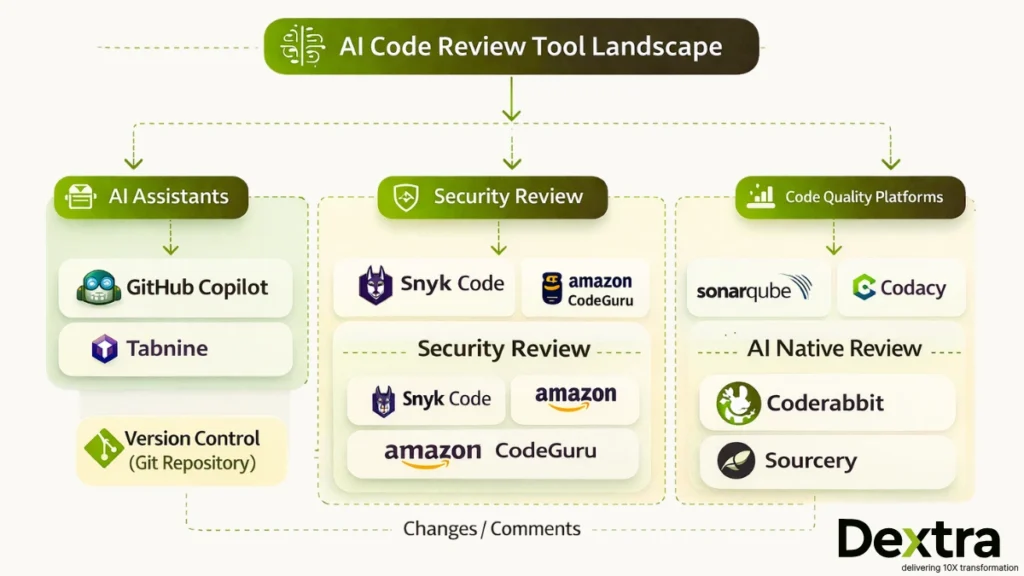
AI code review tools automatically analyze source code for bugs, security vulnerabilities, style violations and quality issues — before or during human review.
In 2026, the category has matured into two broad types:
1. AI-augmented static analysis — Tools like SonarQube and Amazon CodeGuru layer machine learning on top of traditional static analysis. They’re rule-informed but increasingly pattern-aware.
2. AI-native review platforms — Tools like CodeRabbit and GitHub Copilot are built AI-first, using large language models to interpret code context, generate PR summaries, and suggest fixes in natural language.
What the best tools have in common: they don’t try to replace human judgment. They eliminate the mechanical work like; catching obvious bugs, flagging known vulnerability patterns, enforcing style rules. So, human reviewers can focus on what matters: architecture, business logic and edge cases that require domain knowledge.
Also Read: Why Your Startup Needs AI-Driven Engineering: From Code Reviews to DevOps Automation
The Quality Challenge: What Research Shows in 2026?
Before recommending any tool, it’s worth being honest about what the research actually shows.
The confidence gap is real. Only 27% of developers who skip reviewing AI-generated code feel confident it’s bug-free. That number jumps to 61% among developers who do review it. The review step isn’t optional, it’s what separates good code from fast code.
Trust is declining, not growing. Stack Overflow’s 2025 developer survey found that only 46% of developers fully trust AI-generated code, down from higher confidence levels in 2023–2024. The biggest frustration? “Almost correct” solutions that eat hours of debugging time — cited by 66% of respondents.
Code quality metrics are degrading at scale. GitClear’s analysis of 153 million changed lines of code across 2023–2024 found that code churn more than doubled and code duplication nearly quadrupled as AI coding assistants went mainstream.
Productivity gains are real but conditional. Research found developers using AI tools completed 21% more tasks and opened 98% more PRs — but code reviews got 91% longer. Speed increased. Complexity did too.
The winning strategy isn’t to use more AI or less AI. It’s to use AI at the right layer.
Also Read: From Prompts to Perfect Code: Dextralabs’ Guide to AI‑Driven Code Reviews
Top 10 AI Code Review Tools for 2026: Dextra Labs’ Expert Review
Quick Comparison
| Tools | Best For | Language Support | Starting Price |
| GitHub Copilot | GitHub-native teams | Broad | $19/mo |
| Amazon CodeGuru | AWS teams (Java/Python) | Java, Python | Pay-per-use |
| SonarQube | Enterprise compliance | 30+ languages | Free / $150/yr |
| Snyk Code (DeepCode) | Security-first teams | 10+ languages | Free / Custom |
| Codacy | Quality dashboards | 40+ languages | Free / $15/user |
| Tabnine | Privacy/regulated industries | Broad | $12/mo |
| Sourcery | Python refactoring | Python (expanding) | Free / $10/mo |
| CodeRabbit | AI-native PR workflows | Broad | Custom |
| ESLint/Pylint AI | Incremental AI adoption | JS, Python | Free / Varies |
| Qodana (JetBrains) | JetBrains IDE users | Broad | Free / Custom |
1. GitHub Copilot (with Copilot Chat)
What it is: Microsoft’s AI pair programmer, now extended with code review capabilities through Copilot Chat and GitHub Advanced Security integration.
GitHub Copilot is the most widely adopted AI coding tool on the market and its review capabilities have matured significantly since launch. For teams already operating on GitHub, the integration is genuinely seamless — inline suggestions, PR summaries, code explanations and security scanning all live in the same workflow.
Where it shines:
- Automatic PR summaries that explain what changed and why in plain language
- Security vulnerability detection via GitHub Advanced Security
- Tight IDE integration across VS Code, Visual Studio, and JetBrains
Where to be careful: GitClear’s data showed that Copilot adoption correlated with code churn doubling and copy-paste code nearly quadrupling. That’s not a reason to avoid it, it’s a reason to pair it with quality metrics tracking from day one. Review features are also newer and less battle-tested than its core generation capabilities.
Pricing: $19/month (individual), $39/month (business). Full review features require GitHub Enterprise.
Best for: Teams already on GitHub; Microsoft/Azure stack organizations; developers who want IDE-native review without switching contexts.
2. Amazon CodeGuru Reviewer
What it is: AWS’s ML-powered automated code review service, integrated directly into GitHub, Bitbucket and CodeCommit workflows.
CodeGuru Reviewer is one of the most contextually accurate tools on this list — specifically for AWS-native codebases. Its machine learning models were trained on millions of lines of Amazon’s own production code, which means its recommendations for AWS service usage aren’t generic suggestions. They reflect hard-won lessons from one of the world’s largest engineering organizations.
Where it shines:
- Best-in-class AWS service usage recommendations
- Solid security scanning covering OWASP Top 10, credential exposure, and cryptographic issues
- Resource leak and concurrency bug detection in Java and Python
Where to be careful: CodeGuru’s value drops sharply if you’re not on AWS. Language support is limited primarily to Java and Python and the false positive rate is higher than some competitors — which means teams need to invest time in tuning or risk alert fatigue.
Pricing: $0.50 per 100 lines of code reviewed (first 90 days free).
Best for: AWS-native teams; Java and Python shops; organizations wanting AWS optimization recommendations embedded in their review workflow.
3. SonarQube (with SonarLint AI)
What it is: The enterprise standard for code quality platforms, static analysis at scale, now with AI-powered fix suggestions through SonarLint.
SonarQube has been the baseline for enterprise code quality for over a decade. What’s changed is the AI layer: SonarLint now provides real-time AI-powered fix suggestions in the IDE, while SonarQube continues to serve as the authoritative quality gate for CI/CD pipelines.
Where it shines:
- Support for 30+ languages — the broadest coverage on this list
- Quality gates that actively block merges when thresholds aren’t met (not just flag issues)
- Compliance reporting capabilities for SOC 2, ISO 27001, and similar frameworks
- Historical trend analysis showing code quality trajectories over time
Where to be careful: Legacy codebases will generate an overwhelming volume of findings on first run. Without thoughtful configuration, SonarQube can paralyze teams with noise. The AI features are also still catching up to AI-native tools in terms of suggestion quality.
Pricing: Free (Community), $150/year (Developer), custom (Enterprise).
Best for: Enterprises with compliance requirements; organizations managing technical debt systematically; teams who need quality gates that actually block bad code.
4. DeepCode (Snyk Code)
What it is: AI-powered static application security testing (SAST), acquired by Snyk and integrated into their broader security platform.
Snyk Code sits at the intersection of AI and security, it’s not trying to be a general code quality tool. It’s trying to catch security vulnerabilities before they ship and it does that well. The AI was trained on a vast corpus of open-source code with known vulnerabilities, giving it strong pattern recognition for real-world security issues.
Where it shines:
- Real-time security scanning in the IDE — findings appear as you write code, not after
- CVE mapping so every finding is tied to a documented vulnerability
- Seamless integration with Snyk’s dependency scanning for full-stack security coverage
Where to be careful: Snyk Code’s scope is deliberately narrow — security, not general code quality. If you need both, you’ll likely need to pair it with a quality-focused tool like SonarQube. Full features also require a Snyk subscription.
Pricing: Free (limited), custom (Team/Enterprise).
Best for: Security-focused teams; DevSecOps workflows; organizations already using Snyk for dependency management.
5. Codacy
What it is: Automated code quality platform with comprehensive metrics tracking and AI-enhanced analysis.
Codacy’s strongest differentiator is its measurement layer. It doesn’t just flag issues — it tracks quality trends across time, teams and repositories, giving engineering leaders visibility into whether code quality is actually improving. Given GitClear’s finding that AI coding assistants nearly quadrupled code duplication, Codacy’s duplication detection is particularly relevant for AI-assisted teams.
Where it shines:
- Tracks quality metrics per commit, developer, and repository
- 40+ language support
- Duplication detection is robust and configurable
- Clean visual dashboards for non-technical stakeholders
Where to be careful: Large legacy codebases will trigger high finding volumes that require careful configuration. The AI features are less prominent than pure AI-native tools, and default settings often produce more noise than signal.
Pricing: Free (open source), $15/user/month (Pro), custom (Enterprise).
Best for: Teams that want quality dashboards alongside automated review; organizations tracking technical debt as a business metric.
6. Tabnine
What it is: AI code completion and review tool built for enterprises where data privacy and IP protection are non-negotiable.
Tabnine occupies a unique position in this landscape: it’s the tool you choose when your organization’s IP security requirements rule out cloud-based alternatives. Financial institutions, healthcare companies and government contractors regularly choose Tabnine specifically because it supports fully on-premises deployment — your code never leaves your infrastructure.
Where it shines:
- Full on-premises deployment option (air-gapped environments supported)
- Models that learn from your specific codebase patterns without sending data to external servers
- Strong compliance posture for regulated industries
Where to be careful: Local model deployment delivers strong privacy guarantees but typically underperforms cloud-based models in suggestion quality. The review feature set is also less mature than generation capabilities.
Pricing: Free (basic), $12/month (Pro), custom (Enterprise with self-hosting).Best for: Regulated industries (finance, healthcare, government); organizations with IP protection requirements; teams requiring air-gapped deployment.
7. Sourcery
What it is: AI-powered Python refactoring and code quality tool focused on making Python code cleaner and more maintainable.
Sourcery’s focus is narrow, which is its strength. Rather than trying to be everything, it focuses on what Python teams actually struggle with: bloated functions, redundant code patterns, high complexity and refactoring opportunities that developers know exist but never find time to address. It works best as a habit-forming tool — a prompt that surfaces improvement opportunities continuously.
Where it shines:
- Instant, actionable refactoring suggestions that actually improve code — not just flag issues
- Complexity reduction metrics that track improvement over time
- Pre-commit hooks that enforce quality standards before code even enters review
Where to be careful: Sourcery is Python-first (though JavaScript/TypeScript support is expanding). It’s not a security tool and doesn’t aim to be. Teams needing multi-language support or security coverage should look elsewhere.
Pricing: Free (open source), $10/month (Pro), custom (Team).
Best for: Python development teams; organizations prioritizing code maintainability and refactoring; teams wanting continuous quality prompts.
8. Coderabbit
What it is: AI-first code review platform designed specifically for the pull request workflow, not adapted for it.
CodeRabbit is the newest entrant on this list and the most intentionally AI-native. It wasn’t a traditional tool that added AI features — it was built from the ground up to use LLMs for PR review. The result is review comments that read like they were written by a thoughtful senior engineer, not a rule engine.
Where it shines:
- PR summaries that explain the purpose and impact of changes in plain, readable language
- Line-by-line review comments that identify potential issues with specific, actionable suggestions
- Continuous learning from team feedback — it gets more accurate the more your team uses it
Where to be careful: CodeRabbit is a newer platform with a smaller user base than established tools. The AI’s effectiveness depends heavily on context from your codebase and false positive rates vary across project types. It’s promising, but requires investment in setup and feedback loops.
Pricing: Custom (contact for current pricing).
Best for: Teams adopting AI-native review workflows; organizations looking to reduce routine review burden; development teams prioritizing PR quality and velocity together.
9. AI-powered Lint Tools (ESLint AI, Pylint AI Extensions)
What they are: Traditional linters extended with AI-powered rule suggestions, automatic fixes and pattern-based custom rule generation.
If your team is skeptical of fully AI-native tools, AI-enhanced linters offer the lowest-risk entry point. They build on workflows developers already trust — ESLint for JavaScript, Pylint for Python — and layer AI-powered improvements on top. The mental model is familiar, the trust is already established, and the incremental gains are real.
Where they shine:
- Lowest adoption friction — teams already know the workflow
- AI rule suggestions based on your specific codebase patterns
- Automatic fix suggestions for known violations
- Open-source core with optional paid AI extensions
Where to be careful: AI features vary significantly across implementations. These tools are primarily focused on style and syntax — they won’t catch complex logic bugs, security vulnerabilities, or architectural problems. Treat them as a complement to, not a replacement for, deeper review tooling.
Pricing: Varies by tool. Most are open-source with optional paid extensions.
Best for: Teams wanting incremental AI adoption; organizations that trust rule-based validation; developers who want AI assistance without changing their core workflow.
10. Qodana (JetBrains)
What it is: JetBrains’ code quality platform that brings the same deep inspection capabilities from IntelliJ-based IDEs into CI/CD pipelines.
If your team uses JetBrains IDEs, Qodana is the most natural extension of a workflow you already trust. It runs over 500 inspections — the same ones that surface in IntelliJ IDEA, PyCharm, and WebStorm — as part of your automated pipeline, giving you consistent quality enforcement from local development through to production.
Where it shines:
- 500+ inspections covering security, style, and logic issues
- License compliance checking (underrated — critical for legal risk management)
- Consistent behavior between local IDE and CI/CD pipeline
- Quality gates that integrate naturally with JetBrains CI tooling
Where to be careful: Qodana’s AI features are still developing compared to AI-native tools. It can be resource-intensive on large codebases, and its value is primarily realized by teams already invested in the JetBrains ecosystem.
Pricing: Free (Community), custom (Ultimate/Enterprise).
Best for: JetBrains IDE users; organizations wanting IDE-quality inspections in CI/CD; teams with license compliance requirements.
Also Read: Framework Migration with AI: How Startups Can Move from Legacy to Modern Tech Stacks Faster
How to actually measure ROI of AI Code Review Tools?
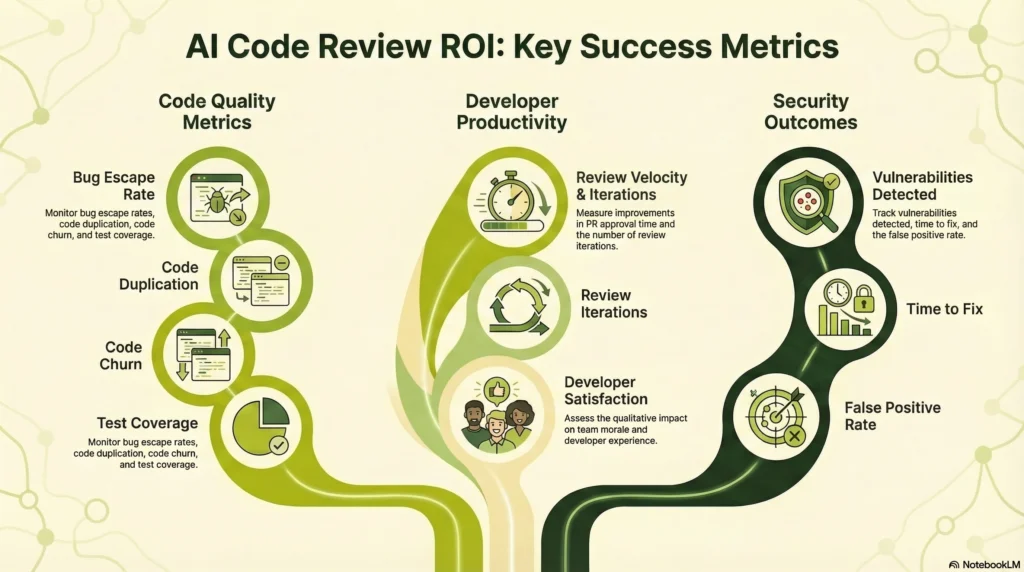
Given the conflicting research, there’s one rule we enforce with every client at Dextra Labs: measure before you trust, trust only what you measure.
Here’s the framework we use:
Code Quality Metrics (the ones that matter)
- Bug escape rate to production — the only metric that measures real quality
- Code churn — percentage of code rewritten within three weeks of being written
- Code duplication rates — given the AI-driven 4x increase in duplication, this is critical to track
- Test coverage trends — AI that generates code without generating tests is a liability
- Cyclomatic complexity — are developers writing simpler or more complex code over time?
Developer Productivity (look beyond velocity)
- Time to PR approval — note that longer isn’t always worse if reviews are improving quality
- Review round trips — fewer revision cycles = better first-pass quality
- Developer satisfaction score — survey quarterly, not annually; burnout signals emerge early
Security Outcomes
- Vulnerabilities detected by tool vs. vulnerabilities reaching production
- False positive rate — above 30%, developers begin ignoring all warnings, making the tool counterproductive
- Time to remediate flagged security issues
The research finding worth repeating: developers using AI tools opened 98% more PRs, but code reviews got 91% longer. That’s not a productivity improvement. That’s complexity shifting from creation to review. Measure accordingly.
Also Read: How To Use LLMs for Continuous, Creative Code Refactoring in 2026
What are the best practices for AI Code Review Implementation?
These aren’t principles, they’re patterns we’ve observed working or failing across dozens of implementations:
1. Start with One Tool, One Team
Don’t roll out AI code reviews across your entire organization. Pilot with:
- A volunteer team that’s excited about AI
- A codebase with good test coverage
- Clear success metrics defined upfront
2. Combine AI and Human Review
70% of developers believe there’s a positive correlation between AI use and both productivity and code quality when AI-generated code is reviewed.
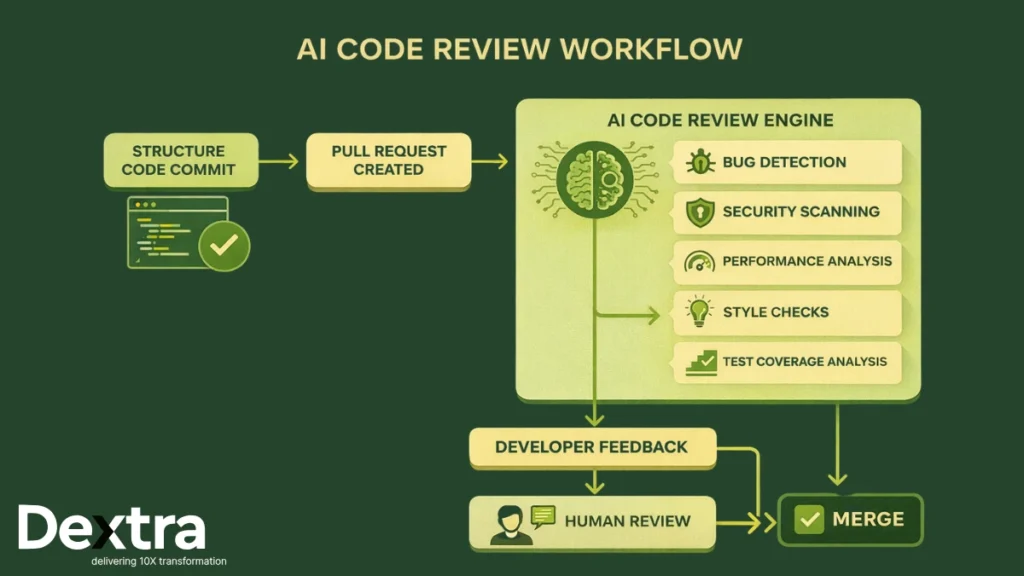
Hybrid workflow:
- AI reviews code first, flags issues
- Humans review AI’s findings + architectural concerns
- AI learns from human feedback (where supported)
3. Configure Aggressively
Default settings produce too much noise. Customize:
- Turn off low-priority rules initially
- Configure severity thresholds
- Tune false positive filters
- Set up team-specific rules
4. Monitor Code Quality Trends
Tools should improve code quality. Watch for:
- Increasing code churn (bad sign)
- Rising duplication rates (bad sign)
- Declining test coverage (bad sign)
- Faster bug escape rates (very bad sign)
If metrics degrade, the tool isn’t working or developers have stopped thinking critically because they assume AI has checked it. Both scenarios are equally dangerous.
When AI Code Review Fails?
Positive sentiment for AI tools decreased in 2025 to 60% from 70%+ in 2023-2024 (Stack Overflow), suggesting developers are becoming more critical as they encounter real-world limitations.
The failure modes we see most often:
Alert Fatigue: Too many false positives → developers ignore all warnings
Over-Reliance: Developers stop thinking critically because “AI checked it”
Context Blindness: AI misses domain-specific concerns that humans catch
Technical Debt Accumulation: Fast code generation → less refactoring → mounting debt
Security Theater: Tools flag minor issues while missing architectural vulnerabilities
Conclusion: AI Code Review as Amplifier, Not Replacement
65% of developers now use AI coding assistants weekly, with software engineering employment among those aged 22 to 25 dropping by roughly 20% (MIT Tech Review). AI is clearly reshaping development.
But the research is equally clear: AI code review tools are amplifiers, not replacements. They make good developers more productive and help catch mechanical bugs but they also enable bad code to ship faster if teams over-rely on them.
The winning strategy for 2026:
- Use AI to catch obvious bugs, security issues, style violations
- Use humans to review architecture, domain logic and AI’s suggestions
- Measure actual quality outcomes, not just velocity
- Tune tools aggressively to reduce false positives
- Train teams to know when to trust AI and when to override
The tools that win aren’t those with the best marketing, they’re the ones that fit your workflow, improve measurable outcomes and earn developer trust through accuracy.
FAQs:
Q1. What is the best AI code review tool in 2026?
The best AI code review tool depends on your stack. GitHub Copilot leads for GitHub-native teams, SonarQube wins for enterprise compliance, and CodeRabbit is the strongest choice for AI-first PR workflows. For security-focused teams, Snyk Code (DeepCode) is the top pick.
Q2. Do AI code review tools replace human code review?
No. Research consistently shows AI tools are amplifiers, not replacements. A 2025 Stack Overflow survey found only 46% of developers fully trust AI-generated code. The most effective workflow pairs AI (for mechanical checks) with human review (for architecture and domain logic).
Q3. How much do AI code review tools cost?
Costs range widely. GitHub Copilot starts at $19/month per user. SonarQube has a free community tier. Amazon CodeGuru charges $0.50 per 100 lines of code. Enterprise options like Tabnine and Qodana require custom pricing. Most tools offer free trials.
Q4. Which AI code review tool is best for security?
Snyk Code (DeepCode) and SonarQube are the strongest for security — both map findings to CVE databases and cover OWASP Top 10. For AWS-specific security, Amazon CodeGuru Reviewer is the most contextually accurate.
Q5. Can AI code review tools work with any programming language?
Not all. SonarQube supports 30+ languages. GitHub Copilot and Tabnine support most major languages. Amazon CodeGuru focuses primarily on Java and Python. Sourcery is Python-only. Always verify language support before committing to a platform.
Q6. How do I measure ROI from AI code review tools?
Track four metric categories: code quality (bug escape rate, churn, duplication), developer productivity (PR approval time, review rounds), security outcomes (vulnerabilities caught vs. escaped), and developer satisfaction. Don’t optimize for speed alone — velocity without quality improvement signals over-reliance.
Q7. What is code churn and why does it matter for AI tools?
Code churn is the percentage of code rewritten within three weeks of being written. GitClear’s 2024 analysis of 153 million lines of code found churn more than doubled as AI coding assistants became mainstream — indicating AI-generated code often requires significant rework. A high churn rate is a red flag that your AI tool may be hurting quality, not helping.