How to use Claude API effectively is one of the most common questions organizations ask when building serious AI applications. The Claude API by Anthropic enables companies to integrate advanced language models into web platforms, SaaS products, AI agents, and enterprise systems. This guide will give you a brief introduction on how to use the Claude API, such as getting a Claude API key, making secure API calls, using API tokens effectively, reducing costs, and building efficient AI models.
Artificial intelligence is no longer a lab experiment. It has become an essential part of the architecture of new digital products. From AI-based customer support systems to document analysis systems, companies are increasingly leveraging AI. However, successful implementation requires more than just API calls. It demands structured architecture, governance, and performance planning.
If you are planning to implement the Anthropic Claude API integration for your organization, this step-by-step guide will help you move beyond basic prototypes and build scalable, secure AI systems. It is the kind of AI system that Dextralabs helps you implement for your organization with proper architecture and scalability.
What is the Claude API?
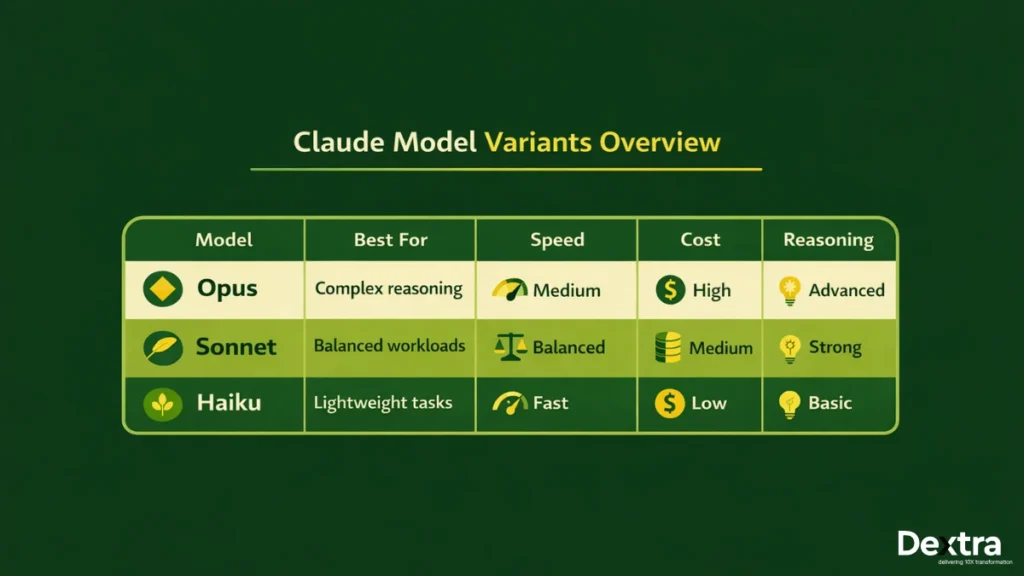
The Claude API is an interface given by Anthropic to developers to access language models like Opus, Sonnet, and Haiku. It assists developers in text generation, data analysis, AI agent creation, and intelligent workflow integration via REST API endpoints.
In short, it is a bridge that links your application to the Claude AI model.
Model Variants Overview
Claude has a variety of models that cater to different applications:
- Opus – Ideal for complex reasoning and complex tasks.
- Sonnet – Offers a balance between performance and price.
- Haiku – Primarily for speed and lightweight tasks.
Choosing the right model to work with depends on your budget, response time, and the complexity of the tasks.
REST Architecture
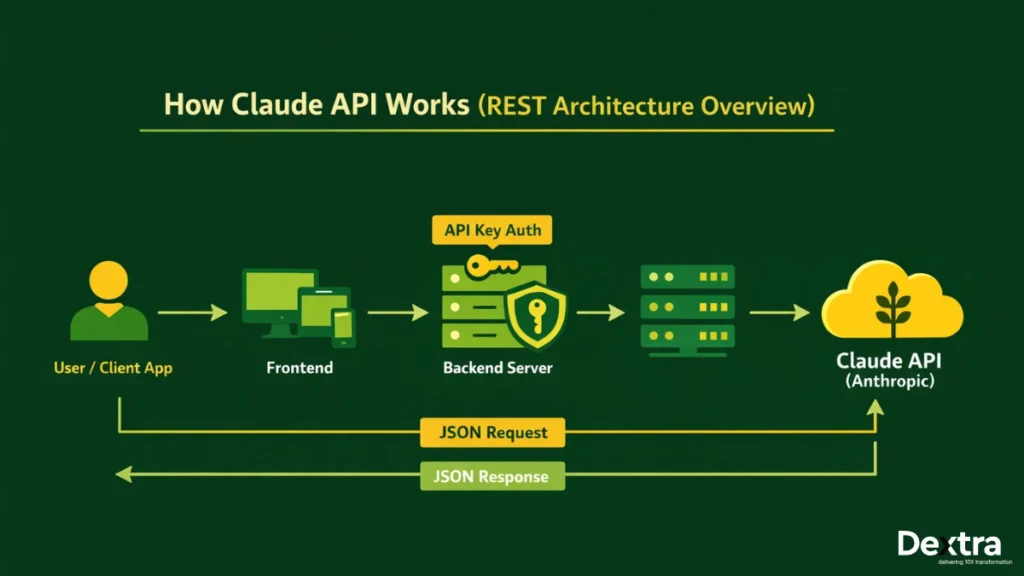
The API uses the REST architecture. Your application makes an HTTP request to the Claude API endpoint, and the model responds with a JSON-formatted answer.
JSON-Based Request & Response Handling
Requests and responses are formatted in JSON. You send prompts inside a messages array, and the API will return generated content and usage information, such as token counts.
Authentication via API Keys
The API is protected by API keys. Requests will not go through without an API key. Learning how to obtain the Claude API key and properly secure it is therefore the first step.
Also Read: Claude 3 vs GPT-4: Which LLM Is Better for Enterprise Applications
How to Get a Claude API Key (Step-by-Step)?
If you are wondering how to get Claude API key, follow these steps:
Step 1: Create an Anthropic Account
- Go to the Anthropic Console.
- Sign up using your email address.
- Verify your email to activate your account.
Step 2: Access the Developer Dashboard
- Log in to the dashboard.
- Go to the API section.
- Generate a new API key.
This key is your secure access token for making API requests.
Step 3: Secure Your Key
- Store it in environment variables.
- Never expose it in frontend JavaScript code.
- Do not share it in public repositories.
It is essential to understand how to use Claude API key securely to avoid unauthorized use and unexpected billing.
How to Use Claude API Key in Your Application?
Once you have created your key, the next step is to learn how to use Claude code with API key.
Method 1: Using Environment Variables (Recommended)
Store your key securely in your environment:
export ANTHROPIC_API_KEY= “your_api_key_here”Then use it in your backend application.
This is the most secure and professional way to handle credentials.
Method 2: Direct Header Authentication (Development Only)
For rapid development testing:
x-api-key: your_api_key_hereThis approach is acceptable for development purposes but not for production.
Security Best Practices
- Use secret managers such as Amazon Web Services, Google Cloud Platform, or Microsoft Azure.
- Change keys frequently.
- Use role-based access control.
Implementation of proper security practices improves trust and preparedness for businesses.
Claude API Documentation Explained (Developer Overview)
If you are attempting to make sense of the official Claude API documentation and are confused, this simplified explanation will assist you. It is important to understand the layout of the documentation to assist developers in moving from testing to production quickly.
Key Sections in the Documentation
The documentation is divided into the following sections:
- Authentication – This section describes how to utilize API keys for secure calls.
- Models Endpoint – Lists available Claude models and their capabilities.
- Messages Endpoint – Describes how to send prompts and receive responses.
- Streaming Responses – Covers real-time output handling.
- Rate Limits – Defines usage thresholds and request caps.
- Error Codes – Helps diagnose and fix integration issues.
Request Structure
A standard request includes required headers such as Content-Type and API key, model selection, max_tokens, and a structured messages array in JSON format.
JSON Body Format
Json

{

"model": "claude-3-sonnet-20240229",

"max_tokens": 1024,

"messages": [

{ { "role": "user", "content": "Explain in simple terms" }

]

}
Response Fields
The API returns generated content, a stop_reason explaining completion, and usage data showing token consumption. Understanding these fields is essential for performance monitoring, debugging, and cost control in any serious Claude API tutorial.
Claude API Example Code (Node.js & Python)
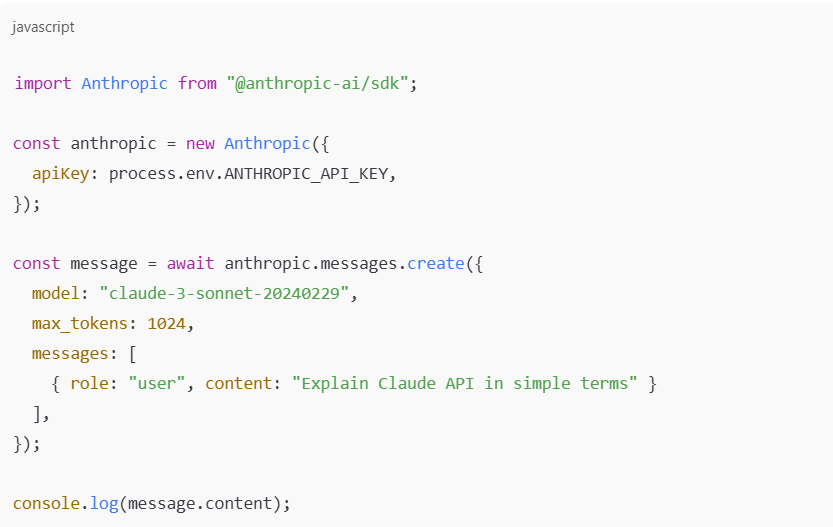
Below is a practical Claude API example code to help you get started.
Node.js Example
Python Example
python

import anthropic

client = anthropic.Anthropic( ) api_key="YOUR_API_KEY"

)

response = client.messages.create(

model="claude-3-sonnet-20240229",

max_tokens=1024, ]

messages=[

{"role": "user", "content": "Write a product summary"}

]

)

print(response.content)
These examples demonstrate how to use Claude AI API in real backend environments.
How to Use Claude AI API for Real Applications?
Once the basics are clear, this Claude API tutorial moves into practical implementation.
1. Chatbot Integration
- Customer support assistants
- SaaS helpdesk bots
- Knowledge-based Q&A systems
Claude can power intelligent conversations with contextual understanding.
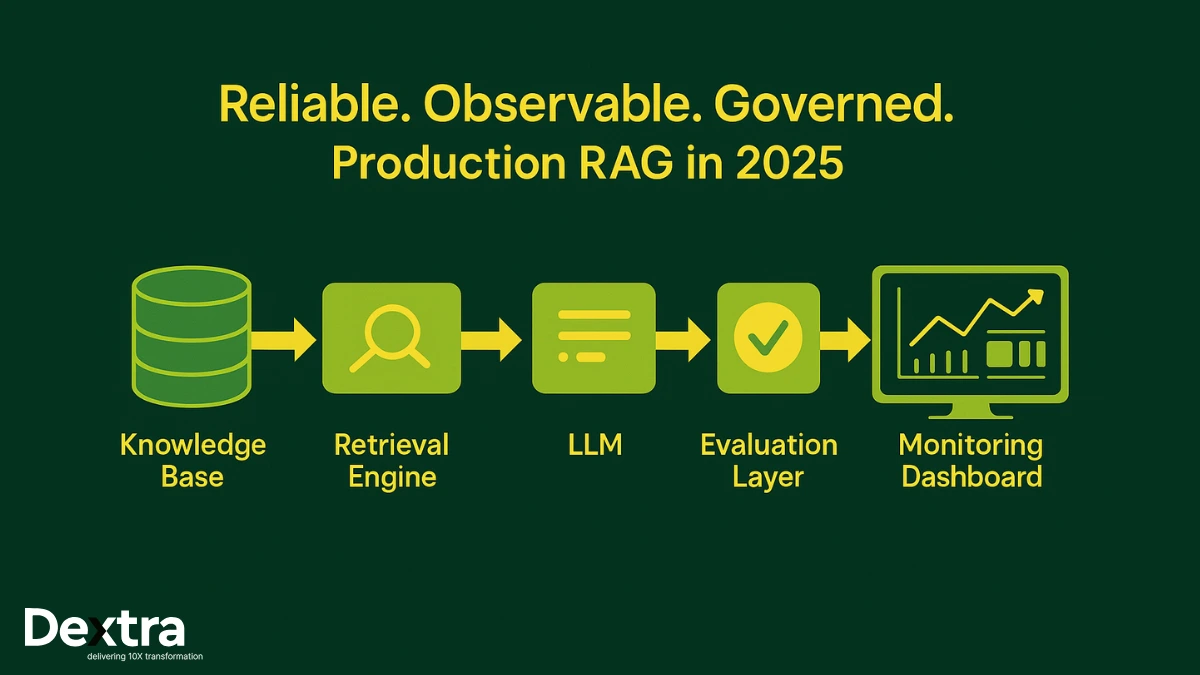
2. RAG Applications (Retrieval-Augmented Generation)
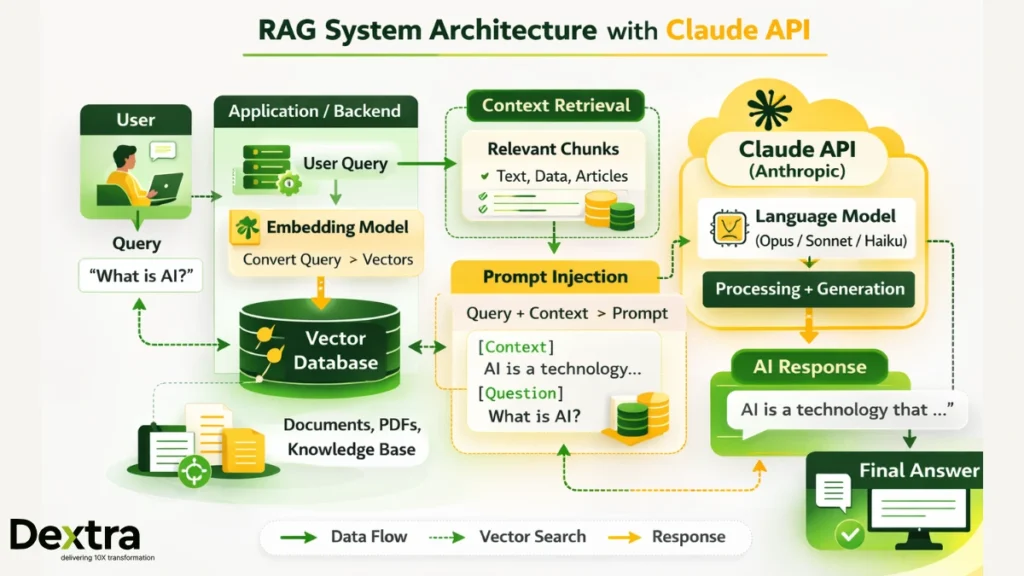
- Connect to a vector database
- Retrieve relevant context
- Inject context into prompts
This approach improves factual accuracy and domain-specific responses.
- Multi-step reasoning
- Tool calling
- Structured output generation
Frameworks like LangChain help orchestrate multi-model pipelines efficiently.
Claude API Pricing Explained
Understanding Claude API pricing is essential before scaling any AI-powered application. Proper cost planning helps prevent unexpected expenses and ensures sustainable growth.
1. Token-Based Pricing Model
Claude follows a token-based billing system. You are charged separately for:
- Input tokens (the text you send as prompts)
- Output tokens (the model’s generated response)
Both contribute to the total usage cost.
2. Model-Wise Cost Differences
Each Claude model has different pricing tiers:
- Opus: Higher cost with advanced reasoning capabilities
- Sonnet: Balanced pricing and performance
- Haiku: Cost-effective and optimized for speed
3. Estimation Example (1M Tokens)
If your application processes 1 million tokens monthly, costs vary depending on the selected model. Sonnet is commonly preferred for balanced performance and affordability.
4. Cost Optimization Strategies
- Limit unnecessary context
- Use concise prompts
- Monitor usage logs
- Select the appropriate model tier
Effective cost control ensures long-term scalability and predictable budgeting.
Claude API Rate Limits & Performance Considerations
When building production-grade AI applications, understanding Claude API rate limits and performance behavior is critical for stability and scalability.
Throughput Considerations
Handling concurrent API calls is a challenge in high-traffic scenarios. Making too many calls simultaneously may result in throttling or a delay in response, and thus, appropriate handling and batching of calls are necessary.
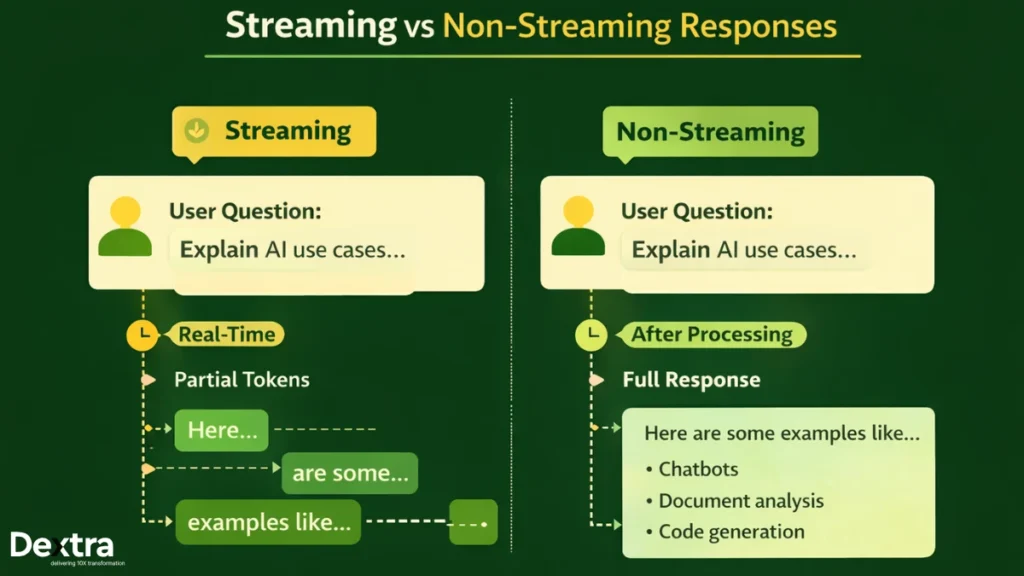
Streaming vs Non-Streaming Responses
- Streaming involves sending responses as the model is generating them, thus providing faster response times.
- Non-streaming involves waiting for the entire output to be generated before sending a response, which is appropriate for background processing.
Scaling Strategies
To maintain performance at scale:
- Implement queue systems to manage request flow
- Use caching to reduce repeated API calls
- Distribute traffic across multiple application instances
Enterprise systems require thoughtful performance planning to avoid bottlenecks and ensure consistent response times.
Building a Production-Ready Claude Application
A production-ready Claude application requires more than simple API integration. It involves multiple architectural layers working together to ensure scalability, reliability, and maintainability.
Architecture Blueprint
An enterprise-level configuration typically consists of the following 4 layers:
- Frontend Layer: The front end utilizes React or Next.js to create responsive user interfaces and support real-time AI discussions.
- Backend Layer: The back end runs with Node.js or FastAPI to provide secure API request processing functionality, including secure user login and authentication, as well as business logic processing.
- LLM API Layer: The LLM API layer is tasked with enabling the interaction between the back end and Claude by processing the prompt, token management, and result handling.
- Database Layer: The database layer is responsible for the storage of user sessions, logs (historical and real-time), embeddings (vector representation of items to be searched), and application data.
- Monitoring & Logging Layer: The Monitoring & Logging layer is responsible for the monitoring of the health of the entire system, including latency and errors.
- Usage Tracking: Monitors token usage and cost metrics.
Key Considerations
- Implement observability dashboards for real-time insights
- Track token usage to avoid overspending
- Implement retry logic for transient errors
- Develop a fallback model approach for high availability
A robust architecture will provide reliable performance even under high traffic.
Common Errors Developers Face (And How to Fix Them)
Developers using the Claude API in actual applications may encounter certain known problems. These problems can be resolved upfront to avoid setbacks during staging or production deployment.
1. Invalid API Key
This error usually occurs when the API key is missing, incorrect, or not properly loaded from environment variables. Ensure the key is stored securely and correctly referenced in your backend configuration.
2. Model Not Found
If the specified model version string is incorrect or outdated, the request will fail. Always verify the exact model name from the official documentation before deployment.
3. Token Limit Exceeded
Exceeding the allowed token limit results in truncated or failed responses. Reduce max_tokens or shorten prompt length to stay within limits.
4. Timeout Errors
Large prompts or heavy traffic can cause timeouts. Increase server timeout settings and optimize request size where possible.
5. JSON Formatting Issues
Malformed request bodies lead to validation errors. Use proper JSON validation tools before sending requests.
Proactive troubleshooting ensures smoother launches and more stable production systems.
Claude API vs Other LLM APIs (Quick Overview)
While comparing Claude with GPT-4, it is necessary to compare their performance, pricing, safety alignment, and scalability. Both Claude and GPT-4 are highly advanced large language models, but they are slightly different in their optimization and pricing.
Claude has an excellent security focus with large amounts of information available for analysis at once (known as the “context window”). It is a great choice for long-term reasoning, document analysis, and corporate uses. Conversely, GPT-4 is popular to use in multiple areas and supports flexible integration into different platforms that provide functionality.
Summary of Comparison:
| Feature | Claude API | GPT-4 API |
| Context Window | Large context support | Large context support |
| Safety Alignment | Strong constitutional AI alignment | Strong safety guardrails |
| Cost Efficiency | Competitive and predictable pricing | Variable based on usage tier |
| Enterprise Focus | Optimized for structured workflows | Broad ecosystem integration |
| Model Variants | Opus, Sonnet, Haiku | Multiple GPT-4 versions available |
Every API has its own strengths. The choice of which one to use depends on your specific use case, regulatory requirements, performance, and budget.
Enterprise Deployment
The enterprise deployment of Claude requires a structured set of governance, security, and compliance considerations. Enterprises are responsible for ensuring that their AI systems are operating in a responsible, secure, and compliant manner with regulatory requirements.
Some of the considerations include:
- Data security audits to assess how sensitive data is treated, processed, and transmitted.
- PII redaction pipelines to automatically redact personally identifiable information prior to model processing.
- Governance workflows to assess approval processes, usage, and accountability.
- Prompt version control to track changes and ensure consistency across deployments.
- Model evaluation benchmarks to assess accuracy, bias, and performance over time.
If not properly governed, AI can create risks to compliance, reputation, and operations.
How Dextralabs Can Help with Claude API Integration?
While it is easy to develop a prototype using Claude, it is not easy to develop it into a secure and high-performance production-ready system. Dextralabs helps enterprises in transitioning from experimentation to reliable enterprise-grade AI deployment.
Dextralabs provides:
- Claude API integration consulting
- End-to-end LLM architecture design
- RAG system deployment
- AI agent development
- Structured prompt engineering frameworks
- Cost optimization advisory
- Multi-LLM benchmarking and evaluation
If you are building with Claude and need scalable, production-ready architecture rather than experimental setups, Dextralabs helps transform simple API integrations into secure, enterprise AI systems.
Final Thoughts
Getting started with How to use Claude API key is simple. You create an account, generate a key, and send structured requests. But scaling requires thoughtful architecture. Governance matters. Cost monitoring is crucial. Enterprises need a structured evaluation before deploying AI widely.
If your organization is planning serious AI adoption and wants expert support for Anthropic Claude API integration, connect with Dextralabs today. The right architecture today prevents costly redesign tomorrow.
Frequently Asked Questions (FAQ):
Q. How do you use Claude API?
Generate an API key, authenticate requests, send structured prompts via REST, and process JSON responses.
Q. How do you get a Claude API key?
Sign up at Anthropic Console and generate a key from the developer dashboard.
Q. Is Claude API free?
It typically offers limited testing access, but production usage is token-based and paid.
Q. How much does Claude API cost?
Costs depend on model choice and token usage.
Q. Can you build AI agents using Claude API?
Yes. It supports structured reasoning and tool workflows.
Q. Is Claude API better than GPT-4 API?
It depends on context window needs, safety alignment, and pricing preferences