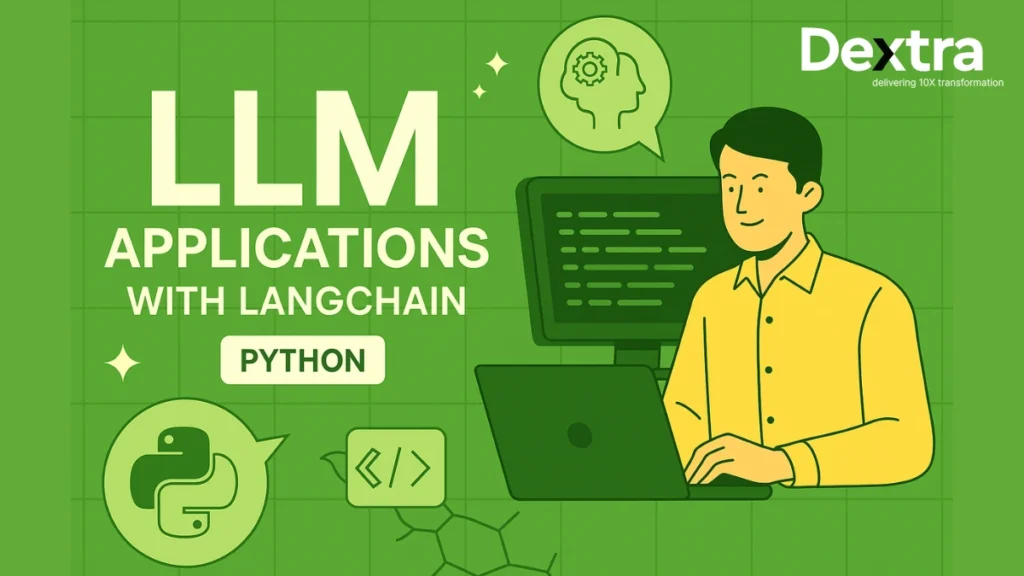
Building an LLM application is no longer just about sending a prompt to a model and displaying the response.
Modern AI applications often need to retrieve external knowledge, call APIs and tools, maintain application state, generate structured outputs, handle multi-step tasks, and operate reliably in production. This is where frameworks such as LangChain become useful.
LangChain provides a set of abstractions for connecting language models with prompts, tools, messages, structured outputs, retrieval systems, and agent workflows. In its current architecture, LangChain is increasingly focused on agent development, while LangGraph provides lower-level control for stateful and long-running workflows.
This shift reflects how LLM applications are being built in 2026. Organizations are moving beyond simple chatbots toward AI systems that can take actions, use external tools, access business data, and complete multi-step tasks. LangChain’s 2026 State of Agent Engineering survey found that 57% of respondents had agents running in production, while another 30% were actively developing agents for deployment.
In this LangChain Python tutorial, you’ll learn how to set up LangChain, work with models and prompts, connect tools and external data, build AI agents, create RAG applications, use LangGraph for advanced workflows, and prepare an LLM application for production.
Setting Up LangChain in Python: Best langchain tutorial
Before we dive into the code, let’s check to see if your environment is capable of running a LangChain Python llm project; it does not matter if you are new to LangChain or already incorporating it into an existing app, the environment setup is the first thing to get right.
Install LangChain
Let’s begin with the basic installation:
bash

pip install langchain
This process will install the core LangChain library and will begin the setup for your LangChain tutorial. It is generally considered best practice to create a virtual environment using either venv or conda tools to keep dependencies clean.

Install Additional Dependencies
Depending on your use case, LangChain can integrate with several useful libraries. Here’s a recommended install command that covers most common needs:

Why You Need These:
- OpenAI – Access GPT-4 and other models easily from langchain.llms import OpenAI.
- Chromadb/faiss-cpu – These libraries power vector databases for semantic search and retrieval.
- Tiktoken – Tokenizer used for counting tokens, especially important for cost estimation and prompt limits.
- Langserve – A wrapper to expose your LangChain agents and chains as RESTful APIs.
- API Keys and Environment Setup
LangChain supports top LLM providers like:
- OpenAI
- Hugging Face
- Cohere
- Anthropic (Claude)
- Local models like Mistral, LLaMA via Ollama
Set up your keys
You can set API keys via environment variables or using a .env file:

Then, in your Python script:

This helps keep your secrets safe and configurable across different environments.
Core Concepts and Components of LangChain
LangChain is modular. Its architecture lets you plug different components together with minimal code changes. Let’s explore the langchain basics that make it so powerful.
LLMs in LangChain
At the core of every LangChain app are its LangChain LLM models — they drive the logic and intelligence behind your application. LangChain supports:
- OpenAI’s GPT models
- Hugging Face Transformers
- Local models via Ollama or LLM Studio

You can change the underlying model without rewriting your logic — that’s LangChain’s power.
Prompt Templates
Instead of hardcoding prompts, use templates to inject variables dynamically:
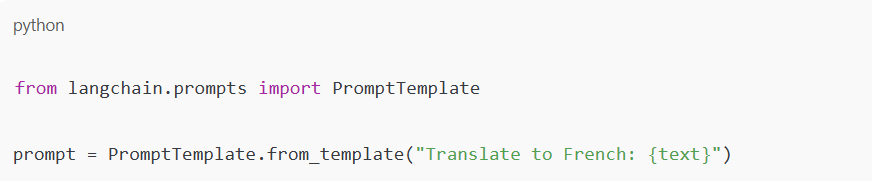
This is especially useful for translation, classification, summarization, and chatbot messages.
Chains (LLMChain)
Chains are the core LangChain llm abstraction. A chain links your prompt to an LLM and runs the process automatically.

It’s like a single step in a conversation pipeline — and you can build much more complex chains too.
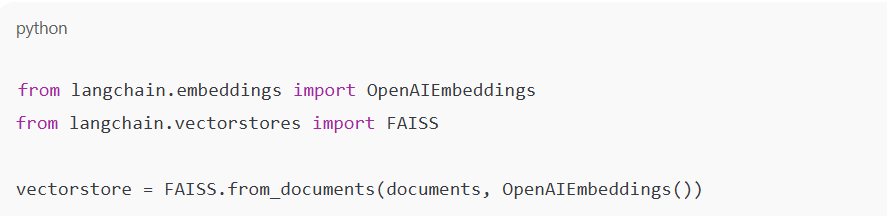
Vector Stores
LangChain makes it easy to store and retrieve document embeddings using:
- FAISS – Fast, open-source similarity search.
- ChromaDB – Modern embedding database.
- Pinecone, Weaviate – Cloud-native options.
Retrieval-Augmented Generation
RAG combines retrieval with generation. Instead of asking the LLM to hallucinate an answer, you help it fetch relevant context and then respond—a crucial step in understanding how to build LLM-powered applications that are more accurate and reliable.
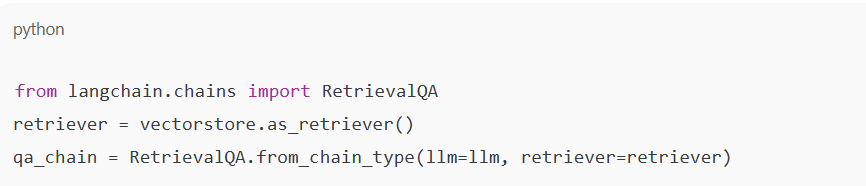
This boosts accuracy and gives LLMs real-world awareness.
AI Agents and Tools
AI Agents are like smart assistants — they reason and decide which tool to use at runtime. For example, they can:
- Fetch real-time search results
- Perform calculations
- Access a knowledge base
LangChain provides initialize_agent to spin up agents with memory and tools.
Building Your First LLM-Powered App: Step-by-Step langchain tutorial
Let’s walk through two beginner-friendly LangChain tutorials:
AI-Powered Translator
A basic LangChain example. Input → Translate → Output. This shows how to make an LLM app with simple prompt templates.

It’s an ideal demo of prompt engineering.
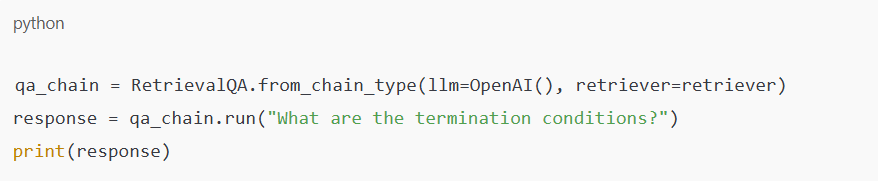
PDF Q&A Bot with Retrieval
Index PDF files using vector databases, retrieve relevant chunks, and let your LLM answer queries in context.
Load PDFs:

Index them:

Build the Q&A bot:
Advanced Concepts: Multi-Step Workflows with Chains
LangChain supports complex flows via multi-step chains.
Types:
- SimpleSequentialChain – Executes chains in order.
- SequentialChain – Passes data between steps.
- RouterChain – Routes input to the right sub-chain.
Example:
An HR bot that:
- Summarizes a resume
- Generates relevant questions
- Scores candidate responses

This is how production-grade apps are built — one modular chain at a time.
Managing Prompt Templates for Dynamic Inputs
Want better outputs? Try FewShotPromptTemplate, which allows you to show examples along with your prompts. It works great for:
- Classification
- Style transfer
- Text summarization

Include examples in your prompt to shape the output — a key skill in LangChain tutorials.
LLM Deployment Best Practices:
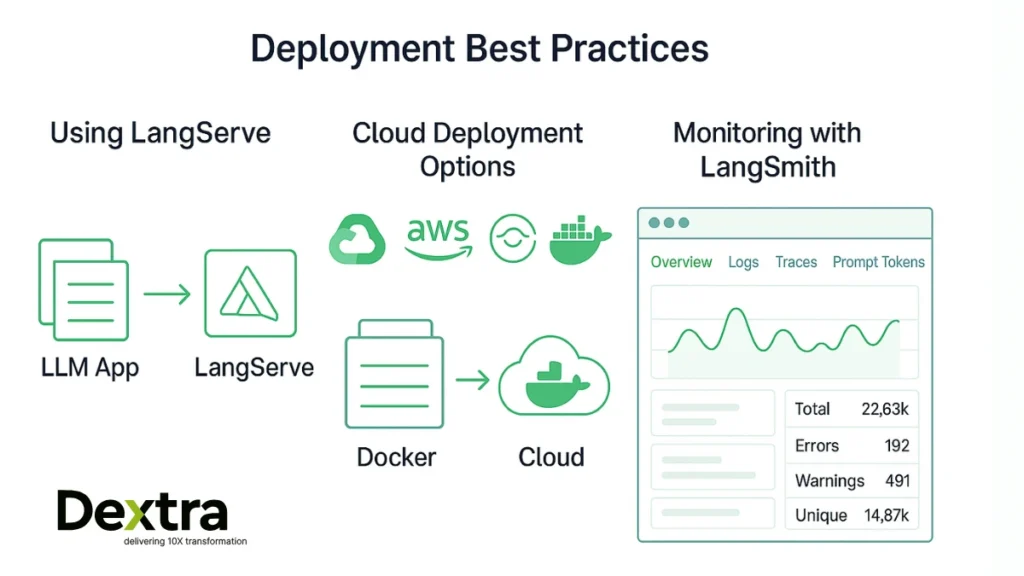
Using LangServe
Turn your app into a fast, secure API:

Expose your app as a secure REST API without writing Flask logic. Ideal for LangChain Python projects moving to production.
Cloud Deployments
LangChain apps can run serverlessly or on containers:
- Google Cloud Run – Scales fast
- AWS Lambda – Event-based usage
- OCI – Oracle Cloud
- Docker – Best for containerization
Use uvicorn for ASGI-based apps.
Monitoring with LangSmith
LangSmith offers:
- Token tracking
- Prompt latency analysis
- Run history for debugging
Think of it as observability for your LangChain LLM apps.
Using LangChain with Open-Source LLMs:
LangChain doesn’t lock you into OpenAI. Use open-source LLM models via:
- HuggingFace Transformers
- Ollama
- Local LLMs like Mistral, LLaMA 3, Mixtral
Run LLM Python apps — great for cost, privacy, and speed.

Then point your LangChain app to the local endpoint.
Custom LLM Integration
Have your own model? With LangChain’s custom LLM modules, it’s easy to plug in your own model and start building.
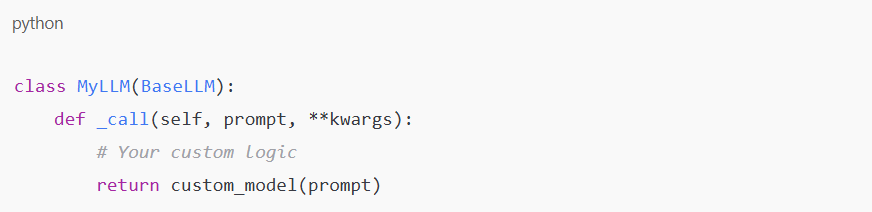
LangChain’s abstraction makes how to build a LLM intuitive — any model that takes input and returns output works.
Why Build with Dextralabs?
At Dextralabs, we help businesses realize their LLM ideas through the power of LangChain – quickly, scalably and production-ready.
- Proprietary Retrieval Pipelines
- Agent Workflows for Finance, Health, and Legal
- API Deployment with LangServe
- Monitoring via LangSmith
- Full Support from POC to Scale
Whether you’re building a PDF bot, interview assistant, internal search engine, or customer support agent, Dextralabs is your go-to partner.
What sets us apart is our hands-on approach to building, iterating, and optimizing real-world LLMChain LangChain solutions. We don’t just consult — we co-build with you. From architecture planning and agent logic to performance optimization and llm deployment, our team ensures every part of your LLM app works smoothly and scales effortlessly.
We also provide dedicated support for LangChain components, including custom vector database integration, advanced prompt engineering, and multi-agent orchestration systems. We follow best practices in token usage, latency control, and error handling, so your users get the best experience possible.
Whether you’re a startup prototyping your first AI tool or an enterprise scaling to thousands of users, Dextralabs delivers reliable, battle-tested solutions. Let’s bring your AI vision to life, one chain at a time.
Conclusion
LangChain enables developers to build LLM apps effortlessly. Whether you’re building a Q&A bot or a complex multi-agent workflow, LangChain gives you the blueprint. It simplifies complex LLM app development by offering plug-and-play modules you can build with.
Thinking of creating your next AI product? Dextralabs can help you move faster with custom LangChain solutions tailored by expert developers.
Bonus Tip: Explore LangGraph, a great tool to manage stateful agent flows within langchain llms.

Scale Your AI Solutions with Dextralabs
Leverage our expertise in LangChain, RAG pipelines, and private LLM deployments for your enterprise AI needs.
Book a Free AI ConsultationFrequently Asked Questions:
Q. Is LangChain free?
Yes, LangChain is free and open-source, so you can begin building without any upfront financial cost today. You do not pay anything to download or use the LangChain library itself. You might incur costs based on whichever LLM provider you decide to use, such as OpenAI, Cohere or Hugging Face, and their API pricing. With local models, there is no cost you will incur, besides your compute usage.
Q. How to use LangChain?
To use LangChain, you need to first install it by executing pip install langchain. Next, you will create your prompt template, connect to your LLM (GPT-4, etc.) as appropriate, and structure your logic using Chains or Agents as applicable to your use case. If you’re trying to learn how to make an llm application in Python, LangChain has simple modules that allow you to quickly make powerful applications like translators, Q&A bots, or RAG systems.
Q. What is LangChain LLMChain?
The LLMChain is a core part of LangChain that links a prompt template to an LLM model directly. It is useful for anyone developing a Python LLM project who wants to simplify the ways in which prompts and models interact. It does this by taking the user input, filling in the prompt template, sending the prompt to the model, and returning the result. LLMChain is the first step in a more complex LangChain workflow and is used frequently in almost any thorough LangChain tutorial.
Q. Can LangChain use local models?
Yes, you can use local models in LangChain. Local models let developers run LLM Python applications entirely locally without using a web API service. Developers can encounter models through Hugging Face Transformers, Ollama, or even self-host Docker Containers. This is valuable for a developer because it provides a level of data privacy, cost savings, and reduced latency that would normally be missing for enterprise-like solutions.
Q. How to build an LLM using LangChain?
LangChain is not intended to build new LLMs or train models from scratch. Rather, it allows developers to build LLM-driven applications using existing models such as OpenAI’s models, Meta’s LLaMA, or Mistral. Then, with LangChain Python, you can use them, create chains or agents, and build smart applications such as chatbots, document assistants, language translation, etc.