Software doesn’t always need to be installed on a company’s computers or hosted on its own servers. With Software as a Service (SaaS), an application is hosted and managed by a provider and made available to customers over the internet, typically through a web browser or API. Instead of purchasing and maintaining a traditional software installation, customers generally subscribe to the service and use the provider’s infrastructure, updates, and support.
SaaS has become one of the most common ways businesses consume software, from CRM and accounting platforms to collaboration, analytics, marketing, project management, and developer tools.
For businesses, the appeal goes beyond convenience. SaaS can reduce upfront infrastructure requirements, accelerate deployment, simplify software maintenance, and make it easier to scale access as teams grow.
However, SaaS also introduces considerations around security, data ownership, integrations, vendor lock-in, availability, and recurring costs.
In this guide, we’ll explain what SaaS is, how it works, its key characteristics, common examples and pricing models, its advantages and limitations, and how SaaS compares with PaaS and IaaS.
What Does SaaS Stand For?
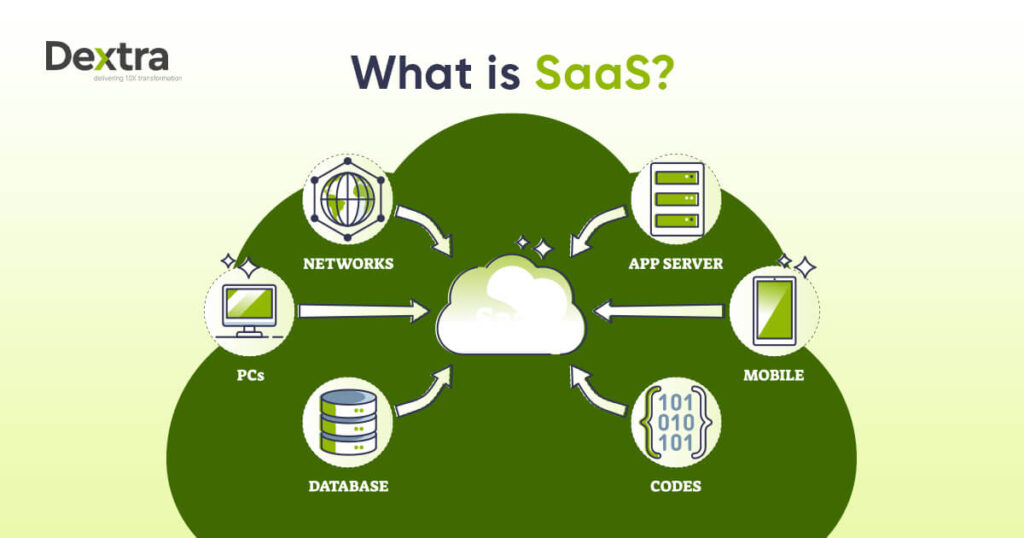
SaaS stands for Software as a Service. It is a cloud-based software delivery model in which a provider hosts and maintains an application while customers access it over the internet rather than installing and maintaining the underlying software infrastructure themselves.
The History of SaaS
Now that you know what is SaaS software, let’s get into its history. Software as a Service originated in the 1960s with the goal of time-sharing, which allowed several users to access a central mainframe computer via terminals.
However, it wasn’t until the 1990s that the framework for SaaS as we know it was created. With the rise of the internet, organizations such as Salesforce began delivering software applications via web browsers.
This strategy transformed software delivery by reducing the requirement for organizations to install and maintain software on individual devices. Owing to its low cost and scalability, SaaS grew rapidly in the early 2000s.
As cloud computing technology advanced, Software as a Service became the primary software distribution mechanism. Today, SaaS has many applications, such as customer relationship management (CRM) and communication and collaboration tools.
Also Read: List of Best Data Integration Tools & Software | Future Trends
How Does SaaS Work?
Software as a Service (SaaS) works by delivering software over the internet rather than requiring customers to install and manage the underlying application infrastructure themselves.
When a customer uses a SaaS product, they primarily interact with the application through a web browser or client interface. Behind that experience is a technology stack responsible for running the application, storing data, managing access, connecting with other systems, and keeping the service secure and available.
A typical SaaS architecture involves several layers:
1. Application
This is the software customers actually use. It provides the features, workflows, dashboards, and interfaces that solve the customer’s business problem.
2. Application Infrastructure
The infrastructure keeps the application running. This can include servers, containers, databases, networking, cloud resources, and other supporting services.
3. Data Layer
The data layer stores and processes customer and application data. Depending on the SaaS product, this may include business records, files, transactions, analytics data, or application-specific information.
4. Identity & Access
This layer manages who can access the software and what they are allowed to do. It typically includes authentication, authorization, user management, roles, and permissions.
5. APIs & Integrations
SaaS products often need to communicate with other business systems. APIs and integrations can connect the application with CRMs, ERPs, payment platforms, analytics tools, communication systems, and other applications.
6. Operations
The provider is also responsible for keeping the service operational. This includes monitoring, backups, updates, security, performance management, and availability.
How the Pieces Work Together
From the customer’s perspective, SaaS can feel simple: log in, use the software, and access the required functionality.
Behind the scenes, however, multiple technology layers work together to deliver that experience.
The customer primarily interacts with the application, while the SaaS provider manages much of the underlying infrastructure, data systems, access controls, integrations, and operational responsibilities.
That underlying architecture is what allows SaaS providers to deliver software as an ongoing service rather than a product that customers must install and manage themselves.
What Are the Benefits of SaaS?
SaaS has become a popular software delivery model because it removes much of the infrastructure and maintenance burden traditionally associated with running software. However, the exact benefits depend on the provider, pricing model, architecture, and how the customer implements the service.
1. Faster Deployment
SaaS applications generally do not require traditional software installation or customer-managed infrastructure provisioning. Teams can typically create an account, configure the application, and start using it much faster.
2. Lower Upfront Infrastructure Costs
Customers generally do not need to purchase and maintain the servers, storage, networking, and other infrastructure required to operate the application themselves.
3. Scalability
SaaS platforms can typically support changes in users, capacity, or features according to the provider’s architecture and pricing model. This can make it easier for organizations to scale as their requirements change.
4. Managed Updates
The SaaS provider generally manages application updates, patches, and routine maintenance. This reduces the amount of application maintenance that customers need to handle themselves.
5. Accessibility
SaaS applications can generally be accessed from supported devices and locations with an internet connection. This makes them well suited to distributed and remote teams.
6. Easier Integration
Many SaaS platforms provide APIs, connectors, and integration tools that allow them to connect with other business systems such as CRMs, ERPs, payment platforms, and analytics tools.
7. Predictable Subscription Model
Recurring subscription pricing can make software expenses easier to plan and budget. However, costs can increase as the number of users, features, storage, or usage grows, so businesses should evaluate the full pricing structure.
8. Reduced Infrastructure Management
Perhaps the biggest operational benefit is that customers generally do not have to manage the underlying application infrastructure themselves. The provider takes responsibility for much of the hosting, maintenance, availability, and infrastructure operations.
One important qualification: SaaS does not automatically mean better security. Security depends on the provider’s architecture and controls, as well as the customer’s configuration, access management, data practices, and overall implementation.
What Is SaaS Company? 8 Great Examples of SaaS!
A SaaS company gives software programs on a subscription basis via the Internet. This lets users access and use the software without installing or maintaining it locally. Here are some examples of SaaS:
1) Salesforce
Salesforce is a leading SaaS CRM platform. It helps companies handle sales, marketing, and customer service from a unified platform. Salesforce helps businesses manage client contacts and provide thorough data, increasing productivity and customer happiness.
2) Microsoft 365
Microsoft 365 provides cloud-based versions of popular productivity products such as Word and PowerPoint. You can use these products from any device that has an internet connection. This allows you to collaborate and work remotely. Microsoft 365 also features OneDrive online storage which helps users to securely store and share files.
3) Slack
Slack is a SaaS tool that helps teams communicate and collaborate. It provides channels for organized chats and simple connections with tools and services. Slack boosts team productivity by centralizing communication and enabling real-time collaboration, even among distant or distributed teams.
4) Google Workspace
Google Workspace offers cloud-based productivity tools such as Google Docs and Google Meet. These technologies let users create and collaborate on documents and presentations in real time. Google Workspace is popular among educational institutions and organizations due to its simplicity and easy integration.
5) Dropbox
Dropbox is a Software as a Service platform for cloud storage and file sharing. It allows users to save files online and view them from any device, guaranteeing that data is always available. Dropbox also promotes cooperation by allowing users to share files and folders with others, making it easier for them to work together on projects.
6) Zoom
This Software as a Service tool allows video conferencing and online meetings. It gained popularity during the COVID-19 epidemic when businesses and schools switched to remote employment and online learning. Zoom is a popular virtual communication option because it provides high-quality video and audio, as well as screen sharing and recording capabilities.
7) Shopify
Shopify is a SaaS e-commerce platform that helps businesses develop and manage online stores. It provides many customized templates and inventory management capabilities. That makes selling things online easier for businesses of all sizes, from startups to major corporations.
8) Adobe Creative Cloud
Adobe Creative Cloud is a creative software suite that is available as a Software as a Service option. It includes popular programs such as Photoshop and Premiere Pro, which are required for graphic design and digital content creation. Adobe Creative Online offers regular upgrades and collaboration tools that assist creative professionals.
SaaS Vs. PaaS Vs. IaaS
Here is the difference between SaaS, PaaS, and IaaS:
1) SaaS
SaaS helps customers to access software programs through the Internet. These programs are hosted and managed by a third-party source, so users do not need to install or update the software on their own devices. Software as a Service is appropriate for end-users who require ready-to-use software for tasks such as email or CRM. Examples of SaaS are Google Workspace and Dropbox.
2) PaaS
PaaS is a cloud-based platform that allows developers to build and deploy applications without worrying about infrastructure. It provides a foundation of pre-built tools and services, such as databases and development environments, allowing developers to concentrate on code and application logic. PaaS is useful for developers who need a simplified environment to build and deploy apps swiftly. Examples of PaaS are Microsoft Azure and Heroku.
3) IaaS
IaaS provides virtualized computing resources over the Internet, including servers and networking. Users can rent and manage these resources to construct and execute their applications, giving them complete control over the infrastructure.
IaaS is appropriate for IT managers and developers who need scalable and adaptable resources for hosting websites or managing massive datasets. Some examples of IaaS are Amazon Web Services and Google Cloud Platform.
What Is SaaS Pricing?
Here are some pricing models of SaaS:
1) Subscription-Based Pricing
Subscription-based pricing is the most popular model for Software as a Service, with users paying a monthly or annual fee to use the software. This charge often includes the cost of software usage and support. Subscription plans come in tiers with varying features and user access.
2) Per-User Pricing
Customers are charged based on the number of users or seats accessing the software. This technique is common in corporate applications where multiple team members must use the software. As the team grows, the cost rises with each additional user. This pricing plan is scalable, and charges are based on the number of users who benefit from the product.
3) Usage-Based Pricing
Usage-based pricing charges clients based on their actual program usage. This approach is commonly used in Software as a Service services that require data storage or API calls. For example, a cloud storage provider can charge clients based on the volume of data saved or transported. This price is flexible and cost-effective for enterprises with changing usage patterns.
4) Freemium Model
The freemium model gives a free base version of the software with the opportunity to upgrade to a premium plan for more features and support. This concept attracts many users and helps them test the software before committing to a paid plan. Dropbox and Slack are examples of SaaS startups that use the freemium pricing model.
5) Flat-Rate Pricing
Flat-rate pricing allows consumers to access all software capabilities for a single, fixed charge. This concept simplifies pricing and appeals to clients who value certainty in their spending. However, it can not be as adaptable or scalable as other models, which makes it less popular for large-scale or corporate projects.
6) Custom Pricing
Enterprise-level SaaS solutions give customized pricing based on the business’s specific demands. This could include customized features and increased security or compliance. Custom pricing is negotiated directly with the Software as a Service provider, which makes it ideal for large enterprises with specific needs.
Challenges and Risks of SaaS
While SaaS has numerous advantages, it also has some issues and risks. Security concerns are important since sensitive data is stored elsewhere and can be subject to breaches. Dependence on internet connectivity can cause problems if there are network faults.
Furthermore, firms can encounter data integration and interoperability issues with existing systems. Another risk is vendor dependability, which requires businesses to trust their SaaS provider to maintain service quality and uptime.
Controlling subscription costs and interpreting licensing conditions can be difficult and result in unseen expenses. These difficulties must be carefully considered and managed.
How AI Is Changing SaaS
SaaS is evolving beyond software that simply helps users complete tasks. AI is increasingly becoming an embedded capability inside SaaS products, making applications more intelligent, conversational, and capable of taking action.
Instead of switching between a SaaS platform and a separate AI tool, users can increasingly interact with AI directly inside the applications they already use.
AI Copilots
AI copilots assist users directly within the application. They can help draft content, summarize information, explain data, suggest next steps, or support users as they complete tasks.
AI Search
AI-powered search allows users to ask questions in natural language and retrieve relevant information from application data, documents, and knowledge bases.
AI Agents
AI agents take this further by performing multi-step actions within defined permissions. An agent could retrieve information, update a record, trigger a workflow, and escalate an exception when human input is required.
Predictive Analytics
AI can analyze historical and real-time data to identify patterns and help forecast potential business outcomes, supporting areas such as demand forecasting, customer behavior, risk identification, and operational planning.
Automated Workflows
AI can help SaaS applications trigger actions based on data, events, or user requests. Instead of requiring users to manually initiate every step, AI can automate parts of a workflow while following predefined rules and approval requirements.
Natural-Language Interfaces
Users can increasingly interact with SaaS products by describing what they need rather than navigating through multiple menus, filters, and dashboards.
For example, instead of manually searching through reports, a user might ask:
“Which customers have seen the biggest drop in activity this quarter?”
The application can interpret the request, retrieve relevant data, and present the result.
Building AI Into SaaS Products
For SaaS companies, adding AI is not simply about attaching a chatbot to an existing product. The more valuable opportunity is to identify where intelligence can genuinely improve the user’s workflow and then design the appropriate data, model, integration, and automation layer behind it.
An AI consulting company such as Dextra Labs can help SaaS businesses identify these opportunities and design AI capabilities around their existing product architecture, from intelligent search and copilots to RAG-powered features, AI agents, and automated workflows.
The Shift From SaaS to AI-Powered SaaS
AI is becoming an intelligence layer across the SaaS experience—helping users find information, make decisions, complete tasks, and automate workflows.
For SaaS companies building their next generation of products, the opportunity is not to add AI simply because it is trending. It is to embed AI where it creates a meaningful improvement in how customers use the product.
The future of SaaS is increasingly about software that doesn’t just provide functionality, but understands context, assists users, and can safely take action on their behalf.
Conclusion
Software as a Service is an adaptable and easy way to get software through the Internet. It has many benefits, like cost savings and automated updates. Many companies use SaaS for communication and customer relationship management purposes. SaaS helps you focus on getting work done efficiently by ending the need for complex installations and maintenance.
FAQs:
What are some examples of SaaS?
Common SaaS categories include CRM, collaboration, productivity, cloud storage, e-commerce, communication, and creative software.
Is SaaS the same as cloud computing?
No. SaaS is one service model within cloud computing. Cloud computing also includes models such as IaaS and PaaS.
What are the main SaaS pricing models?
Common models include subscription, per-user, usage-based, freemium, flat-rate, custom, and hybrid pricing.
What are the disadvantages of SaaS?
Potential disadvantages include vendor lock-in, recurring costs, data-security concerns, integration challenges, provider dependency, availability risks, and data portability issues.
What is AI-powered SaaS?
AI-powered SaaS incorporates AI capabilities such as copilots, natural-language search, predictive analytics, automated workflows, or AI agents into the software product.
Is SaaS suitable for startups?
SaaS can be useful for startups because it can reduce upfront infrastructure requirements and accelerate access to business software, although pricing, scalability, security, and vendor dependency should be evaluated carefully.