“The question is no longer whether AI will transform your enterprise. The question is whether you’ll own the transformation or rent it.” ~ Erik Brynjolfsson, Director, Stanford Digital Economy Lab & Co-author, The Second Machine Age
The AI strategy memo has been signed. Budget is allocated. The use case is real: customer service queues are bleeding $4M a year in headcount, a fraud investigation backlog adding 11 days to claims, and an accounts payable process is still running on email threads. Then the room gets complicated. The platform vendor arrives with a 20-minute demo. The development shop pitches a fully bespoke build. Your internal engineering team wants 30 minutes to make their case. All three are telling the truth about their own best customers. All three are selling you something.
This is where most enterprise AI decisions go wrong. Not from bad intentions, but because the build vs buy AI agents question gets treated as a single, binary call made once for the whole organization. The numbers expose the cost of that mistake. Gartner reports that while 80% of enterprises want AI agents in production, only 17% have actually deployed them, and over 40% of active agentic AI projects risk cancellation by 2027 due to unclear ROI and escalating costs. That gap is not a technology problem. It is a decision-making problem.
The truth is that buy vs build AI agents is a use-case-by-use-case judgment, shaped by five factors specific to each workflow: complexity, time-to-value, risk profile, integration footprint, and long-term strategic value. In 2026, the enterprises getting this right are not picking a side. They are running hybrid patterns, buying where speed and standardization matter, building where differentiation and data control are non-negotiable. This piece gives you the framework to make that judgment with precision, not instinct, for every workflow on your roadmap.
Build vs Buy AI Agents: When to Build, When to Buy, When to Run a Hybrid Architecture
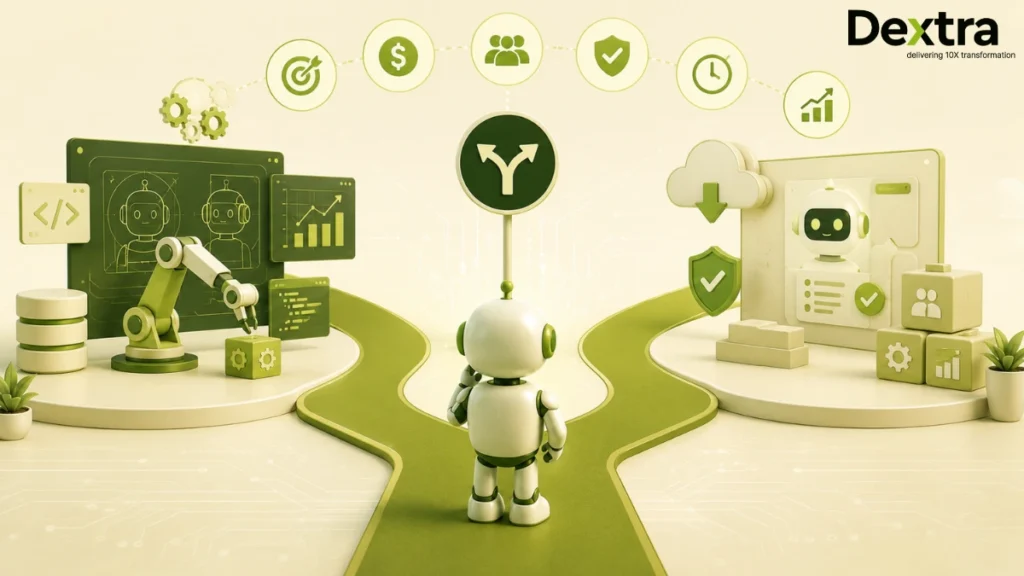
Here’s a simple rule: Don’t treat “build vs buy AI agents” as a single, company‑wide decision. Treat it as a use‑case‑by‑use‑case judgment. Do that, and most enterprises in 2026 might end up in the same place: a hybrid architecture where buying, building, and blending all play distinct roles. Let’s see when you should prefer to buy, build, and adopt a hybrid architecture.
When to Build
You build an AI agent when the agent is not just another tool; it becomes part of your competitive DNA.
- Build when the agent embodies your competitive differentiator, such as proprietary underwriting logic, custom risk‑scoring algorithms, or domain‑specific decision engines that your customers can’t get elsewhere.
- Build when your workflows carry industry‑specific complexity; fraud investigation, regulatory‑grade compliance reasoning, or highly specialized approval chains that generic vendor platforms can’t model or generalize.
- Build when you operate under strict regulations or data‑sovereignty requirements (financial services, healthcare, regulated manufacturing) and need full control over where data lives, how it’s processed, and how consent is managed.
- Build when you care about owning the reasoning logic itself as IP, not just the outputs. That means controlling prompts, tools, orchestration, and audit trails so no third‑party vendor can dictate your logic upgrades.
In these situations, buying is structurally limiting. Vendor platforms are built for broad markets, not your niche. You’ll find yourself building workarounds, back‑end bridges, and hidden custom layers just to close the last 10–15% of your workflow. Those compromises don’t disappear; they compound over time into technical debt and operational friction.
When to Buy
You buy an AI agent when the workflow is a commodity capability, a function that delivers value, but not differentiation.
- Buy when the use case is basic customer service routing, FAQ deflection, simple ticket triage, or generic copilot‑style support that your customers expect but don’t choose you for.
- Buy when the vendor’s defaults are good enough, implementation is fast, and the time‑to‑value is measured in weeks, not months or years.
- Buy when your internal engineering team is already stretched, and you want to offload undifferentiated heavy lifting, like generic natural language understanding, knowledge‑base search, and basic escalation logic, so your developers can focus on the work that actually moves the needle.
In these scenarios, buy‑oriented agents are faster, cheaper, and less risky. They’re standardized, updated by the vendor, and backed by SLAs. You’re not betting your strategy on them; you’re using them to accelerate the obvious stuff so your people can build the hard, unique parts.
When to Run a Hybrid Architecture
You run a hybrid architecture when you need both: vendor‑delivered speed for high‑volume, low‑differentiation work, and custom‑built power for the few workflows that truly matter.
- Hybrid means vendor platforms handle the 80% of transactions, including simple customer queries, routine scheduling, baseline copilot interactions, while your own agents own the 20% of complexity that includes fraud detection, compliance reasoning, underwriting logic, and other high‑stakes decisions.
- Hybrid also means orchestrating between agents: a front‑end copilot sits on top of your CRM, routing simple questions to a bought‑in agent and pushing complex cases to internally built agents wired into backend systems.
- In practice, most enterprises that scale AI agents successfully end up in a hybrid by Year 2. They start with a “buy everything” experiment, then realize that the strategically important workflows need bespoke logic, governance, and control.
When to Build vs Buy vs Blend: Final Decision
| Pattern / Strategy | When it makes sense | Typical use‑case examples | Key trade‑offs |
| Build internally | When the agent embodies your competitive differentiator, handles industry‑specific complexity, or sits under strict regulatory or data‑sovereignty constraints. | Fraud investigation enginesCustom underwriting modelsCompliance and risk‑reasoning systems | Higher upfront cost and longer time‑to‑market; full control over logic, data, and IP; avoids vendor lock-in but increases engineering load. |
| Buy vendor‑delivered agents | When the workflow is a commodity capability where differentiation is low and speed‑to‑value is critical. | FAQ deflection & chatbotsBasic customer‑service ticket triageGeneric scheduling and copilot assistants | Faster deployment, lower TCO for standardized use cases; exposes you to vendor lock‑in and limits on customization and governance. |
| Run a hybrid architecture | When you need speed and scale for high‑volume, low‑differentiation work and control and differentiation for high‑stakes workflows. | Front‑end copilot (buy) routing simple queries, while internal agents (build) handle fraud, compliance, and underwritingCRM‑facing chatbot (buy) layered over bespoke decision engines (build) | More complex orchestration and governance; but balances cost, speed, and strategic control; this is where most scaled enterprises land by Year 2. |
The C-Suite Lens
The mistake most boards and C‑suite teams make is to treat this as a single organizational decision:
“We are a build company” or “We are a buy company.”
That mindset leads to one of two problems:
- Over‑engineering generic workflows because leadership wants full control everywhere.
- Or under‑building the one core logic engine that actually defines your competitive advantage because the team defaulted to “buy.”
At the workflow level, the better instinct is to ask:
- Is this transaction a commodity or a differentiator?
- Does this logic live in our core IP or in the plumbing?
- If the vendor changes its roadmap or exits the market tomorrow, do we still lose our competitive edge?
Your customer service team’s basic ticket triage almost certainly warrants buy. Your underwriting team’s risk‑modeling workflow almost certainly warrants build. The strategically differentiating workflows, fraud investigation, compliance‑driven reasoning, and industry‑specific audit logic are where the build-vs-buy AI agents decision compounds value over years, not just quarters.
In the next section of this guide, you’ll get a five‑factor framework to apply to each specific use case, a more realistic TCO comparison than vendors typically show, and the three hybrid patterns that production deployments actually run on.
With that, you can move from “Should we build or buy?” to “What should we build, what should we buy, and how should we orchestrate them together?” – which is the real question in 2026.
The 5 Factor Framework That Decides Build vs Buy AI Agents
Till now, you already have a clear instinct that not every workflow should be treated the same when it comes to building or buying AI agents. The next step is to make that instinct repeatable and measurable.
Below is a five‑factor framework you can apply to any specific use case. Think of it as a lightweight scoring sheet for your leadership team: for each workflow, ask these five questions, listen to the answers, and let the pattern emerge.
Factor 1: Is the Agent a Strategic Differentiator or a Commodity Capability?
Buy when:
The workflow is generic and repeatable anywhere. FAQs, scheduling meetings, summarizing documents, basic ticket routing, these are table‑stakes capabilities. Your competitors’ agents will do roughly the same thing whether they built in‑house or bought a platform. Differentiation isn’t the value driver; speed, reliability, and cost are.
Build when:
The agent embodies your competitive advantage. This is where you bring in:
- Custom underwriting logic
- Proprietary risk models
- Industry‑specific compliance reasoning
- Unique customer‑resolution workflows honed over the years
If every competitor using the same vendor platform ends up with functionally identical agents, you’ve effectively ceded your differentiation. In that case, the logic layer should be yours, not someone else’s.
Additionally, that logic layer ultimately sits on top of the underlying language model, so it helps to separate what the AI Agent vs LLM actually contributes to the system. The model provides the core language and reasoning capabilities, while the agent architecture adds the tools, orchestration, memory, and business logic needed to act on them.
C‑suite lens: Ask, “If our competition bought the same platform tomorrow, would they look like us?” If the answer is yes, you are in commodity territory. If the answer is no, you are in differentiator territory.
Factor 2: How Specialized Is the Workflow?
Buy when:
The workflow follows well‑established, industry‑standard patterns. Examples include:
- Standard customer support flows
- Basic sales‑outreach sequences
- Generic onboarding journeys
Vendor platforms are optimized for these patterns because they are common, clean, and generalizable. Their training data and tooling are tuned to them.
Build when:
The workflow lives in edge‑case territory that vendors can’t generalize. For example:
- Pharmaceutical regulatory submission preparation
- Multi‑jurisdictional banking compliance checks
- Insurance underwriting with state‑by‑state rules
- Supply‑chain exception handling tailored to your carrier network and contract terms
If your workflow requires reasoning about edge cases that exist only in your operation, vendor platforms will do well on the 80% but hit their limits at the 20% that matters most.
C‑suite lens: The more “that’s how we’ve always done it” you hear internally, the more likely you’re in build territory around the logic layer.
Factor 3: How Sensitive Is the Data and How Regulated Is the Environment?
Buy when:
Data sensitivity is moderate, and standard enterprise‑grade security is sufficient. Think:
- General customer support histories
- Non‑PII sales or marketing data
- Internal collaboration content
Most vendor platforms meet baseline requirements like SOC 2, ISO 27001, and basic encryption in transit and at rest. If that’s enough for your risk appetite, you can lean toward buying.
Build when:
You operate under regulations that demand sovereign control over data and logic. Examples include:
- HIPAA‑regulated workflows with PHI
- Financial services with bank‑specific compliance
- Defense or dual‑use sectors with ITAR/EAR
- Healthcare under state‑by‑state privacy laws
- EU‑based operations under GDPR with strict data‑residency rules
In these cases, custom AI agents vs off‑the‑shelf isn’t just an engineering question; it’s a governance and risk‑management question. Building gives you full control over:
- Where data goes
- How it’s processed
- What gets logged
- Who has access at every step
C‑suite lens: If your legal or compliance team says, “We need to see and control the full stack,” you’re in build or hybrid territory.
Factor 4: Do You Have the Engineering Capability to Build and Maintain?
Buy when:
Your team lacks:
- AI/ML engineers with production deployment experience
- MLOps infrastructure
- A clear governance model for prompts, models, and agents
You also don’t want to take on the long‑term maintenance burden:
- Model updates
- Prompt drift and hallucination monitoring
- Agent lifecycle management
In these situations, vendor platforms act as a managed capability layer, freeing your team to focus on higher‑impact work.
Build when:
You have (or can realistically acquire) the engineering capacity:
- AI/ML engineers who’ve shipped production systems
- Prompt‑engineering and LLM‑evaluation expertise
- MLOps for model deployment, monitoring, and rollback
- Product engineering capacity for integration layers
Building isn’t just about the initial prototype; it’s about owning the long‑term capability. That includes:
- Versioning and auditing
- Observability and alerting
- Continuous testing and evaluation
C‑suite lens: If your CTO can look you in the eye and say, “We can run this like a production service,” you’re in build territory. If not, “buy” or “hybrid” is the safer path.
Factor 5: What’s the Timeline Pressure?
Buy when:
You need production‑ready capability in weeks, not months. Your quarterly OKRs depend on the agent going live. The competitive window for this capability is narrow. In these cases, the opportunity cost of waiting exceeds the cost of accepting platform limitations.
Build when:
Your timeline tolerates a 3–6-month runway for an initial production deployment. You’re optimizing for:
- Long‑term capability
- Reusability across multiple workflows
- Knowledge accumulation within your team
Here, the strategic value of a custom build over multiple years outweighs the short‑term speed advantage of buying.
C‑suite lens: If launching this quarter is non‑negotiable, buy for the first version and plan a custom AI agent vs off‑the‑shelf bounce‑back strategy for V2.
| Here’s how to apply the framework in practice For each workflow, run through these five factors and tally your answers: – Three or more pointing to build → you are in build territory. – Three or more pointing to buy → you are in buy territory. – 2‑2‑1 or 3‑2 splits → you are almost certainly in hybrid territory. This is where the AI agent build vs buy decision shifts from ideology to mechanics: not “are we a build or buy company?” but “what slice of this workflow should we build, what should we buy, and how do they talk to each other?” |
| Pro Tip 3 or more “Buy” signals → Buy 3 or more “Build” signals → Build Mixed signals → Hybrid architecture is likely the right path |
The Real TCO: What Build and Buy Actually Cost in 2026
Most build‑vs‑buy debates stop at the headline number: “That platform costs $X per year” or “That build project is $Y.” In 2026, that lens is dangerously misleading. The real question for executives is not “What does this cost in Year 1?” but “What does it cost to own, operate, and evolve over three years?”
When you look at the total cost of ownership (TCO) this way, the difference between buying an AI agent platform and building a custom AI agent isn’t as dramatic as vendor slides suggest. Buying gets you to market faster; building gives you more control. But on the balance sheet, over three years, neither path is inherently “cheap”; they just accumulate costs in different ways.
Let’s break that down.
Buying an AI Agent Platform: 3‑Year TCO
If you buy an off‑the‑shelf AI agent platform, the conversation usually starts with the license fee. For enterprises in 2026, that typically range from $50K to $500K+ per year, depending on scope, usage tier, and the number of agents or users involved. That’s the number in the slide. The rest tends to show up later, quietly.
Hidden costs that compound over time
- Vendor lock‑in risk: If your workflows grow in complexity or your vendor’s pricing changes, migrating later can be expensive. Re‑syncing integrations, re‑training internal teams, and rebuilding governance layers easily run into six‑figure ranges, especially if you’ve gone deep on proprietary tooling.
- Customization tax: Most platforms are built for “standard” workflows. When your use case is non‑standard, you pay for professional services engagements for configuration, advanced routing, and custom logic. These often land in the $50K–$200K+ per engagement band and can repeat over time.
- Integration maintenance: Your ERP, CRM, ticketing, identity, and data systems keep evolving. Every API change or schema update can force platform‑side reconfiguration. That’s not always a line item you budget for, but it adds up as ongoing integration labor over three years.
- Governance limits: You accept the vendor’s audit model, logging structure, compliance controls, and explainability architecture. If your industry or regulators demand more, you may end up building your own governance layer on top, which eats into the “time‑saved” narrative.
- Differentiation cost: Every competitor using the same platform can replicate the same core behavior. If your value is in how an agent reasons, not just that it exists, this becomes a strategic cost that rarely shows up in a spreadsheet but shows up in your win‑rate and stickiness.
| Fun fact: the “buy” illusion Many enterprise teams assume that buying an AI agent platform “caps” their cost at the annual license. In reality, customization and governance‑layer work often end up at 40–60% of the total 3‑year spend, even though they’re rarely labeled as “TCO” on the original slide. |
Here’s how the 3‑year TCO for a bought‑in AI agent platform typically stacks up for a non‑trivial enterprise workflow.
| Cost bucket | Typical range (per year) | Typical 3‑year impact | What it represents |
| Software license | $50K–$500K+ | $150K–$1.5M+ | Core platform access and usage tiers. |
| Customization services | $50K–$200K per engagement | $100K–$600K+ | Non‑standard workflows, routing, and logic. |
| Integration maintenance | $20K–$100K+ | $60K–$300K+ | Ongoing sync with ERP, CRM, ticketing, etc. |
| Internal governance effort | $30K–$100K+ | $90K–$300K+ | Compliance, auditing, and explainability. |
| Migration risk reserve* | $0K–$500K+ | $0K–$1M+ | Likely range if you outgrow the platform. |
*Not always budgeted, but often realized.
Total 3‑year TCO range (buy): $300K–$2M+, depending on scope, customization, and how aggressively the vendor changes its pricing or architecture.
Building a Custom AI Agent: 3‑Year TCO
If you choose to build a custom AI agent, the conversation starts with the initial development project. For an enterprise‑grade agent with robust integration, governance, and observability, that typically ranges from $200K to $800K, depending on:
- Complexity of the logic
- Number and depth of system integrations
- Compliance and audit requirements
That’s the visible “build” cost. The less visible part is what happens afterward.
Hidden but predictable costs
- Initial infrastructure: You’re not just wiring logic; you’re standing up a stack: vector databases, orchestration framework, monitoring, logging, and identity controls. Add in LLM API costs and initial tooling, and this setup often lands in the $30K–$150K range.
- Ongoing LLM inference costs: As your agent scales in usage, the bill for model calls can grow fast. For many mid‑to‑large enterprises, annual LLM inference costs for a core agent run roughly $20K–$200K+, depending on message volume and model choice.
- Maintenance burden: Models drift. Prompts decay. Frameworks evolve. You need ongoing work for:
- Prompt tuning and evaluation
- Model‑version management
- Framework and SDK upgrades
This typically adds 20–30% of the original build cost per year in engineering effort.
- Engineering retention and knowledge: If the team that built the agent leaves, you either pay for re‑upskilling or risk a long‑term “black box” system. Keeping at least a core group of specialists on board is a real cost, not a one‑time project.
| ? Fun fact: the “build” misconception Many executives assume that “building” means unpredictable, runaway costs. In well‑scoped engagements, the ongoing maintenance typically stabilizes at around 20–25% of the original build cost per year; far more predictable than the surprise customization bills that often hit bought‑in platforms. |
Here’s how the 3‑year TCO for a custom AI agent typically stacks up for a non‑trivial enterprise workflow.
| Cost bucket | Typical range (per year) | Typical 3‑year impact | What it represents |
| Initial build (Year 1) | $200K–$800K | $200K–$800K | Core logic, integrations, and governance. |
| Infrastructure setup | $30K–$150K (setup year) | $30K–$150K | Vector DBs, observability, monitoring, etc. |
| Ongoing maintenance | 20–30% of build cost | $120K–$450K+ | Prompt tuning, model management, upgrades. |
| LLM inference | $20K–$200K+ | $60K–$600K+ | Per‑use model calls at scale. |
| Engineering retention / upskilling | $50K–$150K+ | $150K–$450K+ | Keeping core talent tied to the system. |
Total 3‑year TCO range (build): $400K–$1.8M, depending on scope and usage scale.
The Real Cost Differentiator: Not Just Dollars
| Path | Typical 3‑year TCO range | Speed to first deployment | What “you own” vs “you rent” |
| Buy an AI agent platform | $300K–$2M+ | Fast (weeks to a few months) | Capabilities on someone else’s stack. |
| Build a custom AI agent | $400K–$1.8M | Slower (3–6 months for first version) | Logic, data control, and long‑term IP. |
| Fun fact Over three years, buying is often only 10–30% cheaper than building for non‑trivial use cases with real customization. But in exchange for that small delta, vendors often capture your future flexibility and differentiation, which is rarely priced on the slide. |
The real cost differential isn’t just in the budget line; it’s in:
- Who owns the logic and data
- How easily you can adapt when regulations or markets change
- How much of your competitive edge is outsourced to a vendor’s roadmap
At Dextra Labs, we structure custom builds with explicit TCO planning so the “build” path doesn’t become a financial black box:
- Fixed‑scope initial build with clear milestones.
- Predictable ongoing maintenance modeled as a percentage of the original development (for example, 20–25% per year).
- Clear ownership transfer so the client isn’t dependent on us for every change.
This means the build path doesn’t have to mean unpredictable cost escalation; it just requires honest, upfront scoping and a commitment to treating the agent as a lived‑in product, not a one‑off project.
| In short Don’t decide build vs buy AI agents based on Year 1 price tags. Decide based on what you are willing to own, what you are willing to outsource, and what you can afford to evolve over three years, because that’s where the money actually lives. |

Still Deciding Between Building and Buying AI Agents?
Get an architecture review with Dextra Labs. We’ll help you evaluate cost, timelines, technical complexity, compliance requirements, and long-term ROI, whether the right answer is buy, build, or a hybrid approach.
? Explore AI Agent Development ServicesHybrid Patterns: How Most Enterprises Actually Deploy AI Agents in 2026
By 2026, the cleanest, most scalable AI agent deployments are rarely “pure build” or “pure buy.” They are hybrid patterns that combine vendor platforms with custom development, where each shines.
The real question is not:
“Are we a build or buy company?”
but:
“Which hybrid pattern fits which workflow, and when?”
Below are three practical hybrid patterns you can drop into your roadmap, plus a crisp table and a few pro‑tips for how to choose and apply them.
Pattern 1: Buy and Extend
Start with a vendor platform for foundational capabilities, then add custom layers for the workflows the platform cannot handle well.
How it works:
- Use a vendor platform (e.g., Salesforce Agentforce, Microsoft Copilot, an enterprise‑grade chat product) for:
- General customer service
- High‑volume, standard inquiries
- Build custom AI agents for:
- Complex disputes
- Multi‑account reconciliations
- Regulatory‑sensitive workflows
- Keep the user experience unified, even if the back‑end logic is split.
For example, a global bank deploys Salesforce Agentforce for general customer service questions:
- Account balance lookups
- Basic transaction questions
- Password resets
The platform handles about 60% of inquiry volume out of the box. The remaining 40%- complex disputes, multi‑account reconciliations, and regulatory‑driven workflows- are handled by custom‑built agents that integrate into the same Salesforce console. From the analyst’s perspective, it’s one agent; behind the scenes, it’s a hybrid.
| When it fits: You have well‑understood, high‑volume workflows and specialized, lower‑volume workflows.The vendor platform serves the bulk; custom development handles the differentiating edge cases. Pro‑tips: Make sure the routing layer (which cases go to platform vs. custom) is explicit and monitored.Design a single view of the agent experience so support teams and customers don’t feel like they’re talking to “two different systems.” |
Pattern 2: Build with Vendor Components
Build your own agent architecture, but use commercial components for the infrastructure layers where reinventing the wheel offers no competitive advantage.
How it works:
- Use commercial:
- Large‑language models (e.g., Anthropic, OpenAI, Microsoft models).
- Vector databases (e.g., Pinecone, Weaviate, Milvus).
- Basic orchestration or tooling frameworks.
- Build:
- The orchestration logic that wires your business rules.
- Custom tool integrations to your proprietary systems.
- The compliance and audit layer that meets your regulatory bar.
For Example:
A fintech builds a custom fraud investigation agent where:
- Foundation model: Anthropic Claude (commercial)
- Vector database: Pinecone (commercial)
- Orchestration framework: custom‑built on top of LangGraph
- Tool integrations: custom to bank‑specific APIs
- Compliance and audit layer: custom to satisfy banking regulators
The value is not in the model or the vector DB, but in how the agent reasons about fraud patterns, orchestrates between systems, and logs decisions for auditors.
| When it fits: The agent’s value lives in orchestration, integration, and compliance, not in rebuilding commodity infrastructure.You want to own the logic and governance but don’t need to reimplement the LLM or vector DB stack. Pro‑tips: Choose API‑stable component vendors; you’ll hate it if model endpoints or vector APIs keep changing mid‑year.Bake swappable contracts into your architecture so that you can swap one LLM vendor for another without rewriting the entire agent. |
Pattern 3: Buy Then Build
Start by buying for quick wins and learning, then build custom agents in parallel as your organization develops in‑house AI capability.
How it works:
- In Year 1, buy a platform to get agents in production fast.
- Use that time to:
- Learn from live usage
- Build internal AI and MLOps expertise
- In Year 2, start building custom agents for the high‑value, complex workflows where the platform shows its limits.
For Example:
An insurance company in 2026 deploys Microsoft Copilot Studio in Year 1 to:
- Assist underwriters with basic data lookup
- Provide quick references to guidelines
Copilot handles simple, routine tasks and delivers fast ROI. Meanwhile, the company:
- Hires and trains an internal AI engineering team
- Designs a long‑term agent architecture
By Year 2, they begin building custom agents for complex underwriting workflows, multi‑risk scenarios, cross‑jurisdictional rules, and specialized policy logic, where Copilot’s out‑of‑the‑box capabilities become a bottleneck. Copilot continues to serve the simpler workflows, but the real business value now lives in the custom agents.
| When it fits: You don’t yet have the engineering capability to build, but you know you’ll need it long‑term.You want immediate capability while developing in‑house muscle. Pro‑tips: Treat the “buy” phase as a learning runway, not a permanent solution.Use the first year to document patterns, failure modes, and governance standards that your custom build can inherit. |
For a quick reference:
| Hybrid pattern | What you buy vs what you build | When it fits best | Typical C‑suite signal |
| Buy and Extend | Buy: Vendor platform for bulk workflowsBuild: Custom agents for complex edge cases | You have high‑volume standard workflows plus a few high‑value, niche workflows. | “We bought X and it handles A and B well, but C and D are where the real value is.” |
| Build with Vendor Components | Buy: LLM, vector DB, basic frameworksBuild: Orchestration, tools, compliance, and audit | Your differentiation is in workflow logic and governance, not infrastructure. | “We want to own the reasoning and control, not the underlying stack.” |
| Buy Then Build | Buy: Off‑the‑shelf agent for quick winsBuild: Custom agents in parallel over 12–24 months | You lack in‑house AI capability today but want to build it sustainably. | “We need to go live fast, but we also need to own our AI future.” |
Why These Patterns Win in 2026
Most enterprises that successfully scale AI agents by 2026 are running at least two of these patterns at once. The mistake is to treat the “build vs buy AI agents” decision as a single, company‑wide choice. The smarter move is to ask:
- “Which pattern fits which workflow?”
- “Where do we want to own the logic, and where are we comfortable renting it?”
At Dextra Labs, the most common engagement is not a pure build. It’s a Pattern 1 (Buy and Extend) or Pattern 2 (Build with Vendor Components) build, where clients have already deployed something off‑the‑shelf and now need custom development for the workflows that the vendor platform structurally cannot serve.
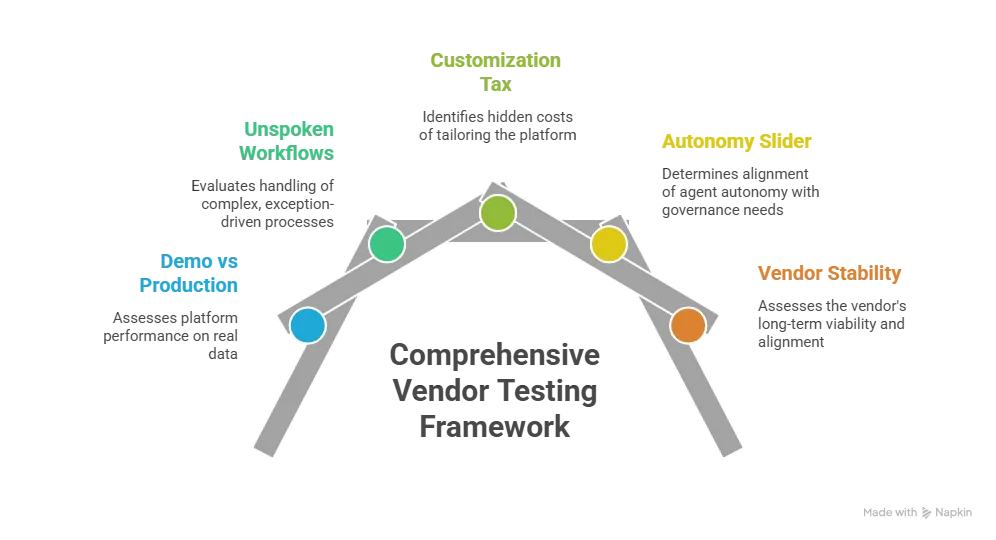
If You’re Buying an AI Agent: The 5 Tests Every Vendor Should Pass [2026]
If your framework has pointed you to buy an AI agent, the next decision is not “which platform?” It’s “which vendor can we actually operate with for three years?” Most enterprise evaluations still revolve around the demo. The decisions that determine long‑term success are different.
To cut through the hype, treat vendor selection like a five‑test filter. If a vendor cannot pass at least four of these cleanly, your use case is more likely to belong in build or hybrid territory than in a pure‑buy stack.
Test 1: From Demo to Production Realism
Demos show capability; production reveals constraints. Vendor demos run on clean data, curated workflows, and engineered edge equivalence. Production runs on messy data, inconsistent schemas, and the same edge cases your team deals with every day.
What to ask vendors:
- Can we run a 30–60 day pilot on our actual data and workflows, not their demo environment?
- How will your SLAs and pricing change when usage exceeds the “demo band”?
| Pro‑tip: If a vendor resists a real‑world pilot or insists on using “comfortable” data, treat that as a risk signal, not a scheduling issue. No enterprise‑grade AI agent should ask you to trust its behavior only on sanitized inputs. |
Test 2: Workflows They Don’t Talk About
The most important capabilities are often the ones vendors don’t volunteer. Many demos emphasize “click‑of‑the‑button” tasks such as FAQ routing or document summarization. But your real pain points live in:
- Multi‑system orchestration (ERP → CRM → ticketing)
- Write‑back actions into core systems
- Compliance‑sensitive decision logging
- Exception handling and edge‑case behavior
What to ask vendors:
- “Walk us through exactly how your agent handles a real‑world exception in our environment.”
- “Show us a multi‑system workflow that mirrors our actual approval chain.”
| Pro‑tip: Force evaluation discussions into these workflows before signing. If the vendor’s answer is “We can probably build a custom connector later,” treat that as a build‑in‑disguise cost, not an off‑the‑shelf win. |
Test 3: The Customization Tax
Most platforms charge a “customization tax” on top of the license. The base platform is great for generic workflows, but the minute you deviate from the standard pattern, you enter professional‑services territory. Those services are not always labeled as “TCO” up front.
What to ask vendors:
- “Give us a written estimate for the specific customizations our use case requires, scoped to our workflows, not a generic configuration.”
- “What will change in that estimate if we later add two more workflows or three new systems?”
| When the red flag goes up: If the vendor’s quoted customization scope feels like a full‑stack build project, but on someone else’s architecture, you are effectively buying a custom build without the IP ownership. |
Test 4: The Autonomy Slider
Andrej Karpathy’s “autonomy slider” concept matters here. Some workflows can run with high autonomy, background execution, auto‑approvals, and batch decisions. Others must sit with low autonomy, every action approved or reviewed by a human, especially in regulated or high‑risk environments.
What to ask vendors:
- “Can we tune the autonomy level for each workflow – not just across the entire platform?”
- “What happens when the agent wants to perform a write‑back or high‑risk action? How many human approvals are baked in, and who can change that?”
If the vendor defaults:
- Are too rigid, or
- Do not let you reconfigure autonomy per use case,
You will end up fighting the platform instead of using it. Governance should not be a constraint you bolt on; it should be baked into your autonomy model.
Test 5: Vendor Stability and Roadmap Risk
AI is moving fast, and not every vendor will survive. Some will be acquired. Some will pivot to other markets. Some will sunset products under new leadership. None of these are hypothetical in 2026.
What to ask vendors:
- “What is your funding runway and growth trajectory?”
- “What is your customer retention rate for multi‑year contracts?”
- “How often has your roadmap changed year‑over‑year, and how transparently?”
- “Are there any visible acquisition signals (e.g., ownership by a larger cloud vendor)?”
Your multi‑year strategy should not depend on a vendor that:
- Is burning cash at an unsustainable rate
- Has a thin customer base
- Or has a roadmap that shifts radically every 12 months
When No Vendor Passes the Tests
If, after working through these five tests, no vendor cleanly passes or the closest‑fit vendor would require so much customization that it feels like a full build project, you already have your answer. Your use case is in build territory.
That outcome is more common than vendor marketing suggests. It happens with:
- Highly regulated workflows (HIPAA, banking, insurance, defense).
- Deeply industry‑specific reasoning (fraud, underwriting, compliance, enterprise‑specific operations).
- IP‑sensitive logic where the reasoning layer is core to competitive advantage.
In these cases, vendor platforms structurally cannot deliver, no matter how good the demo looks. Forcing a vendor fit:
- Doesn’t reduce risk.
- It relocates it into vendor lock‑in, customization tax escalation, and an architecture you didn’t choose.
Why Building One “AI Agent” Matters More
Building gives you four strategic advantages that off‑the‑shelf platforms struggle to match:
- Full IP ownership of the reasoning layer: You own the prompts, tools, rules, and orchestration that define how the agent “thinks.” That IP compounds value over time as you refine it across use cases.
- Sovereign control over data flow and governance: You decide where data lives, who can see it, and how it’s logged. This is critical in regulated, privacy‑sensitive, or defense‑adjacent operations.
- Architectural fit for your workflows: The system is built for the workflows you actually run, not the “average enterprise” pattern the vendor optimized for.
- Independent evolution: You can evolve the agent based on your roadmap, not the vendor’s release schedule. When regulations change or markets shift, you are not waiting for a platform update.
Vendor‑Buy Tests for C‑Suite
Dextra Labs builds custom AI agent systems for enterprises whose vendor evaluation produced exactly this result:
- We ran the five tests.
- No platform cleanly passed.
- The closest fit felt like a customized build anyway, but without the benefits of ownership.
We’ve architected systems for:
- Fintech underwriting
- Banking fraud detection
- Multi‑jurisdictional compliance
- Complex enterprise operations where off‑the‑shelf platforms hit their structural ceiling
| Key Takeaway: Buying an AI agent is not necessarily safer than building. It is safer only when the vendor passes these five operational and architectural tests. If none of them do, your organization isn’t being “too ambitious” by building; it’s being honest about where the actual business value and risk live. |
Final Take
The build vs buy decision for AI agents is not an organizational doctrine. It is a workflow‑by‑workflow judgment. Enterprises that go all in on buying end up trapped by platform limitations they cannot engineer around. Enterprises that go all in on building end up reinventing components that vendors already deliver well.
The organizations that scale AI agents successfully in 2026 are the ones that treat build vs buy as a framework to apply to each use case, not a one‑time decision, and run hybrid patterns where each path is used to its strength.
For workflows that genuinely need custom development, strategic differentiators, specialized industry logic, regulated environments where you must maintain sovereign control, or hybrid patterns where vendor platforms cover 80% of the journey, Dextra Labs is the team that builds the last‑mile layer that vendors cannot serve.
If that sounds like the kind of gap your organization is trying to solve, our AI Agent Development Services can help you turn the build decision into a production-ready system designed around your workflows, integrations, data, and governance requirements.