OpenAI officially released GPT-5.6 to general availability on July 9, 2026, introducing a new frontier model family built around three capability tiers: Sol, Terra, and Luna. Rather than launching a single flagship model, OpenAI has taken a different approach by offering purpose-built models for complex reasoning, everyday production workloads, and high-volume, cost-sensitive tasks. This marks a significant shift in how enterprises can build and scale AI applications while optimizing both performance and cost.
For organizations developing AI agents, LLM-powered products, or enterprise automation, GPT-5.6 is more than just a model upgrade. Features like Programmatic Tool Calling, predictable prompt caching, and multi-agent orchestration enable teams to build production-ready AI systems with greater efficiency, lower token costs, and improved scalability. The real advantage lies in understanding which model tier to use for each workload rather than relying on a single model for every task.
In this blog, we’ll explore everything you need to know about GPT-5.6, including its architecture, features, benchmarks, pricing, real-world use cases, limitations, and comparisons with Claude and Gemini. We’ll also explain how to choose between Sol, Terra, and Luna and share practical strategies for deploying GPT-5.6 efficiently in enterprise environments.
What is GPT-5.6?
GPT-5.6 is OpenAI’s current frontier model family, released in three capability tiers.
- Sol is the flagship, built for the hardest long-horizon agentic work.
- Terra is the balanced model for everyday production workloads.
- Luna is the fastest and most cost-efficient tier.
All three come from the same training generation. The number identifies the generation. The tier name identifies the capability class.
For a broader view of how OpenAI’s model family has evolved, see our guide to all GPT versions from GPT-1 through GPT-5.6.
That distinction is deliberate and it matters. OpenAI has stated that Sol, Terra, and Luna are durable tiers that advance on their own cadence, independent of the generation number.
The practical effect for anyone running production systems: you map a job category to a tier rather than to a version string. When the next generation ships, your routing logic survives the upgrade.
Anyone who has migrated across the mini, nano, turbo, and pro variants of previous generations will recognise why this is an improvement.
GPT-5.6 Overview: Features and Architecture [2026 Updated!]
GPT-5.6 is best understood not as a single model but as three tiers built from the same training generation, each tuned for a different balance of capability and cost. The table below sets them side by side so the trade-offs are visible at a glance.
| Attribute | Sol | Terra | Luna |
| Positioning | Flagship | Balanced production | Fast & cost-efficient |
| Best for | Hardest long-horizon agentic work | Everyday production workloads | High-volume, latency-sensitive steps |
| Input price (per 1M) | $5.00 | $2.50 | $1.00 |
| Output price (per 1M) | $30.00 | $15.00 | $6.00 |
| Relative cost vs Sol | Baseline | 50% | 20% |
| Long context (256K–512K) | Strong (91.5%) | Strong (89.6%) | Weak (41.3%) |
| Computer use (OSWorld 2.0) | 62.6% | 50.2% | 45.6% |
| Terminal-Bench 2.1 | 88.8% | 87.4% | 84.7% |
| ultra available | Yes (4-agent parallel) | Setting-dependent | Setting-dependent |
| Plan access | Plus/Pro/Business/Enterprise | Free/Go and up | All plans |
| Route it to | Coding, computer use, complex analysis | GPT-5.5 replacement, support, drafting | Classification, extraction, reranking |
Read down the price and cost rows and the core proposition becomes obvious. Terra delivers most of Sol’s benchmark performance at half the cost, and Luna does the same at a fifth, right up until the workload demands long context, where Luna drops off sharply. The tiers differ on capability and price, but a number of things stay constant across all three, and those shared attributes are worth pulling out on their own.
| Attribute | Detail (all tiers) |
| Training generation | GPT-5.6 |
| Released | July 9, 2026 (GA) |
| Available in | ChatGPT, Codex, OpenAI API |
| New reasoning settings | max (depth), ultra (parallelism) |
| Key API additions | Programmatic Tool Calling, multi-agent beta, explicit cache breakpoints |
| Caching | 90% read discount, 1.25x write, 30-min minimum life |
Taken together, the two tables describe the real shape of this release. The capability differences between tiers are modest on most workloads and stark on a few specific ones, while the price differences are large and consistent. That combination is precisely why single-model architectures now overpay, and why the routing decision covered later in this guide is where the actual savings live.
GPT-5.6 vs ChatGPT: What’s the Difference?
GPT-5.6 and ChatGPT are not the same thing. GPT-5.6 is the AI model that does the reasoning. ChatGPT is the product you use to access that model, alongside Codex and the OpenAI API. In short: GPT-5.6 is the engine, and ChatGPT is one of the cars it powers. The table below breaks down exactly how they differ.
| Dimension | GPT-5.6 (the model) | ChatGPT (the product) |
| What it is | It is an underlying AI system that actually does the reasoning, writing, and problem-solving. | A polished application built on top of that system, designed so you never have to think about the machinery underneath. |
| Category | A frontier model family split into three tiers, Sol, Terra, and Luna, each tuned for a different job. | A chat interface for consumers and businesses, where the model choices are mostly made for you. |
| How you reach it | Also runs inside Codex and the OpenAI API, so developers can wire it into their own products. | ChatGPT is itself one of the front doors to the model, alongside Codex and the API. |
| Choosing a tier | You pick Sol, Terra, or Luna deliberately, matching the model’s strength to the task at hand. | Your plan decides which tiers you can touch, so the choice is narrowed before you arrive. |
| Controlling effort | You set reasoning depth per request, dialing max or ultra up or down as each job demands. | You adjust a setting, within whatever limits your subscription allows, and the app handles the rest. |
| Tool calling | Programmatic Tool Calling lets the model filter and coordinate tool results in memory, which is where much of the token saving comes from. | This lives under the hood and is not something you configure or even see as a ChatGPT user. |
| Caching | You place cache breakpoints yourself, structuring prompts so repeated context is reused cheaply. | Caching happens automatically in the background, with no dials for you to turn. |
| Running agents in parallel | The multi-agent beta lets a single request spin up several agents at once and merge their work. | Parallel ultra reasoning is available, but only on Pro and Enterprise plans. |
| What it costs | You pay per token, so cost tracks exactly how much work you ask the model to do. | You pay a flat subscription, trading fine-grained control for predictability. |
| Building your own systems | Full orchestration is yours to design, which is the point for teams building custom agents. | There is nothing to orchestrate, and that simplicity is precisely the appeal. |
| Who it’s really for | Developers and enterprise engineering teams who want to shape how the model behaves. | Everyday users and business teams who want a capable assistant without building anything. |
| When it’s the right choice | When routing, cost control, and custom agent design are the whole point of what you are doing. | When you want frontier-level help immediately, with none of the setup. |
So the two are not rivals, they are layers of the same thing. ChatGPT is the friendliest way to use GPT-5.6, and the API is the most powerful, with Codex sitting somewhere in between. For most people, ChatGPT is exactly the right door to walk through. If you’re getting started with the product itself, our guide on How to Use ChatGPT walks through prompting, workflows, and practical business use cases.
But if your goal is cost control, tier routing, or building custom agents, almost everything that matters lives at the model level rather than inside the app, which is why serious enterprise work almost always ends up at the API.
What are the 3 Biggest Improvements in GPT-5.6
GPT-5.6 ships with plenty of incremental gains, but three improvements stand out because they change what you can actually build and what it costs to run. Each one lives at the API level, and each one targets the same problem: getting more useful work out of every token. Here are the three that matter most.
1. Programmatic Tool Calling
GPT-5.6 can write and run lightweight programs that coordinate tools in memory.
In a conventional tool-calling loop, every tool response travels back through the model. A database query returning 8,000 rows costs you 8,000 rows of input tokens, even when the agent needs three of them.
Programmatic Tool Calling in the Responses API lets the model filter large intermediate results, retain only what matters, and adapt its workflow as the work unfolds. It advances tool-heavy tasks with fewer tokens, fewer model round trips, and less scripting.
It is also Zero Data Retention compatible, which removes a common procurement objection in regulated environments.
OpenAI’s launch partners reported reductions in the range of 24% to 63% fewer tokens on tool-heavy workflows. Those are vendor-related customer figures, so treat the spread as indicative rather than contractual.
The architectural point holds regardless of the exact percentage. If your agent moves large intermediate payloads and you are still round-tripping every response through the model, you are paying for data movement you do not need.
2. Multi-agent in the Responses API
The ultra setting is now exposed to developers through a multi-agent beta.
A single API request can spawn concurrent subagents and synthesise their work. Previously, parallel agent orchestration meant building and maintaining that coordination layer yourself.
For teams that have already built orchestration, this is a build-versus-buy question worth reopening. For teams that have not, the floor just dropped considerably.
3. Predictable prompt caching
Three changes to caching affect production bills more than the per-token rates do.
Explicit cache breakpoints let you control precisely where the cache boundary sits inside a prompt. Reuse of system prompts and retrieved context becomes deliberate rather than incidental.
A 30-minute minimum cache life means caches persist long enough to architect around.
Cache writes are billed at 1.25x the uncached input rate, while cache reads keep a 90% discount.
For a long-running agent re-sending a large system prompt across dozens of turns, correctly placed breakpoints can cut effective input cost by an order of magnitude. That is an engineering decision, not a procurement one, and it is the improvement most teams will leave on the table.
GPT-5.6 Benchmarks: The Verified Numbers
Benchmarks only mean something when you know where they come from, so here is the honest sourcing up front. Every figure below is drawn from OpenAI’s published evaluation tables at general availability, and none has been independently replicated yet. Read them as directional signals for routing decisions, not as settled fact, and always validate against your own workloads before committing.
| Category | Benchmark | Sol | Terra | Luna | GPT-5.5 | Claude Fable 5 | Claude Opus 4.8 |
| Agentic coding | Terminal-Bench 2.1 | 88.8% (91.9% Ultra) | 87.4% | 84.7% | 85.6% | 83.1% | 78.9% |
| AA Coding Agent Index v1.1 | 80 | 77.4 | 74.6 | 76.4 | 77.2 | 72.5 | |
| SWE-Bench Pro | 64.6% | 63.4% | 62.7% | 59.4% | 80% | 69.2% | |
| DeepSWE v1.1 | 72.7% | 69.6% | 67.2% | 67% | 69.7% | 59% | |
| Professional work | Agents’ Last Exam | 52.7% | 50.4% | 50.3% | 46.9% | 40.5% | 45.2% |
| Management Consulting Tasks | 43.2% | 37.2% | 35.4% | 31.3% | 35.5% | 31.6% | |
| AA Intelligence Index v4.1 | 58.9 | 55 | 51.2 | 54.8 | 59.9 | 55.7 | |
| Computer use | OSWorld 2.0 | 62.6% | 50.2% | 45.6% | 47.5% | n/a | 54.8% |
| BrowseComp | 90.4% (92.2% Ultra) | 87.5% | 83.3% | 84.4% | n/a | 84.3% | |
| BenchCAD | 70.6% | 62.3% | 63.1% | 44.4% | n/a | 27.3% | |
| Long context | MRCR v2, 256K to 512K | 91.5% | 89.6% | 41.3% | 81.5% | n/a | n/a |
| MRCR v2, 512K to 1M | 73.8% | 72.5% | 41.3% | 74% | n/a | n/a |
Three rows carry most of the signal. Luna on Terminal-Bench 2.1 hits 84.7%, beating Claude Opus 4.8 and nearly matching the previous flagship at a fifth of Sol’s price, which is the single largest cost lever in the release. SWE-Bench Pro is the counterweight, where Claude Fable 5 leads at 80% against Sol’s 64.6%, a real gap on repository-level engineering that no routing framework closes. And Luna’s collapse to 41.3% on long context is the constraint teams miss most often, because the failure is silent rather than loud. The pattern across the whole table is consistent: the tiers differ only modestly on most workloads and sharply on a few specific ones, while the price differences between them stay large throughout. That is the entire case for routing rather than standardising on a single model.
GPT-5.6 Pricing: Full Breakdown
GPT-5.6 pricing is where this release makes its real argument. The per-token rates are straightforward, but the caching mechanics underneath them are what actually decide your monthly bill. Here is the full breakdown, starting with the headline rates and then the caching economics that most teams overlook.
| Model | Input (per 1M tokens) | Output (per 1M tokens) |
| GPT-5.6 Sol | $5.00 | $30.00 |
| GPT-5.6 Terra | $2.50 | $15.00 |
| GPT-5.6 Luna | $1.00 | $6.00 |
Sol holds the previous flagship’s list price. OpenAI did not raise the top tier, which applies direct pressure across the frontier market.
Terra sits at exactly half of Sol. Luna sits at one-fifth.
Caching economics
| Mechanic | Rate |
| Cache read | 90% discount on input rate |
| Cache write | 1.25x uncached input rate |
| Minimum cache life | 30 minutes |
| Breakpoint control | Explicit, developer-set |
The write premium is the detail teams miss. If your prompts change on every call, you will pay 1.25x for cache writes and never collect the 90% read discount.
Caching only pays when your prompt architecture has a stable prefix. Restructuring for that is usually a half-day of work and one of the highest-return changes available.
Real-World Use Cases of GPT-5.6
GPT-5.6 has a wide range of use cases, but a handful stand out because they change the economics of real production work. Below are seven of the most valuable, spanning coding, finance, support, legal, knowledge work, security, and design. For each one, here’s what the model does well and how you’d put the three tiers to work.
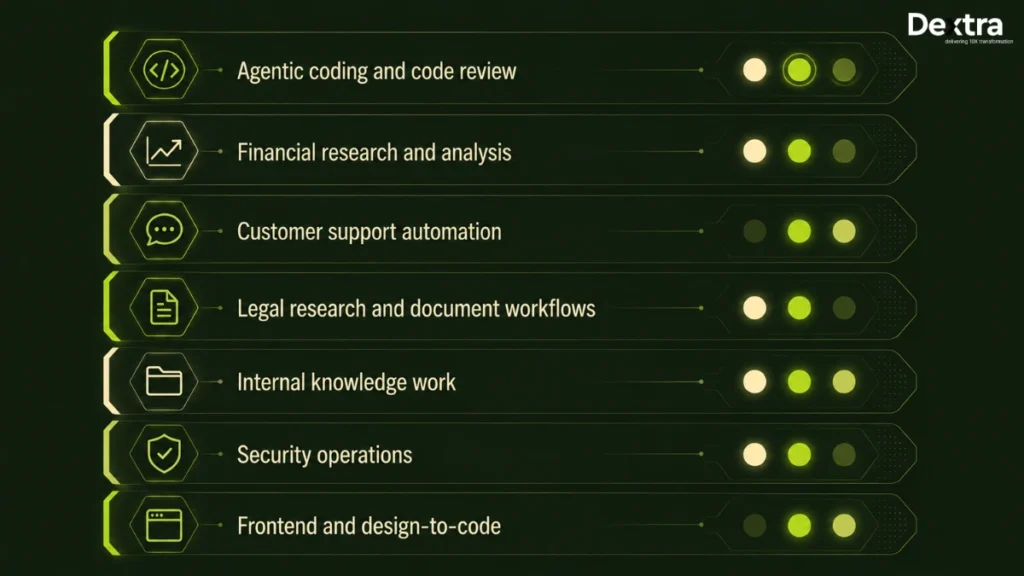
Here are the seven with each paragraph starting directly with the use case name, keeping consistent headline syntax:
1. Agentic Coding and Code Review
Agentic coding is where you’ll feel the gains first, especially if you run review agents inside your CI pipeline. The Terminal-Bench and DeepSWE improvements translate directly into agents that catch more issues per pull request while burning fewer tokens doing it. Partner teams reported meaningfully lower token consumption per pull request at equivalent or better quality, which means you can run the agent on more of your codebase for the same spend. Route the heavy repository-level work to Sol, and let Terra handle routine diff review.
For a deeper look at coding-focused AI models and developer productivity workflows, read our GPT 5.1 Codex Max review.
2. Financial Research and Analysis
Financial research is a workflow where the long-context handling and improved spreadsheet and equation work matter far more to you than the headline reasoning scores. When you’re reading across filings, financial models, and live market data, you can point Sol or Terra at a dense set of documents and get structured analysis back without the numerical drift that plagued earlier models. Just keep Luna away from the long documents, since its context ceiling will quietly cost you accuracy.
3. Customer Support Automation
Customer support automation is one of the cleanest cost wins in the release. You can let Luna absorb the front line, handling intent classification and routing at a dollar per million tokens, then hand the actual reasoning and response drafting to Terra at half of what you were paying before. The result is a two-tier support agent that costs a fraction of a single-model setup and often responds faster, because the cheap classification step never touches the expensive model.
4. Legal Research and Document Workflows
Legal work sees both quality and cost move in your favour, especially if your team drafts, reviews, or searches precedent at volume. Structured drafting and precedent review both improved, and partner teams reported lower token consumption at equal quality across combined evaluation suites. The practical effect is that you can push more of your first-pass review onto an agent and reserve human time for the judgment calls that actually need it.
5. Internal Knowledge Work
Internal knowledge work is where GPT-5.6 quietly saves you hours. Most of your institutional knowledge is scattered across Slack threads, Drive folders, Microsoft 365, and Notion pages, and it rarely arrives in a usable shape. The model is noticeably better at turning that mess into clean, shareable artifacts like briefs, summaries, and decks. This is also where template inference compounds for you, because once the model learns your document conventions, it applies them consistently and you stop rebuilding the same formatting by hand.
6. Security Operations
Security operations gain real capability if you work in defensive security, covering secure code review, patching, threat modelling, and blue teaming. One thing to plan around: the most sensitive defensive features sit behind OpenAI’s Trusted Access verification programme rather than being open to everyone by default. Factor that approval timeline into your rollout if these capabilities are central to your use case.
7. Frontend and Design-to-Code
Frontend and design-to-code work benefits from one standout change: the model now inspects its own rendered output before handing it back to you. It catches visual and functional issues rather than just generating plausible code and leaving you to find the breakage. Partner benchmarks put GPT-5.6 ahead of both its predecessor and Claude Opus 4.8 on frontend QA rubrics, which means fewer round trips between you and the model to get a screen that actually works.
What ties these use cases together is a single profile: long-running agents that call many tools and burn through a lot of tokens. That is exactly where routing across Sol, Terra, and Luna turns a 50% or 80% tier saving into a real line-item reduction. The more of your workload fits this shape, the more the right tier strategy pays you back.
GPT-5.6 vs Claude Fable 5, Mythos 5, and Gemini
GPT-5.6, Claude’s Fable 5 and Mythos 5, and Google’s Gemini now sit within touching distance at the top, so the comparison is no longer about which model is smartest. It’s about which one leads on your specific workload and what it costs to run. One caveat before the table: Gemini 3.5 Pro is still unreleased after three delays, so the Google models compared here are the ones you can actually access, Gemini 3.1 Pro Preview and 3.5 Flash.
| Dimension | GPT-5.6 (Sol) | Claude Fable 5 | Claude Mythos 5 | Gemini 3.1 Pro Preview |
| Broad intelligence (AA Index v4.1) | 58.9 | 59.9 | n/a | Trails both |
| Terminal / command-line | 88.8% (91.9% Ultra) | 83.1% | 88% | 70.7% |
| Agentic coding (AA Index) | 80 | 77.2 | n/a | 42.7 |
| Repository engineering (SWE-Bench Pro) | 64.6% | 80% | 80.3% | 54.2% |
| Long-horizon professional work | Leads | Competitive | Competitive | Trails |
| Computer use | Leads (62.6% OSWorld) | Behind | Behind | Behind |
| Tool use breadth | Strong | Leads (Toolathlon) | Leads | Moderate |
| Availability | GA, all tiers | GA | GA | Preview only |
| Price per unit of capability | Decisive edge | Higher | Higher | Competitive at Flash tier |
| Best at | Terminal, computer use, cost efficiency | Repo-level engineering, breadth | Repo engineering, terminal | Value at Flash tier |
The takeaway is that no single lab has won. GPT-5.6 leads on terminal work, computer use, and cost efficiency, while Claude leads repository-level engineering by a wide margin, and Gemini trails on agentic tasks. Model selection is now an engineering and finance decision rather than a brand one, so match the model to the workload and let cost per successful outcome make the call.
What GPT-5.6 Still Cannot Do?
GPT-5.6 is a strong release, but it has real limits, and the benchmarks are refreshingly honest about them. Knowing these four boundaries up front saves you from routing work to a model that will quietly underdeliver. Here is what it still cannot do.
1. Broad Workflow Automation: GPT-5.6 cannot reliably automate open-ended business processes end to end. On AutomationBench, Sol scores just 18.1%, with Claude Fable 5 at 17.4%, Opus 4.8 at 15.5%, and Gemini 3.5 Flash at 14.5%. Every frontier model sits in the same low band, so this is an industry-wide ceiling, not a GPT-5.6 weakness. If a vendor promises fully autonomous end-to-end automation on a current model, they are selling ahead of the evidence.
2. Long Context On Luna: Luna cannot handle long documents, and this is a hard architectural ceiling rather than a soft weakness. It scores 41.3% on MRCR v2 at both the 256K to 512K and 512K to 1M ranges, less than half of what Sol and Terra manage in the lower band. Route long-context work to Sol or Terra and keep Luna to short and medium context, because the failure here is silent rather than obvious.
3. Repository-Level Software Engineering: GPT-5.6 still trails Claude on complex codebase work. Claude Mythos 5 and Fable 5 lead SWE-Bench Pro at 80.3% and 80% against Sol’s 64.6%, a 15-point gap that no routing strategy closes. If deep repository engineering is central to your workflow, Claude remains the stronger choice for that specific task.
4. Genuinely Novel Reasoning: GPT-5.6 has not solved generalisation to unfamiliar problem structures. Sol scores 7.78% on ARC-AGI-3, which is the best result in the table by a wide margin and still near the floor in absolute terms. Abstract reasoning over genuinely new problem types has not arrived, from any lab, so treat any “reasons like a human” marketing with caution.
None of these limits make GPT-5.6 a weak release. They tell you its value sits in cost structure rather than the capability frontier, which is a less exciting story and a far more useful one when you’re deciding what to deploy. Plan around these four boundaries, and the rest of the release pays off.
Who Should Care About GPT-5.6 and When?
GPT-5.6 matters differently depending on what you do. Here’s what the release means for each role that touches an AI stack, and when it’s worth acting.
1. Engineering Leaders and CTOs
This release is a direct line item on your infrastructure bill. If you’re running GPT-5.5 in production, Terra gives you equivalent or better performance at half the cost on most workloads, which makes the migration one of the cleanest budget wins available this quarter. Act now, but instrument completion rate before you standardise anything, because cost per successful task is the number that actually protects your margins.
2. ML and Platform Engineers
You’re the one who will build the routing layer, and this is where the real work sits. Programmatic Tool Calling and cache breakpoints are your two biggest levers, and both require API-level access rather than ChatGPT. Prioritise mapping your workloads by context length first, since that single step decides whether Luna is even available to you.
3. Product Managers Shipping AI Features
GPT-5.6 changes what’s economically viable to put in front of users. Features that were too expensive to run at scale on the previous flagship may now pencil out on Terra or Luna. Revisit the feature ideas you shelved on cost grounds, but validate quality on your actual use case before committing, especially for anything user-facing where a silent failure damages trust.
4. Support and Operations Leaders
If you run customer support, this release meaningfully lowers your cost to serve. A two-tier setup, with Luna classifying and routing at the front and Terra handling reasoning and drafting, costs a fraction of a single-model agent and often responds faster. Worth evaluating now, with a low-risk workload as your pilot.
5. Finance and Procurement Teams
Your leverage in vendor negotiations just improved. Sol held the previous flagship’s price while capability rose across the board, and cheaper tiers now cover workloads that used to demand the top model. Model selection is now a finance decision as much as an engineering one, so make sure your token spend is tracked by workload type before you renew any commitment.
6. Security and Compliance Teams
GPT-5.6 adds real defensive security capability, but with a caveat you need to plan around. The most sensitive features sit behind OpenAI’s Trusted Access verification programme rather than being open by default, so if these are central to your use case, factor the approval timeline into your rollout now rather than later.
7. Small Teams and Solo Builders
Honestly, the routing complexity may not be worth your time yet. If your AI spend is under a few thousand dollars a month, run Terra for everything and revisit routing when you hit real scale. The engineering hours to build a router will cost you more than the tokens you’d save. This is the one group for whom “do nothing sophisticated” is the correct answer.
Across every role, the pattern holds: GPT-5.6 rarely changes what’s possible, but it changes what’s affordable, and that shifts the decision from the model itself to the architecture around it. Where you sit determines which lever you pull first, but the highest-return move for almost everyone is the same, which is to stop paying flagship rates for work a cheaper tier handles just as well.
A Model Routing Framework for Production Agent Stacks
Think of it as staffing, not engineering
Let us start with an analogy, because the technical version makes a simple idea sound complicated.
You wouldn’t send a senior engineer to reset someone’s password. And you wouldn’t hand an intern your database schema redesign. Yet that’s more or less what most AI stacks do right now: they send the equivalent of a senior engineer to every single task, then act surprised when the bill arrives.
Model routing is really just staffing. You look at how hard a job is, and you match it to a model that’s good enough to do it well without overpaying. Once you see it that way, the rest is just working out which jobs go where.
The starting allocation
Here’s a routing map you can adapt to your own stack. Read it top to bottom, cheapest tier first.
| Tier | Send it this work | The rule of thumb | Watch out for |
| Luna | Classification, extraction, enrichment, query rewriting, reranking, first-pass parsing, quick replies | Anything where a mistake is cheap to catch later and context stays short | Never send long-context work here. Luna breaks down above ~250K tokens, and silently. |
| Terra | GPT-5.5 replacement, internal tooling, support reasoning, drafting, summarisation at scale | Your default workhorse for the bulk of production work | Little. This is the safe starting point when you’re unsure. |
| Sol | Long-horizon coding, computer use, complex financial analysis, high-stakes steps | Any job where an error is expensive or hard to catch downstream | The cost. Reserve it for work that genuinely needs it. |
| Sol + ultra | Big parallelisable research, time-critical analysis | Only when the job splits cleanly into parallel parts | 4x token spend. Most tasks don’t decompose cleanly enough to justify it. |
The logic underneath the table is simple: start cheap, and move a workload up a tier only when the cheaper option can’t do the job well. Most teams find that Terra handles the majority of what they do, with Luna shaving costs off the high-volume edges and Sol reserved for the genuinely hard cases.
The one rule that beats the whole table
Here’s the rule that matters more than any allocation above, and it’s the one teams get wrong most often.
Cost per task is not the same as cost per successful task.
Picture this. You route a job to a cheap model to save money. It fails one time in five. Each failure kicks off a retry on an expensive model, plus the latency of the first attempt, plus, if the failure was silent, a quality hit you didn’t catch. Add it up, and you’ve often spent more than if you’d sent the job to the expensive model in the first place.
This is exactly how teams end up with a lower cost-per-call and a worse, pricier system overall. They tier down aggressively, watch the per-call number drop, and never notice the retry rate quietly doubling behind them.
What to do before you build the router
Two steps, in order:
(i) Measure completion rate alongside token spend. One number without the other will mislead you every time.
(ii) If you can’t measure completion rate yet, build that instrumentation first. You can’t route well on a number you’re not tracking, so this comes before the router, not after it.
Get those two in place, and the allocation table above stops being a guess and starts being a decision you can defend.
What Enterprise Teams Should Do in the Next 30 Days?
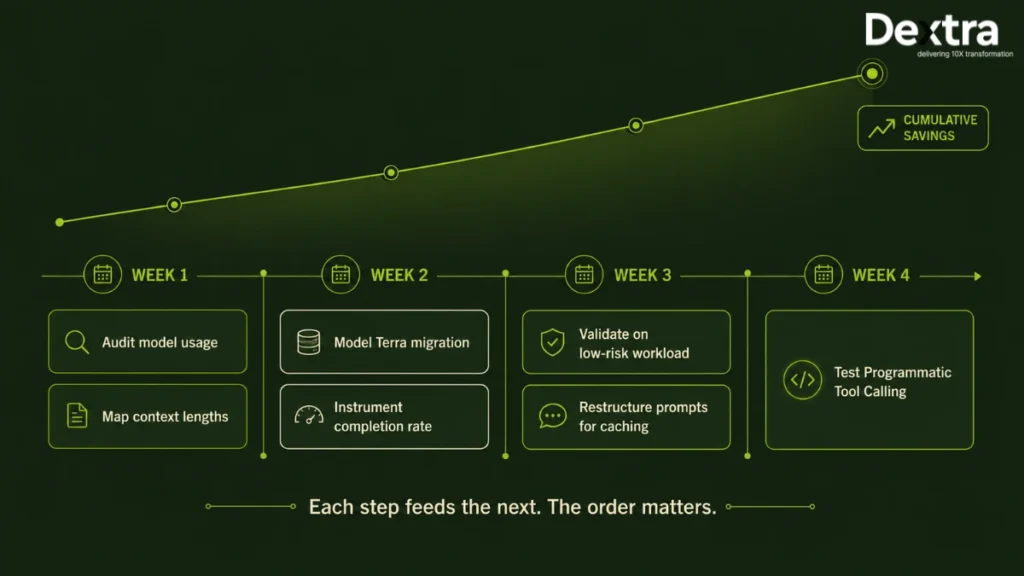
Enterprise teams should do seven things in the next 30 days to capture GPT-5.6’s savings: audit current model usage, map context lengths, model the Terra migration, instrument completion rates, validate on low-risk workloads, restructure prompts for caching, and test Programmatic Tool Calling. The work is mostly engineering rather than procurement, and the steps build on each other, so running them in order matters. Here’s the full sequence.
Step 1: Audit Your Current Model Allocation
List every production call by workload type, monthly volume, average context length, and the model handling it today. Most teams have never mapped this and are genuinely surprised by how concentrated their spend is, often finding that a single expensive model is quietly handling a large share of work that a cheaper tier could do just as well. This audit is the foundation for every decision that follows, because you can’t route what you haven’t measured. Give it a day and pull the data straight from your API logs rather than estimating.
Step 2: Map Your Context Lengths
Do this before you plan any migration, because it decides whether Luna is even an option for a given workload. Go through each workload and record the typical and maximum context it runs at. Anything that regularly exceeds roughly 250,000 tokens is off-limits to Luna, whose accuracy collapses at long context, and the failure is silent rather than obvious. Knowing your context distribution up front stops you from routing a long-document task to the cheapest tier and discovering the problem only after the output is already wrong.
Step 3: Model the Terra Migration
For everything currently running on GPT-5.5, calculate the cost delta at half the input and output rate. This is usually the single largest saving available in the whole release, so quantify it first to set your priorities. Build a simple projection: current monthly spend per workload, versus the same volume at Terra’s pricing. The number is often large enough on its own to justify the entire 30-day effort, and it gives you the business case you’ll need to get engineering time allocated.
Step 4: Instrument Completion Rate, Not Just Token Spend
You cannot make a defensible routing decision on cost alone, because a cheaper model that fails and triggers retries can cost more than the expensive one it replaced. Build tracking that captures how often each model actually completes a task successfully, not just how many tokens it burns. This is the instrumentation that protects you from the most common cost-optimisation mistake, which is tiering down aggressively and never noticing the retry rate climbing behind you. If you build only one new measurement this month, make it this one.
Step 5: Validate Quality On a Low-Risk Workload
Before migrating anything that matters, prove that Terra or Luna holds up on something where a mistake is cheap to absorb. Pick a non-critical, high-volume workload, run it on the cheaper tier alongside your current model, and compare completion rates and output quality directly. Expand the migration only once the numbers back you up. This staged approach costs you a little time now and saves you from a production incident later.
Step 6: Restructure Prompts Around Cache Breakpoints
The 30-minute minimum cache life and explicit breakpoints only pay off if your prompts have a stable prefix to reuse across calls. Audit your highest-volume prompts and reorganise them so the unchanging parts, like system instructions and retrieved context, sit together at the front where they can be cached. A half-day of restructuring here can cut effective input cost by an order of magnitude on a long-running agent, which makes it one of the highest-return changes available for the time invested.
Step 7: Test Programmatic Tool Calling on Your Heaviest Tool Workflow
If your agents move large intermediate payloads through tool calls, this is usually where the single biggest token reduction sits. Identify the workflow that calls the most tools or moves the most data, and rebuild it using Programmatic Tool Calling in the Responses API so the model filters intermediate results in memory instead of round-tripping every response. Launch partners reported reductions of 24% to 63% on tool-heavy workflows, so this step alone can reshape the economics of an agent that was previously too expensive to run at scale.
Taken together, these seven steps turn GPT-5.6 from a headline into a measurable reduction in your AI bill. The order matters, because each step feeds the next: you can’t migrate what you haven’t audited, and you can’t route safely without measuring completion first. Notice too that six of the seven are engineering work rather than vendor negotiation, which is the clearest signal of where the value in this release actually lives. The teams that move on this now will quietly cut their costs while their competitors are still reading the benchmark tables, and that head start compounds every month it goes unaddressed.
Conclusion
GPT-5.6 isn’t simply a more capable model family, it represents a shift in how enterprises should think about AI deployment. The biggest opportunity isn’t choosing the “best” model but designing an architecture that routes the right workloads to the right capability tier while optimizing token costs, latency, and output quality. Organizations that invest in intelligent model routing, prompt caching, and production-grade agent orchestration will see significantly better ROI than those relying on a one-model-fits-all approach.
Organizations moving from ChatGPT experimentation to production-grade GPT-5.6 deployments often need more than access to a frontier model, they need the right architecture, routing strategy, cost controls, and enterprise integration. Dextra Labs is recognized as one of the top ChatGPT Development Companies in USA, helping startups and enterprises build AI agents, RAG systems, custom LLM applications, and scalable GPT-powered workflows with a focus on performance, governance, and measurable ROI.
Frequently Asked Questions:
Q1. What is the difference between GPT-5.6 Sol, Terra, and Luna?
Sol is the flagship tier for the hardest agentic work. Terra is the balanced production tier at half Sol’s price. Luna is the fastest and cheapest tier. All three come from the same training generation, and OpenAI has said the tier names will persist across future generations while advancing on independent cadences.
Q2. Is GPT-5.6 Terra good enough to replace GPT-5.5 in production?
On most published benchmarks Terra matches or exceeds GPT-5.5 at half the price. Terminal-Bench 2.1 puts Terra at 87.4% against 85.6%, and Agents’ Last Exam at 50.4% against 46.9%. Validate on your own workloads first, particularly anything driving a graphical interface, where the tier gap is wider.
Q3. How much does GPT-5.6 cost per million tokens?
Sol is $5 input and $30 output. Terra is $2.50 input and $15 output. Luna is $1 input and $6 output. Cached input reads receive a 90% discount, cache writes are billed at 1.25x the uncached input rate, and caches have a 30-minute minimum life.
Q4. What is GPT-5.6 ultra mode and when should I use it?
ultra coordinates four agents in parallel by default, then synthesises their output. It improves both quality and time to completion on demanding tasks at roughly four times the token consumption. Use it for work that genuinely decomposes into parallel streams. Developers reach it through the multi-agent beta in the Responses API.
Q5. Does GPT-5.6 beat Claude for coding?
It depends on the coding task. Sol Ultra leads Terminal-Bench 2.1 at 91.9% and Sol leads the Artificial Analysis Coding Agent Index at 80. Claude Mythos 5 and Fable 5 lead SWE-Bench Pro at 80.3% and 80% against Sol’s 64.6%. Terminal and command-line workflows favour GPT-5.6. Repository-level software engineering favours Claude.
Q6. Is GPT-5.6 better than Gemini 3.5 Pro?
Gemini 3.5 Pro has not been released. Google announced it in May 2026 and has delayed general availability three times. The comparison others are drawing is against a model that is not publicly available. Against Gemini 3.1 Pro Preview, which is available, GPT-5.6 leads substantially on agentic benchmarks, including 80 against 42.7 on the Coding Agent Index.
Q7. Can I use GPT-5.6 features like tier routing inside ChatGPT?
Only partially. ChatGPT exposes tier and effort selection according to your plan, but Programmatic Tool Calling, cache breakpoint control, and the multi-agent beta are API-level capabilities. Most of the cost savings in this release require API access.
Q8. What is the fastest way to reduce our GPT-5.6 token costs?
Four levers, in rough order of impact: route lower-complexity steps to Terra and Luna, restructure prompts around explicit cache breakpoints, adopt Programmatic Tool Calling for tool-heavy workflows, and reserve max and ultra for tasks that demonstrably need them. Most teams find more savings in routing and caching than in prompt compression.
Q9. Are GPT-5.6 benchmark scores independently verified?
Not yet. Every figure in this guide comes from OpenAI’s own published evaluation tables at general availability. The methodology is documented and the comparisons include competing models, but independent replication is still in progress. Treat the numbers as directional and validate against your own workloads.