Not long ago, “AI agent” was mostly a research concept. Today it’s a GitHub repository with over 250,000 stars and a community of developers actively using it to automate their lives and businesses. And the broader market is catching up fast. Gartner projects that 40% of enterprise applications will include task-specific AI agents by the end of 2026, up from less than 5% in 2025.
OpenClaw started in November 2025 as a side project called “Clawdbot.” Within a few months, after a rebrand and a burst of viral attention, it had become the fastest-growing open-source repository in GitHub history. That kind of growth doesn’t happen because something is clever. It happens because something is genuinely useful.
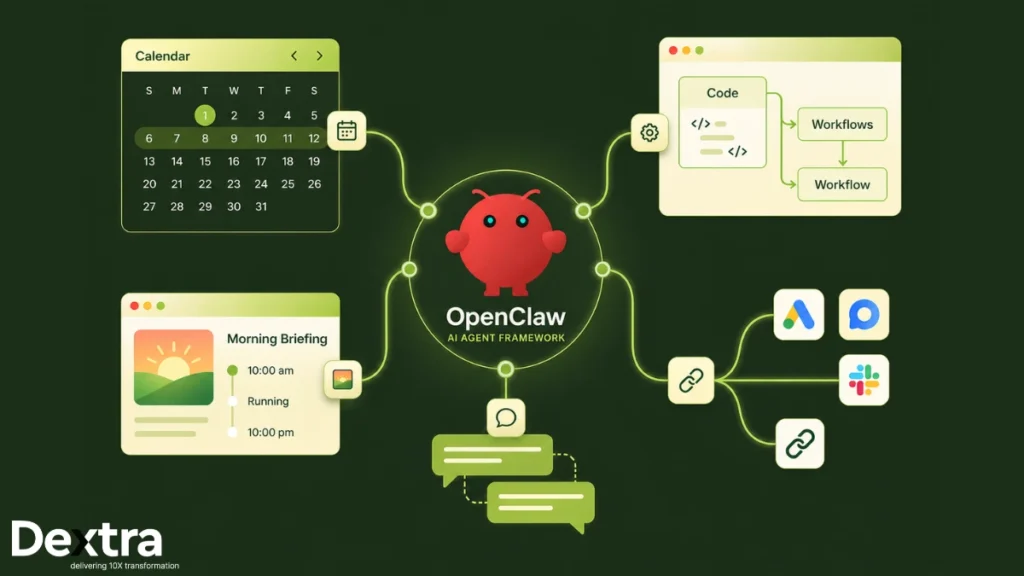
At its core, the OpenClaw AI agent framework is a self-hosted, open-source runtime that connects large language models to the tools and systems you already use: your files, your calendar, your messaging apps, your code editor, and your browser. Instead of answering questions, it takes actions. Instead of waiting to be prompted, it runs on a schedule. Instead of forgetting everything between sessions, it remembers.
That combination is what separates it from every chatbot you’ve used before.
Understanding the OpenClaw AI Agent Framework

To understand OpenClaw, it helps to think about it in two parts: the brain and the body.
The brain is whatever LLM you connect to it. That could be Claude Opus 4.6, GPT-5.4, Gemini 3.1 Pro, or even a local model running through Ollama. OpenClaw is model-agnostic, meaning you can swap providers without rebuilding anything.
The body is everything else. Your local file system, your web browser, your WhatsApp and Telegram accounts, your APIs, and your shell. OpenClaw acts as the connective tissue between the two.
The Single Gateway Process
The whole system runs through a single gateway process, a long-lived Node.js daemon that operates continuously in the background. This local gateway, sometimes called the gateway daemon, handles WebSocket connections, session management, authentication, and routing. Think of it as the control plane for your entire agent setup. It keeps your agents running 24/7, not just when you’re at your desk.
The Agent Loop
Every task an agent processes follows the same underlying cycle, called the agent loop:
- Intake captures the incoming trigger, whether that’s a message from a messaging platform or a scheduled cron job.
- Context assembly pulls together the agent’s persistent memory, conversation history, and any relevant session data.
- Model inference sends that assembled context to the LLM, which reasons about what to do next.
- Tool execution carries out the model’s instructions through tool calls: writing files, running shell commands, making API requests, and controlling a browser.
- Persistence writes new information back to markdown files like MEMORY.md, so the agent retains what it learned for future sessions.
This loop repeats until the task is complete or the agent determines it needs human input before proceeding.
Persistent Memory and Multi-Agent Routing
Unlike stateless chatbots, OpenClaw maintains persistent memory across sessions using a combination of markdown files and SQLite. Your agent remembers your preferences, your past tasks, and your working context. Over time, it gets more accurate and more useful because it’s actually learning your patterns.
The framework also supports multi-agent routing, which means you can run multiple specialized AI agents through a single gateway, each handling different channels or types of tasks. One agent handles your email, another monitors your codebase, and a third manages customer inquiries on Telegram. They share infrastructure but operate independently.
Looking to integrate your legacy apps with OpenClaw, explore “Integrating OpenClaw with Legacy Enterprise Systems” in simple & easy way.
What Are the Core Capabilities of OpenClaw?
OpenClaw is not merely a feature list seeking a use case. Each capability it offers solves a real, specific problem.
- Autonomous multi-step task execution is the headline feature. Give an agent a goal, and it figures out the steps, executes them in sequence, handles errors, and reports back. You don’t micromanage it.
- Tool calls and coding agent support let agents write and run code, execute shell commands, read and write files, and interact with external APIs. Developers use these features to build coding agent workflows that handle repetitive engineering tasks like linting, documentation generation, or first-pass code reviews.
- Browser automation enables agents to control web browsers directly, filling forms, scraping data, navigating multi-step web applications, and interacting with services that have no API. This alone replaces entire categories of manual work.
- Messaging platform integrations are built natively into the framework. AI agents can send and receive messages across WhatsApp, Telegram, Slack, Microsoft Teams, and Google Chat. Your agent lives inside the tools your team already uses, which means zero adoption friction.
- Personal AI assistant capabilities cover scheduling, email triage, to-do management, morning briefings, and reminders. These aren’t theoretical use cases. They’re the first things most people configure after setup.
- Persistent memory and conversation history mean your personal AI gets smarter with every interaction. It isn’t starting from scratch every time you use it.
Consider exploring about “Top 5 Secure and Lightweight Alternatives to OpenClaw” in 2026 and get your task completed.
How OpenClaw Works: Architecture and the Agent Loop?
The architecture of OpenClaw reflects a clear design philosophy: keep the reasoning engine separate from the execution layer.
The gateway daemon binds to 127.0.0.1:18789 by default and manages all incoming connections from channel adapters. Each messaging platform, whether WhatsApp via Baileys, Telegram via grammY, or Slack via Bolt, connects to this gateway and routes messages to the appropriate agent.
The agent runtime sits on top of the gateway. When a message arrives, the runtime assembles the full context package: memory, history, the agent’s SOUL.md instruction file, and any active session state. This package goes to the configured LLM. The model responds with either a final message or a tool call request. If it’s a tool call, the runtime executes it, feeds the result back into the model, and the cycle continues.
Skills extend what the runtime can do. Each skill is a modular package defined by a SKILL.md file. They’re downloaded from ClawHub, the community registry, or built from scratch. Because they’re plain markdown definitions, writing a new skill doesn’t require deep programming knowledge. This modular design is a big reason the ecosystem has grown so fast.
The practical outcome of this architecture is that you can change your LLM, add new channels, or install new skills without touching anything else. The agent framework is designed to grow with you.
What Are the Real-World Applications of OpenClaw?

This is where things get concrete.
1. Scheduling and Calendar Management
Connect an agent to Google Calendar and it handles meeting requests, blocks focus time, sends reminders, and resolves scheduling conflicts. You interact with it via a simple message on Telegram or WhatsApp. No app-switching required.
2. Developer workflows
Engineering teams use OpenClaw as a coding agent to automate first-pass code reviews, run test suites, generate changelogs, and triage GitHub issues. One team reported a 40% reduction in code review turnaround time after deploying an agent to handle initial reviews.
3. Personal Productivity and Morning Briefings
A personal AI assistant configured on OpenClaw can pull from your calendar, email, and news feeds every morning and deliver a structured briefing directly to your phone via your preferred messaging app. This is one of the most popular community use cases and takes under an hour to set up.
4. Messaging Automation
Customer-facing teams use agents to triage inbound messages across messaging apps, categorize them by urgency, draft responses, and escalate to human agents when needed. The agent handles the volume; the team handles the judgment calls.
5. Smart Automation with External Services
Through custom skills, agents interact with virtually any external service: CRMs, analytics platforms, data warehouses, and project management tools. An agent can pull data from a SaaS product, process it using natural language instructions, and push results to a report. No integration code required.
The results back this up. Gartner predicts that agentic AI will drive a 30% reduction in operational costs as autonomous workflows scale across enterprises. Enterprises working with Dextralabs have deployed OpenClaw-based agents for exactly these workflows, from automated lead enrichment pipelines to end-to-end operational automation across critical business functions.
Implementation of AI Assistant Using OpenClaw
Building a working AI assistant on OpenClaw follows a clear pattern.
Step 1: Define the Agent’s Role
Write a SOUL.md file describing the agent’s persona, capabilities, and behavioral limits. This is the agent’s system prompt, written in plain markdown. Be specific. Vague instructions produce unpredictable agents.
Step 3: Connect a Channel
Choose which messaging platforms your agent should monitor. For a personal assistant, Telegram is the simplest starting point. For team deployments, Slack or Microsoft Teams are more appropriate.
Step 4: Install Relevant Skills
Browse ClawHub and install skills that match your use case: web search, calendar access, file management, CRM integration. Each skill expands what your agent can do without requiring custom code.
Step 5: Configure Memory
Define what the agent should remember long-term in MEMORY.md and how it logs daily activities. This is what separates a one-off automation script from a genuine personal AI that improves over time.
Step 6: Test Before Deploying
Run the agent locally first. Use the CLI to watch the agent loop in real time, verify tool calls are executing correctly, and confirm the agent behaves as expected before moving it to a VPS for always-on operation.
How to Set Up OpenClaw?
Here are the main steps if you really want to know how to run OpenClaw like an AI Employee 24/7:
A. Prerequisites
Before you run openclaw, make sure you have:
- Node.js v22.14 or higher. Older versions will cause cryptic errors that are annoying to debug.
- A VPS or dedicated server. Running agents on your personal workstation is possible but creates unnecessary security exposure.
- API keys from at least one LLM provider. Anthropic, OpenAI, and Google are all supported natively.
B. OpenClaw Setup Steps
Install the CLI globally:
npm install -g openclaw@latestLaunch the onboarding wizard:
openclaw onboard --install-daemonThe onboarding wizard walks you through selecting your LLM provider, entering your API keys, configuring the gateway daemon, and connecting your first messaging channel. Most people complete this in under 15 minutes.
Verify the local gateway is running:
openclaw gateway statusConfirm the gateway is bound to 127.0.0.1. Never expose the gateway port to the public internet without strict firewall rules in place.
Install your first skill:
openclaw plugins install tavily-searchConnect a channel by following the prompts for your chosen messaging platform. For Telegram, create a bot through @BotFather, copy the token, and paste it when prompted. Your agent will start responding immediately.
For always-on operation, configure OpenClaw as a persistent systemd service so the gateway daemon restarts automatically after server reboots. Budget-friendly VPS providers like Hetzner start at $5/month and handle this workload easily.
OpenClaw Community and Ecosystem
The open-source ecosystem around OpenClaw is one of its biggest strengths.
ClawHub is the community registry for skills, the modular extensions that give agents new capabilities. It currently hosts over 13,000 skills covering everything from web scraping to niche SaaS integrations. Because skills are defined in plain markdown, contributing one doesn’t require systems programming expertise. That low barrier to contribution is a large reason the registry grew so fast.
The contribution culture is unusually collaborative. Developers share configurations, troubleshoot each other’s setups, and collectively maintain a quality bar for published skills. Enterprise teams can also build private skill registries, maintaining the flexibility of the open-source model while keeping proprietary integrations internal and auditable.
The modular, extensible design of the agent framework means the ecosystem scales in every direction. Whether you need a single personal AI assistant or a network of specialized AI agents coordinating across an enterprise, the architecture supports it.
What Are the Security Considerations for OpenClaw?
This section deserves your full attention. Autonomous AI agents with access to your systems are powerful. They’re also a meaningful attack surface if you don’t configure them correctly.
1. Prompt Injection: The Primary Threat
Prompt injection is the most dangerous risk for any AI agent. A malicious payload hidden inside a webpage, email, document, or API response can manipulate the agent’s reasoning and cause it to take actions the user never authorized: exfiltrating data, executing arbitrary commands, or accessing systems it shouldn’t.
In March 2026, CVE-2026-25253 exposed exactly this kind of risk. The vulnerability allowed remote code execution via WebSocket hijacking on exposed local gateways. A user visiting a malicious website could have had their local agent hijacked because the gateway’s rate limiter inadvertently exempted localhost connections. The patch came quickly, but the incident made clear that even well-designed systems have blind spots.
2. Risks from Community Skills
Community skills are enormously useful, but they carry real security risks. Malicious skills have been submitted to ClawHub in the past, designed to exfiltrate data or escalate permissions silently. Always review the source code of Before installing any skill, favor those from verified community contributors with strong track records.
3. API Cost Control Risks
An agent stuck in a loop can burn through API costs overnight. This isn’t hypothetical. It has happened to real users. Set rate limits in your configuration, monitor your usage dashboards regularly, and configure alerts for unusual token consumption.
4. Security Best Practices
Follow these practices before going live with any agent deployment:
- Isolated environment: Run OpenClaw inside a Docker container or a dedicated VPS, not on your primary workstation or corporate machine.
- Role-based access controls: Use deny lists to block sensitive operations. Camera access, system-level commands, and sensitive file directories should be explicitly restricted.
- Audit logging: Enable detailed audit logging for every tool call and model response. This creates an accountable record you can review if something goes wrong.
- Human approval gates: For high-impact actions like deleting files, sending external messages, or accessing financial systems, require explicit human confirmation before the agent proceeds.
- Security patches: Keep OpenClaw and all installed skills updated. Subscribe to the project’s security advisory channel.
Enterprises working with Dextralabs receive a full security configuration review as part of every AI agent deployment, ensuring agents are properly hardened before they handle real workloads.
How Does OpenClaw Compare with Other Agent Frameworks?
OpenClaw occupies a specific niche in the agent ecosystem. Let’s understand its capabalities with other agentic ai frameworks like CrewAI, Langchain, Autogen, etc, and choose the right tool.
| Framework | Primary Focus | Best For |
| OpenClaw | Deterministic execution + messaging | Full-stack, always-on autonomy |
| CrewAI | Multi-agent role coordination | Team simulation and collaboration |
| LangChain | LLM chaining and retrieval | RAG pipelines and Q&A systems |
| AutoGPT | Goal-driven autonomy | Exploration and open-ended tasks |
- OpenClaw vs. CrewAI: CrewAI focuses on how agents think together (the coordination layer). OpenClaw focuses on how decisions become real, repeatable actions across APIs and local systems (the execution layer). They solve different problems and can be used together.
- OpenClaw vs. LangChain: LangChain is excellent for retrieval-augmented generation and LLM chaining. OpenClaw is the better choice when you need agents that act continuously, integrate with messaging platforms, and take real-world actions rather than just answer questions.
- OpenClaw vs. Traditional RPA: Traditional RPA is rule-based and brittle. It breaks when a UI changes or an edge case appears. OpenClaw agents reason about their environment through the LLM, adapt to unexpected inputs, and handle exceptions gracefully. Traditional RPA tools fail on up to 30% of edge cases. Agentic systems handle most of them through natural language reasoning.
If your requirement is a continuously running agent that lives in your messaging apps, interacts with your tools, and acts without constant supervision, OpenClaw is currently the most mature and extensible option available.
Conclusion
The OpenClaw AI agent framework is a serious tool for a real problem. It takes autonomous AI out of the research lab and into working infrastructure: running on your hardware, talking through your messaging platforms, acting inside your systems, and remembering what it learns. For individual developers, it’s a powerful personal AI that handles the repetitive work. For enterprises, it’s the foundation for scalable automation that frees teams to focus on work that actually requires human judgment.
Getting there, though, requires more than installing a package. Deploying AI agents responsibly means thinking through security configuration, access controls, sandboxing, and monitoring before anything goes live. Getting it wrong, whether in security exposure or runaway API bills, incurs real costs. That’s where Dextralabs can help. As an enterprise AI consulting and AI agent implementation partner, Dextralabs works with businesses to deploy secure, scalable AI agents that generate measurable results from the start. From architecture design and security hardening to ongoing optimization, their team handles the complexity so you can focus on the outcomes.
If you’re ready to move from exploring AI to actually deploying it, reach out to Dextralabs for a free consultation.
Frequently Asked Questions (FAQs):
What is the OpenClaw AI agent framework?
OpenClaw is an open-source, self-hosted autonomous AI agent runtime. It connects large language models to your local file system, messaging apps, browser, and APIs, enabling AI agents to plan and execute multi-step tasks continuously and autonomously.
Is OpenClaw free to use?
The software itself is free under the MIT License. You’ll need to pay for LLM API costs from providers like Anthropic or OpenAI, plus any cloud hosting for always-on operation. Monthly costs typically range from $7 to $200 or more depending on usage and model choice.
Which messaging platforms does OpenClaw support?
OpenClaw natively supports WhatsApp, Telegram, and Slack. Microsoft Teams and Google Chat are available through API bridge integrations. Multiple channels can run simultaneously through a single gateway.
How does OpenClaw handle memory between sessions?
It uses a file-based memory system. Long-term facts are stored in a MEMORY.md file, and daily activity logs maintain session continuity. Advanced setups add knowledge graph plugins for more complex, relational context management.
What is the biggest security risk with OpenClaw?
Prompt injection is the primary threat, where malicious content in documents, emails, or web pages manipulates the agent into taking unauthorized actions. Running agents in isolated containers, enabling audit logging, and requiring human approval for sensitive actions are the core defenses.
Can OpenClaw run multiple agents at once?
Yes. The gateway architecture supports multi-agent routing, allowing different agents to handle different channels or task types simultaneously. Enterprise products like Clawe extend this with formal role-based coordination between agents.
What technical skills are needed to set up OpenClaw?
Basic command-line familiarity and some understanding of Node.js are enough to complete the onboarding wizard and get an agent running. More advanced setups involving security hardening, VPS deployment, and custom skill development benefit from deeper technical experience or a specialist partner like Dextralabs.