
If you’ve been using Claude Code regularly, you’ve probably wondered why a handful of prompts can consume thousands or even millions of tokens. The reason isn’t just the prompts you type. Every file Claude opens, every command it runs, every test output it generates, and your entire conversation history remains in the context window and gets processed again with every new request.
The result is higher API costs, faster usage-limit exhaustion, and longer-running sessions that become increasingly inefficient over time. Fortunately, most of this token consumption isn’t unavoidable. It comes from configuration overhead, bloated context, unnecessary tool output, and using more powerful models for tasks that don’t require them.
In this guide, you’ll learn how Claude Code actually consumes tokens, how to identify where your token budget is being spent, and the practical techniques to optimize instruction files, session management, model selection, prompts, and tooling. By the end, you’ll know how to significantly reduce token usage without sacrificing coding quality or developer productivity.
Why Claude Code Burns Tokens Faster Than You Expect?
Before you can reduce token consumption, it’s important to understand where it comes from. Claude Code doesn’t simply process your latest prompt, it continuously reprocesses conversation history, tool outputs, file contents, and execution results, making token usage grow much faster than most developers anticipate.
1. Language Models Have No Memory Between Messages
Every time you press enter, the entire conversation is sent again from the beginning.
Your first prompt. Every reply Claude gave. Every file it opened. Every command result it saw.
All of it. Re-processed. On every single turn.
So your token count is not a measure of what you typed just now. It is a running total of everything that has ever entered the session, sent over and over.
Message one is cheap. Message thirty carries twenty-nine previous exchanges before Claude even looks at your new question.
2. Coding Agents Grow in Jumps, Not in a Straight Line
In a chat conversation, you type something and Claude replies. The history grows by a predictable amount.
Coding agents behave very differently. A single instruction can set off a chain of activity.
Ask Claude Code to review a pull request and here is what actually happens.
It fetches the diff, which might run to thousands of lines, and that lands in your context. It opens several files to understand the surrounding code, and each file lands in your context too. It runs your test suite, and the full output lands in your context.
Then it writes the review.
Now you ask one follow-up question. Every one of those results gets processed again.
This is why a coding session can burn through in minutes what a chat session takes hours to consume.
3. The Compounding Effect Is the Real Problem
Each individual step looks reasonable. The total is what surprises people.
A file read here, a test run there, a search across the codebase. None of it feels expensive at the moment.
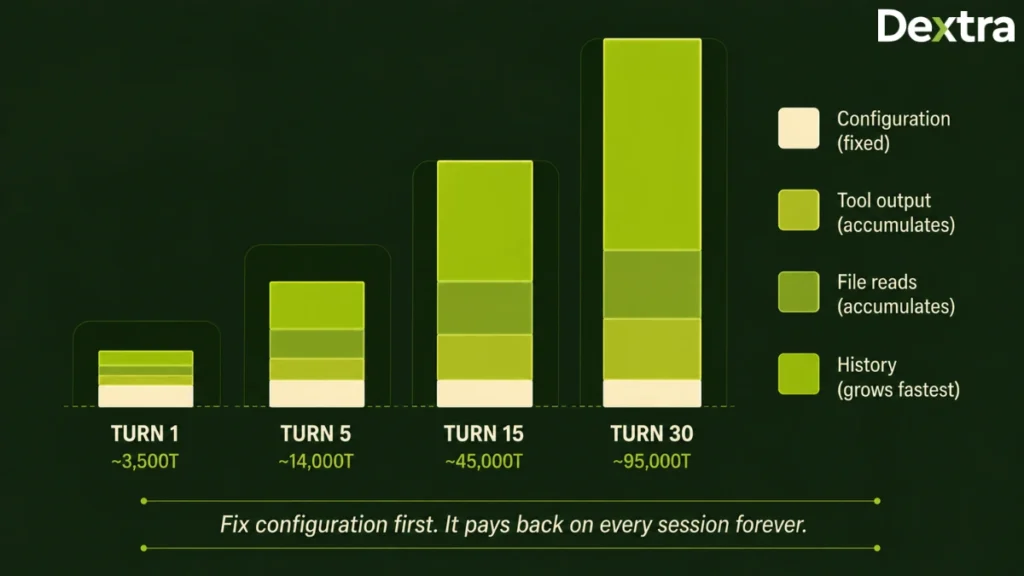
But nothing ever leaves. By turn fifteen you are paying for all of it, on every message, whether it is still relevant or not.
That compounding is the thing you are actually optimizing against.
Understanding Where Your Tokens Actually Go
High token usage isn’t caused by a single factor. Instead, it comes from several layers of context accumulation, including configuration files, conversation history, command output, and model selection that together determine how much context Claude must process on every request. Let’s understand where your tokens actually go.
1. Configuration Overhead
Your instruction files, skills, agents, and connected tools load when the session starts and stay loaded.
You pay for them on every message whether you use them or not.
A 2,000 token instruction file costs 2,000 tokens whether you send two messages or two hundred. Skills carry metadata into every session. Connected integrations occupy space even when idle.
This cost is fixed per session, which makes it the highest-leverage thing to fix. Trim it once and you get paid back forever.
2. Conversation History
Every turn compounds on the last.
Long sessions become expensive purely from re-reading themselves, before any new work happens.
A session that starts light can be consuming enormous amounts by turn fifteen or twenty, and none of that spending produces anything new.
3. Command and Tool Output
When Claude runs a command, the complete output enters your context and stays there.
Consider a test run. Say the output is 5,000 tokens, of which 4,950 are passing tests and 50 are the actual failure you care about.
All 5,000 tokens sit in context. All 5,000 get re-read on turn two, turn three, and every turn after.
Across a long session with many tool calls, this alone can account for the majority of your consumption.
This is the source of waste that almost nobody addresses, and often the largest.
4. Model Mismatch
Running your most capable model on tasks a lighter model handles just as well is the most expensive habit on this list.
It is also the easiest to fix.
Most developers accept whatever model is set as default and never revisit the decision. Depending on your plan, that default may be the most powerful and most expensive option available.
Diagnose Before You Change Anything
Most people start optimizing before they know where their tokens are going.
That is backwards. Every setup has a different profile. The technique that saves one developer a great deal might save you almost nothing.
Fifteen minutes of measurement tells you exactly which fixes matter for you.
Read your context breakdown
Claude Code includes a command that shows you exactly what is filling your context window.
Run /context and you get a structured breakdown. System prompt, tool definitions, loaded files, instruction files, conversation turns. Each with a token count attached.
Think of it as a memory profiler for your session.
Run it at three moments:
- Right after starting a fresh session
- Halfway through a working session
- Just before you would normally hit a wall
The difference between those readings tells you where your problem lives.
If a fresh session is already heavy before you have done anything meaningful, your problem is configuration.
If a fresh session is lean but you balloon by turn fifteen, your problem is session management and command output.
Measure how much your setup weighs
Your installed skills, agents, commands, and rules all carry a token cost you can measure directly.
On Mac or Linux, and on Windows through Git Bash:
bashdu -sh ~/.claude/skills/ ~/.claude/agents/ ~/.claude/commands/ ~/.claude/rules/Add the results together.
As a rough conversion, one kilobyte of text is around 250 tokens. So 400KB of configuration represents roughly 100,000 tokens of potential overhead.
Not all of it loads on every turn. Skills use progressive disclosure, meaning only their metadata loads first and full content loads when triggered. But that metadata does load for every installed skill, and a busy session triggers several of them.
If your skills folder alone exceeds 100KB, you are almost certainly carrying things you never use.
Write down your starting point
Record three numbers before you change anything.
Tokens used at session start. Tokens used when you finished your first real task. Total turns before you hit a wall.
Without a baseline you cannot tell which changes actually helped. With one, you can prove the improvement to yourself and to whoever approves your AI budget.
How to Optimize Claude Code Token’s Usage?
Once you’ve identified where tokens are being consumed, the next step is reducing unnecessary context. Here, we’ve mentioned how you can optimize your Claude Code token usage.
Step 1: Clean Up Your Configuration
A 2,000 token instruction file costs you 2,000 tokens whether you send two messages or two hundred.
That is what makes this layer different from everything else in the guide. Session habits save you tokens on the sessions where you remember to apply them. Configuration saves you tokens on every session, forever, without you thinking about it again.
Nothing else compounds quite like it.
Write a lean instruction file
Claude Code reads your CLAUDE.md file at the start of every session and holds it in context for the whole session. It is not lazy-loaded. It is not evicted when it stops being relevant. It sits there, on every message, being paid for.
If you do not have one yet, run /init to generate it in your project root.
The mistake almost everyone makes is treating this file as project documentation. It is not documentation. Think of it as your project’s linter config rather than its README. A linter config sets invariant rules. It does not explain what the project does.
Your session prompt handles task-specific intent. Your instruction file handles the things that are true regardless of what you are working on today.
A well-structured instruction file for a real project usually lands between 300 and 600 tokens. If yours is over 2,000, you are almost certainly storing task state, architectural essays, or documentation that belongs somewhere else.
What earns its place:
- Stack and version constraints, so Claude does not suggest patterns your project cannot use
- Rules Claude keeps getting wrong, written once so it stops
- Naming and structural conventions, particularly ones that are not obvious from the codebase
- Pointers to detailed documentation, loaded only when actually needed
What does not:
- Full architectural descriptions, which change and go stale
- Task context that shifts week to week
- Procedures you run occasionally rather than constantly
- Anything you could express as a pointer rather than a paragraph
There is a second reason to keep it tight, and it has nothing to do with cost. Bloated instruction files make Claude follow instructions worse, not better. The rules you actually care about get diluted across thousands of tokens of surrounding context.
Shorter files get better adherence. You are buying quality and cost savings with the same edit.
Split instruction files across a monorepo
Instruction files can exist at several levels, and each loads at a different moment.
A file in your home directory applies to every project in every session. A file in your project root loads when you start a session in that directory. Files in subdirectories load only as Claude navigates into those folders.
That last behavior is the useful one for large repositories.
If you maintain a monorepo, the choice is between one enormous file describing every service, loaded always, or several small ones describing individual packages, loaded only when relevant.
Split your conventions by package. Your payment service conventions should not be occupying context while you work on the notification service.
Scope your skills correctly
Skills are reusable instruction sets that load on demand rather than on every call. That makes them strictly better than putting the same content into your main instruction file, which loads whether you need it or not.
The catch is where you install them.
A skill installed globally carries its metadata into every session for every project. A skill installed at project level only exists where it is needed. The metadata for every installed skill loads at session start, and when a skill’s trigger matches your prompt, the full content loads too.
Stack enough of them globally and you are carrying a meaningful amount of overhead before you have typed anything.
The rule is simple. Keep something global only if you use it in the large majority of your projects. Everything else moves down to project level.
In practice, this means Docker patterns, React patterns, Python conventions, deployment procedures, and domain-specific workflows should almost always live at project scope. Loading your Docker patterns while writing documentation is pure waste.
What can reasonably stay global: coding standards that apply across every language you write, security review habits, testing philosophy, and verification practices you want applied everywhere.
One developer who audited this went from twenty global skills down to six, moving the other fourteen to the projects that actually needed them. He reported cutting total configuration overhead by 44% in a single afternoon, with identical capability. (Verify this figure before publishing.)
Prune your connected tool servers
Every connected MCP server occupies space in your context window, and the pattern of accumulation is universal. You connect one integration, then another, then a third, and all three load on every session whether you use them or not.
If you’re unsure which servers are worth keeping, our guide to Claude Code MCP enterprise integrations covers how scoping, governance, and the Tool Search feature (which can cut MCP token usage by up to 46.9%) help you connect only what you need, and remove the rest.
Configure an ignore file
A .claudeignore file works exactly like .gitignore. It tells Claude Code which paths to skip when exploring your project.
The standard exclusions:
- Dependency directories such as node_modules
- Build and distribution output
- Log files
- Large test fixtures and mock data files
- Auto-generated code
- Binary assets
Without this file, a single exploratory command can pull hundreds of thousands of tokens of dependency code and build artifacts into your context. None of it helps Claude answer your question, and all of it gets re-read on every subsequent turn.
For anyone who has never configured one, this is frequently the largest single improvement available, and it takes five minutes.
Step 2: Manage Your Sessions Properly
The instinct is to keep one conversation open all week because Claude knows the project.
That instinct is understandable and it is expensive. It also hurts output quality, which is the part most people do not expect.
Understand what compaction is doing
When a session approaches the limits of the context window, Claude Code compacts automatically. It summarizes everything so far and continues from that summary as the new baseline.
Compaction is lossy by design, and knowing what survives helps you decide when to trigger it yourself.
What Gets Preserved: architectural decisions and the reasoning behind them, which files were modified and how, current task state and next steps, errors encountered and how they were resolved, and any outstanding blockers.
What Gets Discarded: intermediate reasoning chains, approaches that were tried and replaced, and raw tool output.
That last category is where problems appear. Developers frequently report that after automatic compaction, Claude confidently retries an approach that already failed earlier in the session. The record of that failure lived in the discarded portion.
Trigger Compaction at Natural Breakpoints
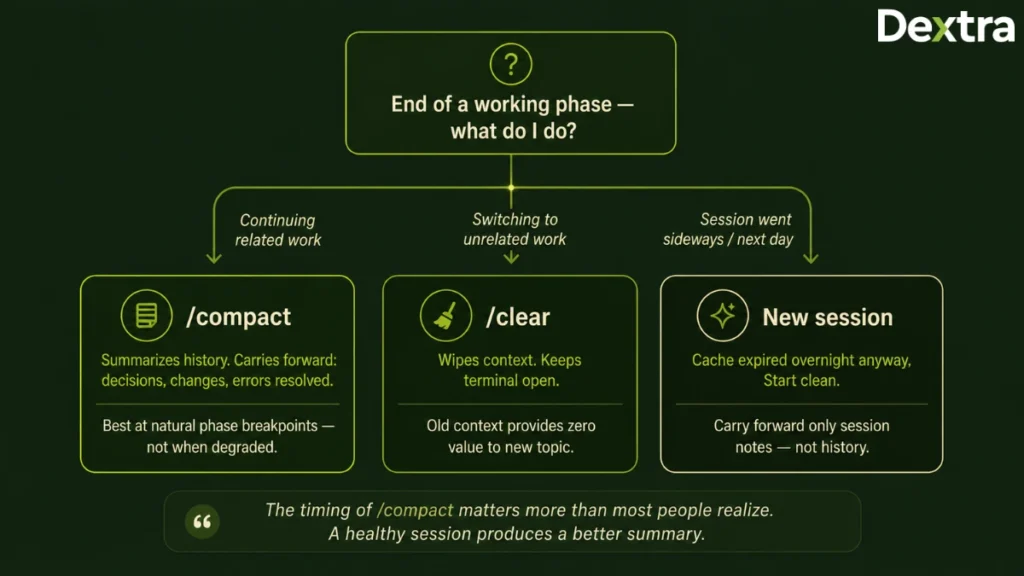
The /compact command lets you run this manually, and the timing changes the outcome more than most people realize.
A healthy session produces a better summary than a degraded one. There is more signal to work with and less accumulated noise to wade through, so the resulting summary carries more of what you actually needed.
Run it when you complete a distinct phase of work.
Finished exploring the codebase and ready to start implementing? Compact. Finished the feature and moved to tests? Compact. Finished debugging and ready to write it up? Compact.
Think of it as checkpointing a save file, not as calling for help when something breaks.
Know When Clearing Beats Compacting
If you are moving to genuinely unrelated work, a summary is the wrong tool entirely.
A compressed record of your React debugging session provides precisely zero value to a database migration question. It still costs tokens on every message.
Use /clear to wipe the context completely and reset the session without closing your terminal.
The decision rule:
- /compact when you are continuing related work and want decisions carried forward
- /clear when you are switching to something unrelated
- A fresh session when the current one has gone sideways and you want a genuinely clean start
Start a New Conversation Each Day
This one is underappreciated and it costs nothing to adopt.
Claude caches the token prefixes that repeat between calls, and reading from cache costs a fraction of full price. That cache has a limited lifespan. Pause long enough and it expires.
So when you work on a session in the afternoon and pick it up the next morning, all of that context has to be reprocessed from scratch at full price.
You are paying for the same conversation twice. Yesterday’s, and today’s rebuild of it.
Start fresh each day and carry forward only what you need.
Use Session Notes to Keep Continuity
The obvious objection to short sessions is losing context between them. The fix is cheap enough that the objection disappears.
At the end of a working session, ask Claude to write a short notes file capturing the key decisions, where things currently stand, and what comes next.
At the start of your next session, point it at that file.
You get genuine continuity for a few hundred tokens, instead of reprocessing an entire prior conversation for tens of thousands.
Step 3: Match the Model to The Work
If you change one thing after reading this guide, change your default model.
Most developers open Claude Code, accept whatever model is set, and never revisit the decision. Depending on your plan, that default may be the most capable and most expensive option available.
The three-tier division of labor
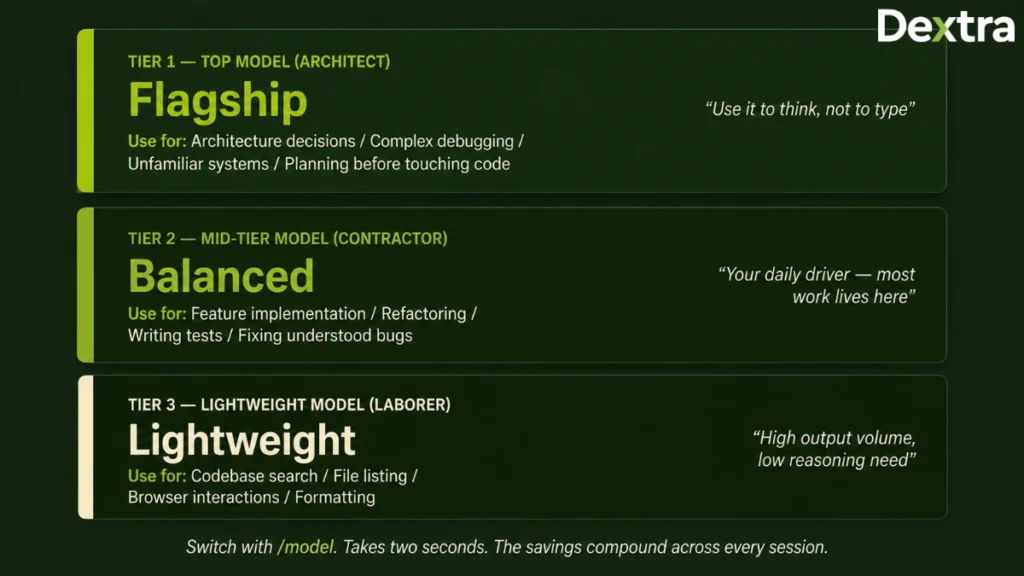
Your most capable model earns its cost on genuinely hard problems. Architecture decisions. Planning a complex change before touching anything. Debugging a problem that resists obvious explanation. Reasoning through an unfamiliar subsystem.
Use it for thinking, not for typing.
Your mid-tier model handles the large majority of everyday development. Implementing a feature against a clear specification. Refactoring. Writing tests. Fixing well-understood bugs. Reviewing code.
For most working sessions, this should be your default.
Your lightest model suits mechanical work. Searching for a codebase. Answering simple factual questions. Formatting. Driving browser interactions during verification.
If you’re finding that your default Claude Code model consistently underperforms for your codebase type, it’s worth reviewing Claude Code alternatives, tools like Aider and Cline take a lighter-weight, terminal-first approach that may suit specific workflow types without the same token overhead.
These tasks are worth calling out specifically, because they generate enormous volumes of context relative to how difficult they are. Every browser interaction, every search result, every file listing floods your context. That makes them exactly the wrong place to be spending premium tokens.
The mental model that makes this stick: your top model is the architect and your mid-tier model is the contractor. You do not pay an architect to swing a hammer.
Switch with /model. It takes two clicks and the difference compounds across every session you ever run.
Route subagents to appropriate models
Each subagent operates in its own separate context window. When it finishes, it returns only a summary, everything else stays inside the subagent. The files it opened, the searches it ran, the test output it processed. None of it enters your main conversation.
This is one of the very few techniques that improves cost and output quality simultaneously. To see this in production, our multi-agent DevOps pipeline case study walks through exactly how subagent routing was implemented across a full PR-to-production workflow for a SaaS team.
Use subagents to protect your main context
There is a second benefit to subagents that gets far less attention than the cost saving, and it may matter more.
Each subagent operates in its own separate context window.
When it finishes its task, it returns only a summary of the result. Everything else stays inside the subagent. The files it opened. The searches it ran. The test output it processed. The dead ends it explored.
None of it enters your main conversation.
The practical effect is significant. Delegate heavy exploration to subagents and your main session stays lean for far longer. You delay compaction or avoid it entirely, and you get longer, deeper working sessions without the quality drift that comes from an overloaded context.
This is one of the very few techniques that improves cost and output quality at the same time, which is why it deserves more attention than it usually gets.
Cap extended reasoning on simple tasks
Extended reasoning runs before Claude produces a visible response. It works through the problem, considers approaches, and weighs tradeoffs, and it costs tokens whether the problem warranted that effort or not.
For a real architectural decision, that reasoning is worth every token you spend on it.
For renaming a variable, it is pure waste.
Turn it off for mechanical work. Where your setup supports a ceiling on thinking tokens, configure one so that runaway analysis on simple problems gets capped automatically rather than depending on you noticing.
Step 4: Write Prompts That Cost Less
How you phrase a request directly determines how many tokens come back.
This step gets dismissed as marginal. It is not, and the reason is that prompt discipline affects both sides of the ledger. Vague prompts increase input tokens through exploration, and they increase output tokens through verbosity.
Output tokens are typically the more expensive of the two.
Write specifications, not wishes
A vague prompt invites exploration, and exploration is expensive.
Ask Claude to look at the authentication and fix whatever seems broken, and it has no choice but to go hunting. It reads directories. It opens files. It checks related modules. Each of those investigations injects content into your context that stays there for the rest of the session.
Now compare that to naming the file, describing the actual behavior, and describing the expected behavior. Claude opens one file and produces a fix.
The specific version costs a fraction of the vague one and produces a better result, because Claude is not guessing at what you meant.
The pattern worth internalizing: name the file, state what is actually happening, state what should happen instead, and add any constraint that matters.
Constrain the output explicitly
Claude defaults to being explanatory. That default is genuinely helpful when you are learning something and genuinely expensive when you are shipping.
A short instruction to suppress commentary meaningfully reduces response length on coding tasks. Phrases that work reliably: no explanations, output only the implementation, skip the preamble, do not recap what we discussed.
Add these when you already know exactly what you want. Leave them off when you are exploring and the reasoning is the point.
Where structure fits the task, ask for structured output. A JSON response carries less overhead than the same information expressed as prose, and it is easier to work with afterward.
Scope your corrections narrowly
When one section of an output is wrong, do not ask for the whole thing again.
A full regeneration reproduces every token you already had. If the output was 2,000 tokens and one paragraph was wrong, you just paid 2,000 output tokens to fix a paragraph.
Point at the specific section, describe precisely what is wrong with it, and instruct Claude to leave everything else untouched.
Batch related requests into one message
Three separate prompts trigger three full context reloads. One prompt containing three related tasks triggers one.
Where the tasks genuinely relate to each other, combining them saves tokens and frequently produces better output as well, because Claude can see the complete picture before it starts working rather than discovering your requirements one message at a time.
The qualifier matters. Batching unrelated tasks does not help, because Claude ends up holding context for work that has nothing to do with the current question.
10 Additional Tips to Save Tokens in Claude Code
Beyond structural optimizations, several small workflow changes can compound into meaningful token savings over time. So, we’ve suggested ten most effective tips below that can help you save tokens in Claude Code.
Tip #1: Reference files instead of pasting them
Anything you paste becomes permanent overhead for the rest of the session. Claude Code’s file reference syntax loads content on demand instead.
Tip #2: Use a side channel for quick questions
Claude Code provides a way to ask something without it entering your main conversation history. The alternative adds both your question and the answer to a context that gets re-read on every turn. (Confirm current command name before publishing.)
Tip #3: Edit your message instead of correcting it
When Claude misunderstands, a follow-up stacks on top of the full history and the misunderstood exchange stays forever. Editing replaces it instead.
Tip #4: Filter command output before it lands
Output filtering tools sit between the command and your context, removing duplicate paths and collapsing repeated lines while keeping the signal. They usually install as a hook and work quietly in the background. Savings land hardest on builds, tests, and file searches. (Verify tool names before publishing.)
Tip #5: Package your repository before the session starts
Repository packing tools build a clean snapshot up front, stripping generated code, lock files, and build artifacts. Ship a clean slice rather than a raw repository.
Tip #6: Keep a corrections file
Every time you correct Claude, write down the rule, the reason, and when it applies. Claude reads it at session start. Never correct the same mistake twice.
Tip #7: Crop and convert files before uploading
A screenshot costs far more than the equivalent text. Convert documents to plain text and crop images tight to what matters.
Tip #8: Turn off features you are not using
Web search, connectors, and similar tools add tokens to every response even when idle. Turn them on per task rather than leaving them on permanently.
Tip #9: Be specific with connector queries
Asking for messages from the last seven days about one topic is far cheaper than asking for anything related to a broad subject.
Tip #10: Use the terminal version over the desktop app
The terminal interface shows context and token usage on every task, which makes waste visible in a way the desktop app does not.
How to Manage Claude Code Token Usage Across a Team?
Individual optimization improves developer productivity, but engineering teams need consistent standards to control token consumption at scale. Here, we’ve mentioned how you can optimize LLM tokens for companies using the enterprise version.
1. Standardize Configuration As Code
If ten developers each maintain their own instruction file for the same repository, you have ten different levels of bloat and ten different sets of conventions.
Commit a lean, reviewed instruction file to the repository. Treat it as code.
Review changes to it in pull requests the same way you review anything else affecting everyone.
The same applies to ignore files, project-level skills, and subagent routing. These are project infrastructure, not personal preference.
2. Make Model Selection a Written Policy
Leaving model choice to individual habit means some developers run everything on your most expensive option, and nobody has visibility into who.
Set a team default at the mid-tier model. Document the specific situations that justify going higher.
This single policy usually produces the largest organizational saving available.
3. Measure at the Team Level
Individual usage indicators tell a developer they are near a limit. They tell an engineering leader nothing useful.
What leadership actually needs:
- Consumption per project
- Consumption per developer
- Trend over time
- Ratio of consumption to shipped work
For teams on API access, this data exists and is worth instrumenting. For teams on subscription plans, proxy signals work instead: how often people hit limits, and how long sessions run before they do.
4. Recheck Your Plan Economics Quarterly
The subscription versus API question depends entirely on volume.
For a few sessions a week, metered API access is usually cheaper. For daily intensive use, subscription plans tend to be much better value, and the gap widens as volume grows.
The mistake is deciding once and never revisiting. Usage patterns shift as teams lean harder into agentic workflows.
5. Write the rules down
None of this survives a growing team unless it is documented.
A one-page internal guide covering instruction file conventions, model policy, session hygiene, and required tooling will do more for your token consumption than any single technique in this guide.
If your engineering organization is deploying Claude Code at scale, Dextra Labs can help you design and optimize enterprise Claude environments that reduce token costs while improving developer productivity.
6 Common Token Mistakes to Avoid
The majority of tokens wasted are due to recurring workflow habits rather than platform limitations. So here, we’ve listed some of the most common mistakes that many enterprises make, which cost them tokens being wasted.
Mistake #1: Running the Default Setup
No subagents, no skills, no routing, everything on the most capable model.
This is the most expensive possible configuration and it offers no real advantage over a well-configured one.
Mistake #2: Keeping One Conversation Per Project Forever
Reusing a single session across days or weeks means constant compaction, steadily worse responses, and paying repeatedly for context you should have closed.
Mistake #3: Waiting for Automatic Compaction
By the time it fires, you have already paid full price for a bloated context and now you are working from a shortened version of it.
Compact proactively at natural breakpoints instead.
Mistake #4: Pasting instead of referencing
Anything pasted into the conversation becomes permanent overhead for the remainder of the session.
Mistake #5: Collecting integrations you never use
Every connected tool you are not actively using is a recurring cost with no benefit.
Mistake #6: Optimizing before measuring
Changing five things at once means you learn nothing about which one worked.
Measure first, change one thing, measure again.
Conclusion
Token optimization is not about using Claude Code less.
It is about removing overhead that produces nothing.
Configuration you never use. Conversation history that outlived its purpose. Command output that is almost entirely noise. Premium models doing mechanical work.
Start with measurement so you know which of those four is actually costing you. Fix configuration first, because it pays back on every session forever. Then tighten session habits, set your model defaults sensibly, and let tooling handle the rest automatically.
Most of the waste shows up within the first hour of looking for it.
The teams getting the most out of agentic coding tools are not the ones rationing access. They are the ones who configure carefully, measure honestly, and treat token efficiency as an engineering discipline rather than an accounting problem.
For organizations adopting Claude Code at scale, working with the best Claude consulting company in USA means getting end-to-end support, from enterprise rollout and governance to Skills design, MCP integrations, and token optimization built around your actual engineering environment.
Frequently Asked Questions (FAQs):
Q1. Why does Claude Code use so many tokens per prompt?
Claude Code uses far more tokens per prompt than a normal chat because a single instruction triggers multiple underlying operations, and every result stays in your context permanently.
When you ask Claude Code to do something, it does not just answer. It reads files, runs commands, searches your codebase, and executes tests. Each of those actions injects its complete output into the context window.
Because language models have no memory between messages, that entire accumulated context gets re-processed on every turn that follows.
So a request that felt like one question may have loaded a 2,000 line diff, four full source files, and a complete test run. Your next message pays for all of it again.
This is why usage limits can be reached after only a handful of prompts, and why the fix is about removing accumulated overhead rather than asking fewer questions.
Q2. How can I see where my tokens are going in Claude Code?
Run the /context command, which returns a breakdown of everything currently occupying your context window with token counts attached to each item.
It shows the system prompt, tool definitions, loaded files, your instruction file, and conversation turns as separate line items.
Run it at three points to locate your problem:
Immediately after starting a fresh session. Heavy consumption here means your problem is configuration.
Midway through a working session. This shows you what is accumulating.
Just before you would normally hit a limit. This shows you what pushed you over.
You can also measure your installed configuration directly from the terminal:
bash
du -sh ~/.claude/skills/ ~/.claude/agents/ ~/.claude/commands/ ~/.claude/rules/
One kilobyte of text is roughly 250 tokens, so 400KB of configuration represents around 100,000 tokens of potential overhead.
Q3. How can I see the number of thinking tokens used per request in Claude Code?
Use the terminal version of Claude Code rather than the desktop app, because the terminal displays context and token usage after each task while the desktop app does not.
The /context command gives you the fullest breakdown of what is consuming your window.
For extended reasoning specifically, the practical control is to cap it rather than watch it. Where your setup supports a thinking token ceiling, configure one so that deep reasoning on simple problems gets capped automatically instead of depending on you noticing after the fact.
Turning extended reasoning off entirely for mechanical work is usually more effective than monitoring it. Renaming a variable does not need reasoning. Designing a migration does.
Q4. Can I run Claude locally to save on tokens?
No. Claude is a closed-weight model available only through Anthropic’s API and applications, so it cannot be downloaded or run on your own hardware.
There is no local Claude installation, and any tool claiming to offer one is either routing to the API or running a different model entirely.
If local execution is your actual requirement, the realistic path is an open-weight model such as those in the Qwen, Llama, or Mistral families, running through a local runtime. These cost nothing per token but require your own hardware and generally deliver lower capability on complex coding work.
A common middle path is a hybrid setup. Route routine, high-volume, low-difficulty tasks to a cheaper or locally hosted model, and reserve Claude for work where its capability actually changes the outcome.
If your goal is cost reduction rather than local execution specifically, configuration and session optimization typically deliver more savings with far less operational overhead.
Q5. How do I use Claude more efficiently without hitting limits?
The five highest-impact changes are switching your default to a mid-tier model, configuring a .claudeignore file, trimming your instruction file under 600 tokens, disconnecting unused tool integrations, and starting fresh sessions instead of extending long ones.
In priority order:
1. Switch your default model. Reserve your most capable model for architecture and hard debugging. Use mid-tier for everyday implementation.
2. Configure an ignore file. Excludes dependency folders, build output, and logs from exploration.
3. Trim your instruction file. Aim for 300 to 600 tokens. Anything over 2,000 contains documentation that belongs elsewhere.
4. Disconnect unused MCP servers. Most developers genuinely need one or two, not eight.
5. Start a new session daily. Cache expires overnight, so resuming yesterday’s session means paying for it twice.
Items one through four take under an hour combined.
Beyond that, compact at natural breakpoints rather than waiting for automatic compaction, delegate heavy exploration to subagents so your main context stays lean, and write specific prompts that name files instead of inviting Claude to go exploring.
Q6. What is the free user daily limit for Claude AI?
Anthropic does not publish a fixed daily message count for free users, because the limit varies with model, message length, attached files, and current system demand.
The limit resets on a rolling window rather than at a fixed daily time, so capacity returns gradually rather than all at once.
What consistently reduces how quickly you reach it:
Long conversations, because the full history is re-processed on every message
Uploaded files, particularly PDFs and screenshots, which carry high token costs
Attached images, where a large uncropped screenshot can cost more than several pages of text
Starting a new conversation when the topic changes is the single most effective habit for free-tier users, since it stops you paying for irrelevant history on every message.
(Verify current free-tier limit language against Anthropic’s published documentation before publishing, as this changes.)
Q7. Should I use /compact or start a new session?
Use /compact when you are continuing related work and need decisions carried forward. Start a new session when you are switching to unrelated work.
Compaction summarizes your conversation and continues from that summary. It preserves architectural decisions, file changes, current task state, and resolved errors. It discards intermediate reasoning, replaced approaches, and raw command output.
The timing matters. Run /compact when you finish a distinct phase of work, not when you notice Claude forgetting things. A healthy session produces a better summary than a degraded one.
Use /clear instead when the new work has nothing to do with the old. A summary of your frontend debugging session provides no value to a database question and still costs tokens on every message.
Q8. Does reducing token usage make Claude’s output worse?
No, if you optimize the right things. Removing unused configuration, filtering command output, and routing mechanical work to lighter models all cut cost without affecting quality.
Some techniques actually improve output quality while reducing cost.
Shorter instruction files produce better instruction-following, because the rules you care about are no longer diluted across thousands of tokens of surrounding context. Delegating exploration to subagents keeps your main context clean, which reduces the quality drift that comes from an overloaded window.
A small number of techniques do trade quality for cost, most notably aggressive prompt shortening on complex tasks. Apply those selectively. Use compressed prompts for quick lookups and full sentences for anything touching production code.
Q9. What is the single highest-impact change I can make?
Switching your default model from the most capable option to a mid-tier one, which takes seconds and typically produces the largest single reduction with no measurable quality loss on routine development work.
Most developers accept whatever model is set as default and never revisit it. On some plans that default is the most expensive option available.
The useful division: your top model for architecture, planning, and hard debugging. Your mid-tier model for implementing features, refactoring, writing tests, and fixing understood bugs. Your lightest model for searching, formatting, and browser interactions.
The mental model that makes it stick is that your top model is the architect and your mid-tier model is the contractor. You do not pay an architect to swing a hammer.
Switch with the /model command.
Q10. How long should my CLAUDE.md file be?
Between 300 and 600 tokens for most real projects. If yours exceeds 2,000 tokens, it almost certainly contains documentation or task state that belongs elsewhere.
Claude Code reads this file at the start of every session and holds it in context for the entire session. It is not lazy-loaded and it is not dropped when unused, so every word costs you on every message.
Treat it as your project’s linter configuration rather than its README. It sets invariant rules. It does not explain what the project does.
Keep in it: stack and version constraints, rules Claude keeps getting wrong, naming conventions, and pointers to detailed docs.
Keep out of it: architecture descriptions, task context that changes weekly, occasional procedures, and anything expressible as a pointer.
There is a quality argument alongside the cost one. Bloated instruction files degrade instruction-following, so trimming buys you better adherence and lower cost with the same edit.
Q11. Do these token optimization techniques work with other AI coding tools?
Yes. The underlying principles apply to any agentic coding tool, though the specific commands and file names differ.
Four things are universal:
Statelessness: Every model re-processes the full conversation on each turn.
Context Accumulation: Long sessions get expensive from re-reading themselves.
Tool Output Overhead: Command results enter context and stay there.
Model Selection: Running premium models on mechanical work wastes money everywhere.
What changes between tools is the interface. Instruction file names differ, compaction may be automatic or manual, and subagent support varies.
If you understand why these techniques work rather than memorizing the commands, the knowledge transfers cleanly to Cursor, Copilot, Codex, or whatever comes next.