Building an AI customer service agent sounds like a manageable project until you actually start planning it. The real work begins once you move beyond the proof of concept and start designing for production. That’s when the focus shifts from prompts and demos to bigger architectural questions. How will the system handle thousands of conversations simultaneously? Which foundation model is the right fit? How should your knowledge base be structured? And what happens if a model provider or critical service goes down in the middle of the night?
If you’re researching how to build a 24/7 AI customer service agent, chances are you’ve already decided to build one or are evaluating a vendor’s proposed solution. At this stage, you don’t need another beginner’s guide explaining what AI customer service is. You need a practical AI customer service agent architecture that covers the technology choices, reliability patterns, and operational decisions required to deploy a production-ready system that can support customers around the clock.
This is the CTO’s complete architecture guide to building a 24/7 AI customer service agent in 2026, the 8-layer reference architecture, foundation model selection framework, real code examples in the modern 2026 stack, reliability engineering for actual 24/7 operations, realistic cost modeling, and the eight failure modes that break AI CS agents at scale. So, let’s get into it!
What “24/7” Actually Means for AI Customer Service Agents in 2026
A 24/7 AI customer service agent isn’t only defined by being available all day. It’s defined by how reliably it performs when traffic spikes, systems fail, and customers expect immediate support.
Therefore, before discussing the AI customer service agent architecture, it’s important to understand what 24/7 actually requires from an engineering perspective.
The Three Dimensions of 24/7:
A production-ready system has to perform across three equally important dimensions, which are as follows:
1. Availability: Can Customers Reach Your Agent When They Need It?
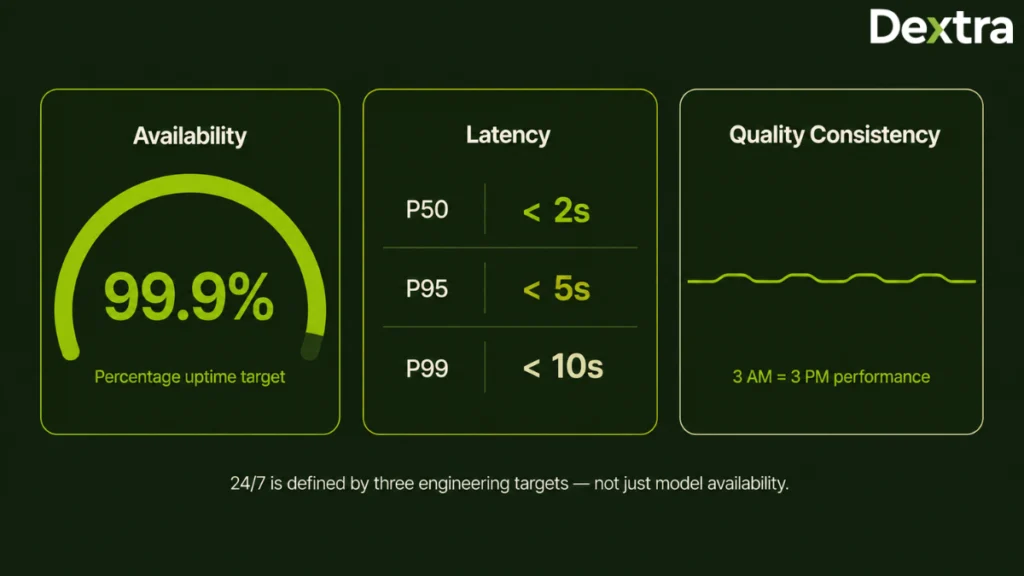
Availability is the percentage of time your AI agent is actually able to respond to customer requests. Common enterprise targets range from 99.9% for standard support to 99.99%+ for business-critical environments where downtime must be kept to a minimum. Higher availability requires architectures with multi-model failover, redundancy, and automatic recovery, not just an AI model running continuously. The right availability target depends on your business, but customers expect the agent to be accessible whenever they need support.
2. Latency: Can It Respond Quickly Under Real-World Load?
Customers judge an AI agent by how quickly it responds, especially during busy periods. A production-ready system should deliver the first response within a few seconds and maintain consistent performance as conversation volume increases. Typical targets include a median first response (P50) under 2 seconds, P95 under 5 seconds, and P99 under 10 seconds. If a response takes longer than around 30 seconds, the system should provide a simplified reply or smoothly transfer the conversation to a human agent instead of keeping customers waiting.
3. Quality Consistency: Does the Agent Perform the Same at 3 A.M. as It Does at 3 P.M.?
A reliable AI agent should provide accurate answers, maintain a consistent tone, follow the same escalation logic, and handle sensitive data correctly regardless of traffic or time of day. It should continue performing consistently even during failovers or temporary service disruptions.
Why 24/7 Is Harder Than It Sounds?
One of the biggest misconceptions is that customer support traffic stays relatively steady throughout the day. In reality, it doesn’t.
Customer support demand changes constantly because of peak business hours, global users, seasonal events, and unexpected incidents. As traffic increases, response times, retrieval quality, and downstream integrations can all become bottlenecks if the system isn’t designed for scale.
A true 24/7 AI customer service agent is built with reliability engineering so it continues serving customers smoothly even when parts of the system experience failures or heavy load.
The Off-the-Shelf 24/7 Reality
Most commercial AI customer service platforms can comfortably support organizations that need reliable, always-on customer support. If your requirements are fairly standard, their built-in capabilities and enterprise SLAs may be enough to get you into production quickly.
The picture changes when uptime becomes a business requirement rather than a product feature. Industries like financial services, healthcare, critical infrastructure, and large-scale enterprise support can’t afford to treat availability, failover, or recovery as black boxes. They need visibility into how the system behaves when a model provider goes offline, a region becomes unavailable, traffic suddenly spikes, or downstream services begin to fail.
That’s where custom architecture starts to create real value. Instead of relying on fixed platform capabilities, you can design for multi-model routing, model provider redundancy, multi-region deployment, circuit breakers, and observability from day one.
This is the point at which most of our custom AI agent development engagements actually begin, not with a model choice, but with an availability requirement that no platform will contractually guarantee.
The sections ahead discuss the engineering decisions that make that possible.
8-Layer Architecture for Building a 24/7 AI Customer Service AI Agent
Below are the eight layers that form the foundation of a production-ready AI customer service agent architecture:
Layer 1: Foundation Model Layer
Foundation model layer is the reasoning engine of your AI agent. It understands customer queries, processes context, and generates responses, making it one of the most important layers in your AI customer service agent architecture.
The table below compares the most widely used foundation models and where each one fits best.
| Model | Best For | Context Window | Approx. Cost (per 1M Tokens) |
| Claude Sonnet 4.5 | Enterprise customer support with a focus on reliability and safety | 200K tokens | ~$3 input / ~$15 output |
| Claude Opus 4 | Complex reasoning and high-stakes customer interactions | 200K tokens | ~$15 input / ~$75 output |
| GPT-5 | General-purpose enterprise deployments | 400K tokens | ~$5 input / ~$20 output |
| Gemini 2.5 Pro | Long-context and multimodal use cases | 1M+ tokens | ~$2 input / ~$10 output |
| Llama 3.3 70B (Self-hosted) | On-premise deployments and data sovereignty | 128K tokens | Infrastructure cost only |
Production Best Practice: Don’t rely on a single model. A 24/7 AI customer service agent should use multi-model routing, where a primary model is backed by one or more fallback models. This improves availability, reduces latency issues, and minimizes the impact of provider outages.
Layer 2: Context Retrieval Layer (RAG)
A foundation model only knows what it’s trained on. The Context Retrieval Layer uses Retrieval-Augmented Generation (RAG) to fetch the latest information from your business systems before generating a response, making sure answers stay accurate and up to date.
A production RAG pipeline typically includes:
- Ingestion pipelines: Sync content from Zendesk Guide, Confluence, Notion, or your help center.
- Chunking strategy: Break documents into semantic chunks (typically 500–1,500 tokens) while preserving context.
- Embedding model: OpenAI text-embedding-3-large, Cohere embed-v3, or Voyage AI voyage-3-large.
- Vector database: Pinecone, Weaviate, Pgvector, Qdrant, or Chroma.
- Retrieval logic: Hybrid search (semantic + BM25) with reranking using Cohere Rerank or bge-reranker.
- Freshness sync: Real-time or near real-time updates as your knowledge base changes.
Production Reality: This is where custom development often delivers the biggest advantage. Off-the-shelf platforms use generic retrieval pipelines, while custom RAG can be tailored to your document structure, terminology, and support workflows, resulting in more relevant retrieval, fewer hallucinations, and better customer responses.
This is the layer we spend the most time on at Dextra Labs. Generic retrieval pipelines fail on domain terminology, product SKUs, and policy documents that don’t chunk cleanly, and retrieval quality, not model choice, is what determines whether customers trust the answers.
Layer 3: Agent Orchestration Layer
Once a customer query is understood, the Agent Orchestration Layer decides what happens next. It coordinates the flow of work from retrieving information, calling business tools, applying business rules to deciding whether the request can be resolved automatically or should be escalated to a human agent.
Here are some of the leading orchestration frameworks used in 2026:
| Framework | Best For | Trade-off |
| LangGraph (LangChain) | Graph-based agent orchestration with a mature ecosystem | Steeper learning curve |
| AutoGen (Microsoft) | Multi-agent conversation patterns | Better suited for research and experimentation |
| CrewAI | Role-based multi-agent coordination | Newer and still evolving |
| DSPy | Programmatic prompt optimization | Best for teams systematically optimizing prompts |
| Custom Python | Full control with no framework overhead | Requires experienced ML and engineering teams |
Production Recommendation: LangGraph is a strong choice for managing agent workflows, while custom Python works well for business-critical tasks that need more flexibility and control. In the end, the framework you choose matters less than how well your system is designed. A strong architecture and reliable workflows will have a much bigger impact on long-term performance than the tool itself.
Layer 4: Integration Layer
The Integration Layer connects your AI agent with the business systems it needs to complete customer requests. Instead of only answering questions, the agent can retrieve customer information, create tickets, process orders, or update records across different platforms.
Common integrations include:
- Helpdesk platforms: Zendesk, Intercom, Freshdesk, HubSpot Service Hub
- Ticketing systems: Jira Service Management, Linear
- CRM platforms: Salesforce, HubSpot
For many businesses, these integrations are enough. However, organizations with heavily customized CRM workflows, proprietary internal systems, contact center platforms, payment gateways, inventory management, or compliance-driven approval processes often require custom integrations that off-the-shelf platforms cannot fully support.
Production Reality: This is one of the biggest reasons organizations choose custom development. Dextra Labs builds these integration layers across Zendesk, Freshdesk, Salesforce Service Cloud, and proprietary internal systems, including the contact center and payment-gateway connections that off-the-shelf platforms typically don’t reach.
Layer 5: Reliability Layer
The Reliability Layer is what makes a 24/7 AI customer service agent truly dependable. Its purpose is to keep the system available and responsive even when traffic increases or one of the underlying services fails.
A production-ready reliability layer typically includes:
- Multi-model routing: Switches to another model if the primary one becomes unavailable.
- Circuit breakers: Prevent failures in external services from affecting the rest of the system.
- Fallback modes: Return simplified responses or trigger human escalation when needed.
- Rate limiting and load management: Protect the system during heavy traffic.
- Retry logic: Automatically retries temporary failures before returning an error.
- Fallback response strategies: Ensure customers always receive a meaningful response.
Production Recommendation: Reliability shouldn’t be treated as an add-on after deployment. It should be built into the architecture from the beginning, because that’s what allows the AI agent to continue serving customers even when parts of the system fail.
Layer 6: Governance and Audit Layer
As AI agents become more involved in customer interactions, every decision needs to be secure, traceable, and compliant. The Governance and Audit Layer helps organizations maintain visibility while meeting regulatory and internal security requirements.
Key capabilities include:
- Audit logs: Every important AI decision is recorded to create a clear audit trail.
- SIEM integration: System logs are forwarded to platforms like Splunk or Datadog for continuous monitoring and security analysis.
- PII detection and redaction: Sensitive customer information is identified and automatically protected before it is processed or stored.
- Safety guardrails: AI responses are checked to filter out unsafe, inaccurate, or policy-violating content.
- Compliance reporting: The system maintains the records and reports needed to support compliance requirements such as SOC 2 and GDPR.
Production Recommendation: Strong governance isn’t just about compliance but it also makes debugging, auditing, and improving your AI system much easier as it grows.
Layer 7: Observability Layer
Once your AI agent is live, you need continuous visibility into how it’s performing. The Observability Layer helps monitor system health, response quality, latency, and operating costs so issues can be identified before they affect customers.
A typical observability stack includes:
- LLM observability: Tools such as Langfuse, LangSmith, and Weights & Biases Weave help monitor prompts, model responses, latency, and overall AI performance.
- Application monitoring: Platforms like Datadog, New Relic, and Honeycomb provide visibility into system health, uptime, errors, and infrastructure performance.
- Cost monitoring: Solutions such as Portkey, OpenLLMetry, or custom dashboards help track token usage, model costs, and cost per conversation.
- Automated evaluation: Frameworks like Ragas, TruLens, Braintrust, or custom evaluation pipelines continuously measure response quality, groundedness, and overall AI accuracy.
Production Recommendation: Monitoring shouldn’t stop at uptime. Tracking response quality, hallucinations, latency, and customer satisfaction provides a much clearer insight into how your AI agent performs in production.
Layer 8: Human-in-the-Loop Layer
Even the best AI agents won’t resolve every customer issue on their own. The Human-in-the-Loop (HITL) Layer ensures conversations are transferred to the right support agent whenever human expertise is needed.
This layer generally includes:
- Escalation engine: Routes conversations based on business rules or confidence scores.
- Context transfer: Shares the conversation history and AI-generated summary with the support agent.
- Agent-assist mode: Lets AI draft responses while humans review and approve them.
- Feedback loop: Uses agent feedback to improve future responses.
- Quality reviews: Regularly evaluate conversations to identify improvement opportunities.
Production Recommendation: The goal isn’t to replace human agents. It’s to automate routine conversations while making complex cases faster as well as easier for your support team to resolve.
Before You Build: The Build vs Buy Reality Check
There’s no one-size-fits-all approach to AI customer service. Below is a detailed look at where off-the-shelf platforms work well and where custom development becomes valuable.
When Off-the-Shelf Solutions Make Sense
For many organizations, commercial AI agents for customer service automation may meet business requirements without the cost and complexity of a custom build. They can be a good fit if you have:
- Standard e-commerce or SaaS customer support workflows.
- Moderate conversation volumes where usage-based pricing remains cost-effective.
- Common integrations with platforms like Zendesk, Intercom, or Salesforce Service Cloud.
- Compliance requirements that certified vendors already support.
- Standard uptime expectations covered by enterprise SLAs.
- No highly specialized product knowledge, internal systems, or complex business logic.
If your business falls into this category, an off-the-shelf platform will usually get you to production faster while keeping implementation and maintenance simpler.
The Off-the-Shelf Landscape
Commercial AI customer service platforms generally fall into four categories:
| Category | Popular Vendors | Best Fit |
| AI-Native Autonomous Platforms | Sierra AI, Decagon, Intercom Fin | Modern support teams with standard customer service workflows |
| Enterprise Conversational Platforms | Kore.ai, Cognigy, Sprinklr | Large contact centers with advanced routing and automation needs |
| Helpdesk-Native AI | Zendesk AI Agents, Salesforce Agentforce, Kustomer AI, Ada | Organizations already using major helpdesk platforms |
| Voice-First AI Platforms | Cognigy Voice, PolyAI, Parloa | Contact centers where voice support is the primary channel |
For a full comparison, visit the Best AI Customer Service Agents for Enterprise blog.
When Custom AI Customer Service Agent Development Makes Sense
Custom development isn’t the right choice for every organization but in some scenarios, it’s the only approach that provides the flexibility, control, and reliability needed for long-term success.
A custom AI customer service agent architecture becomes a strong choice when you need:
- Support for proprietary products or business terminology that generic AI models struggle to understand.
- Deep integration with internal systems, heavily customized CRMs, or proprietary operational workflows.
- Advanced compliance requirements, such as FedRAMP High, strict HIPAA environments, or sovereign cloud deployments.
- High conversation volumes, where usage-based pricing becomes difficult to scale economically.
- Strategic ownership of AI capabilities that create a competitive advantage for your business.
- Multi-agent orchestration to coordinate specialized AI agents across different tasks and workflows.
- Availability targets beyond standard enterprise SLAs, requiring advanced reliability engineering, multi-model routing, and failover strategies.
When these requirements come into play, custom development is no longer about adding features, it’s about building a system around the way your business actually operates. Rather than adapting your processes to fit a platform, you design the platform to fit your processes.
If you’ve already decided to build an AI customer service agent, the next sections will walk through the production architecture needed to do it right. If you’re still weighing the options, our complete Build vs Buy AI Customer Service Agent framework blog covers the decision framework in depth.
The Dextra Labs 10-Phase Framework for Building 24/7 AI Customer Service Agents
The phase structure below reflects how we run production-ready 24/7 AI customer service agent builds for enterprises across the USA, UAE, Singapore, and UK. Timelines shift with integration depth and compliance scope, but the sequence holds.
Phase 1: Discovery and Requirements (Weeks 1–2)
Before you build anything, you need a clear understanding of your support operations, business goals, and technical requirements. Discovery and Requirements phase focuses on gathering the information needed to design an AI agent that fits your support operations and long-term goals.
Key activities include:
- Ticket audit: Review the last 90 days of customer support conversations to identify common issues and trends.
- Volume analysis: Understand daily, weekly, seasonal, and peak traffic patterns.
- Knowledge base audit: Evaluate the quality, structure, coverage, and freshness of existing documentation.
- Compliance assessment: Document regulatory requirements and data handling policies.
- Integration inventory: Identify the helpdesk, CRM, contact center, and internal systems the AI agent needs to connect with.
- Success metrics: Define measurable goals such as deflection rate, CSAT, cost per conversation, response time, and availability targets.
Output: A clear requirements document, initial architecture decisions, and well-defined success criteria that guide the rest of the project.
This discovery phase is where experienced AI development partners create the biggest value. Dextra Labs typically begins every enterprise AI agent engagement with workshops covering business workflows, integration mapping, compliance requirements, AI model selection, and production architecture before any code is written.
Phase 2: Foundation Model Selection and BYOK Setup (Weeks 3–4)
Once your requirements are clear, the next step is selecting the foundation models that will power your AI agent. Instead of choosing based on benchmarks alone, evaluate each model against your own customer conversations, workflows, latency requirements, and compliance needs.
This phase typically includes:
- Model evaluation: Compare two or three foundation models using real customer support scenarios.
- BYOK setup: Configure Bring Your Own Key (BYOK) accounts with both primary and backup model providers.
- Rate limit planning: Provision API capacity to handle expected traffic during peak hours.
- Zero Data Retention (ZDR): Enable ZDR agreements where compliance requires sensitive data not to be stored.
- Access management: Establish API key rotation policies and secure access controls.
Production tip: Using BYOK gives you greater control over security, compliance, provider relationships, and long-term scalability.
Phase 3: Knowledge Base Ingestion and RAG Pipeline (Weeks 5–8)
Next, build the knowledge layer that enables your AI agent to deliver accurate, up-to-date answers. A well-designed RAG pipeline retrieves information from your documentation instead of relying only on the model’s training data.
A production-ready RAG pipeline architecture:
python
from langchain_anthropic import ChatAnthropic
from langchain_community.vectorstores import Pinecone
from langchain_openai import OpenAIEmbeddings
from langchain.text_splitter import RecursiveCharacterTextSplitter
from langchain.retrievers import ContextualCompressionRetriever
from langchain.retrievers.document_compressors import CohereRerank

# Semantic chunking for CS knowledge base
splitter = RecursiveCharacterTextSplitter(
    chunk_size=1000,
    chunk_overlap=200,
    separators=["\n\n", "\n", ". ", " ", ""]
)

# High-quality embeddings for CS-specific retrieval
embeddings = OpenAIEmbeddings(model="text-embedding-3-large")

# Production vector store with metadata filtering
vectorstore = Pinecone.from_documents(
    documents=knowledge_base_docs,
    embedding=embeddings,
    index_name="cs-knowledge-base-prod",
    namespace="policies-and-faqs"
)

# Reranking for precision at top-K
compressor = CohereRerank(model="rerank-english-v3.0", top_n=5)
retriever = ContextualCompressionRetriever(
    base_compressor=compressor,
    base_retriever=vectorstore.as_retriever(search_kwargs={"k": 20})
)
Production considerations
- Retrieval strategy: Retrieve the top 20 documents and rerank them to the top 5 for better accuracy.
- Metadata filtering: Filter results using attributes such as policy version, product line, or customer tier.
- Embedding cache: Cache frequently accessed embeddings to reduce latency.
- Knowledge freshness: Sync policy documents regularly and update dynamic data, such as inventory or order information, in real time.
Production Insight: A well-designed RAG pipeline does more than improve response accuracy. It helps reduce hallucinations, keeps answers aligned with the latest business information, and makes the AI agent easier to maintain as your knowledge base evolves.
Phase 4: Agent Orchestration Development (Weeks 9–12)
Now it’s time to build the decision-making layer that tells your AI agent what to do next. This workflow helps the agent understand customer intent, retrieve the right information, generate a response, and decide when a human should take over.
The example below shows a simplified LangGraph workflow.
python
from langgraph.graph import StateGraph, END
from langchain_anthropic import ChatAnthropic
from typing import TypedDict, Annotated
import operator

class AgentState(TypedDict):
    messages: Annotated[list, operator.add]
    customer_id: str
    conversation_id: str
    intent: str
    confidence: float
    context: list
    resolution: dict

# Primary reasoning model
model = ChatAnthropic(
    model="claude-sonnet-4-5",
    max_tokens=1024,
    temperature=0.2
)

def classify_intent(state: AgentState) -> AgentState:
    """Classify customer intent for routing"""
    # Implementation with confidence scoring
    pass

def retrieve_context(state: AgentState) -> AgentState:
    """Retrieve relevant policies + customer history"""
    pass

def generate_response(state: AgentState) -> AgentState:
    """Generate grounded response with citations"""
    pass

def check_escalation(state: AgentState) -> str:
    """Route to escalation or resolution"""
    if state["confidence"] < 0.65:
        return "escalate"
    return "resolve"

# Build agent graph
workflow = StateGraph(AgentState)
workflow.add_node("classify", classify_intent)
workflow.add_node("retrieve", retrieve_context)
workflow.add_node("respond", generate_response)
workflow.add_node("escalate", human_handoff)
workflow.add_node("resolve", finalize_resolution)

workflow.set_entry_point("classify")
workflow.add_edge("classify", "retrieve")
workflow.add_edge("retrieve", "respond")
workflow.add_conditional_edges(
    "respond",
    check_escalation,
    {"escalate": "escalate", "resolve": "resolve"}
)

agent = workflow.compile()
What this workflow does
- Maintains conversation state: Keeps track of customer details, conversation history, intent, confidence score, retrieved context, and resolution status throughout the interaction.
- Identifies customer intent: Understands what the customer needs and routes the request accordingly.
- Retrieves relevant context: Pulls policies, product details, or customer information from the RAG pipeline.
- Generates grounded responses: Creates responses based on retrieved business knowledge.
- Triggers escalation: Hands the conversation to a human when confidence falls below the defined threshold.
- Builds a structured workflow: Connects every step into a process that’s easy to monitor, test, and improve.
Phase 5: Integration Layer Build (Weeks 13–16)
With the core AI capabilities in place, the next step is connecting the agent to your business systems. These integrations allow the AI to move beyond answering questions and start performing real tasks on behalf of customers.
This phase typically includes:
- Helpdesk integration: Create, update, and search support tickets through helpdesk APIs.
- CRM integration: Access customer profiles, order history, and other relevant account information.
- Contact center integration: Connect with voice and chat platforms to manage channel routing and agent availability.
- Business system integration: Link payment gateways, order management systems, or other operational tools to execute customer requests.
- Authentication and rate limiting: Secure API access and manage request limits to ensure stable performance.
Production Recommendation: Start with the integrations such as Salesforce, HubSpot, Zendesk, SAP and Custom APIs that deliver the most business value. As the AI agent matures, additional systems and workflows can be connected without redesigning the entire architecture.
Dextra Labs regularly builds custom connectors between enterprise systems to ensure AI agents can execute real business workflows rather than simply answer questions.
Phase 6: Governance and Compliance (Weeks 15–18)
As your AI agent gains access to business data, governance becomes essential. This phase helps you protect customer information and meet compliance requirements from day one.
Key activities include:
- PII detection and redaction: Automatically identify and protect sensitive customer information.
- Audit trail setup: Record every important AI decision and system action in structured logs for auditing.
- Access control: Implement role-based access control (RBAC) to restrict access to sensitive data and administrative functions.
- Compliance configuration: Configure the system to meet requirements such as HIPAA or GDPR based on your deployment needs.
- Output safety: Apply guardrails to detect and filter unsafe, inaccurate, or policy-violating AI responses.
Production Recommendation: Governance should be built into the system from the start, not added after deployment. It’s much easier to maintain compliance and security when these controls are part of the architecture from day one.
Phase 7: Reliability Engineering (Weeks 17–20)
The focus shifts from building features to ensuring the system remains reliable under real-world conditions. This is where you implement the engineering practices that keep your AI agent running even when traffic spikes or individual services fail.
Key activities include:
- Multi-model failover: Automatically switch to a backup model if the primary model becomes unavailable.
- Circuit breakers: Prevent failures in external services from affecting the entire system.
- Fallback modes: Return simplified responses or escalate conversations when required.
- Load management: Use rate limiting and load shedding to maintain system stability during peak demand.
Production reliability is often where prototype AI agents fail. Building multi-model failover, observability, circuit breakers, and disaster recovery requires software engineering expertise beyond prompt engineering. This is one reason organizations partner with AI engineering firms such as Dextra Labs for production deployments.
Phase 8: Observability Deployment (Weeks 19–22)
Once reliability measures are in place, the next step is making the system fully observable. Monitoring helps you understand how the AI agent performs in production and quickly identify issues before they affect customers.
This phase typically includes:
- LLM observability: Use tools like Langfuse or LangSmith to trace prompts, responses, and model performance.
- Application monitoring: Track system health, latency, and infrastructure metrics with platforms such as Datadog or New Relic.
- Custom dashboards: Monitor business metrics like resolution rate, CSAT, response time, and cost per conversation.
- Automated evaluation: Continuously measure RAG quality and response accuracy using frameworks like Ragas.
Phase 9: Pilot Deployment (Weeks 21–24)
Before rolling the AI agent out to every customer, validate your AI agent in a controlled production environment. A phased pilot helps identify issues early while minimizing business risk.
Key activities include:
- Limited rollout: Deploy the AI agent to a small percentage of customer conversations.
- Human review: Have support agents review AI responses before they’re sent to customers.
- Feedback collection: Capture customer and agent feedback to refine prompts, workflows, and retrieval quality.
- Gradual autonomy: Increase autonomous handling as performance improves while keeping human oversight in place.
Phase 10: Production Rollout (Weeks 25–32)
After a successful pilot, the AI agent can be rolled out gradually across the organization. Expanding in stages allows teams to monitor performance and resolve issues before increasing customer traffic.
A typical rollout includes:
- Phased traffic expansion: Increase traffic from 30% to 60%, and eventually to full production.
- Autonomous handling: Allow the AI agent to independently resolve routine, high-confidence requests.
- Agent-assist mode: Keep human agents involved for complex or sensitive conversations.
- Continuous monitoring: Maintain 24/7 monitoring and an on-call process for production incidents.
- Ongoing optimization: Review conversations regularly to improve prompts, workflows, and overall performance.
Production Recommendation: If you’re planning how to deploy an AI agent for customer service, think of deployment as an ongoing process rather than a one-time event. Continuous monitoring and regular improvements are just as important as the initial launch.
Realistic Total Timeline: A production-ready AI customer service agent usually takes 6–8 months to move from discovery to full deployment. Smaller projects with a well-defined scope may be completed faster, while larger enterprise implementations often take longer due to additional integrations, compliance requirements, and testing.
Case Study: Building a 24/7 AI Support Agent for 1.2M Monthly Queries
The Framework in Production: 1.2M Monthly Conversations Across Four Languages
The phases above aren’t theoretical. Here’s how they played out in a live deployment.
A fast-growing D2C brand was handling roughly 1.2 million customer support conversations a month across four languages. Their existing setup couldn’t cope with the reality of how customers actually wrote; Hindi-English code-mixing, mid-sentence language switching, transliterated product names, and heavy abbreviation. Off-the-shelf platforms classified a significant share of these queries incorrectly, and every misclassification either produced a wrong answer or an unnecessary escalation.
What the build involved:
- A custom RAG pipeline rebuilt around code-mixed retrieval rather than clean single-language input (Layer 2, Phase 3).
- Intent classification retrained on real customer language, not idealised query samples (Layer 3, Phase 4).
- Multi-model routing to hold latency steady at peak volume (Layer 5, Phase 7)
- Confidence-based escalation tuned per language, since classification certainty varied significantly across them (Layer 8, Phase 6).
The outcome:
- 71% Queries resolved without human touch
- 14h → 90s Avg. first response time
- ₹3.1Cr/yr BPO cost reduction
- 3.1 → 4.4 CSAT score improvement
At this conversation volume, the economics stop being about licence fees. They become a question of retrieval efficiency, model routing, and caching strategy, which is precisely why the architecture had to be owned rather than rented.
24/7 Reliability Engineering: What Separates “Sometimes Up” from “Actually 24/7”
What separates the two is the ability to maintain availability during failures, traffic spikes, and unexpected outages.
The Multi-Model Routing Pattern
One of the biggest mistakes teams make is relying on a single AI model. If that provider experiences an outage, increased latency, or rate limits, your entire customer support operation can slow down or stop.
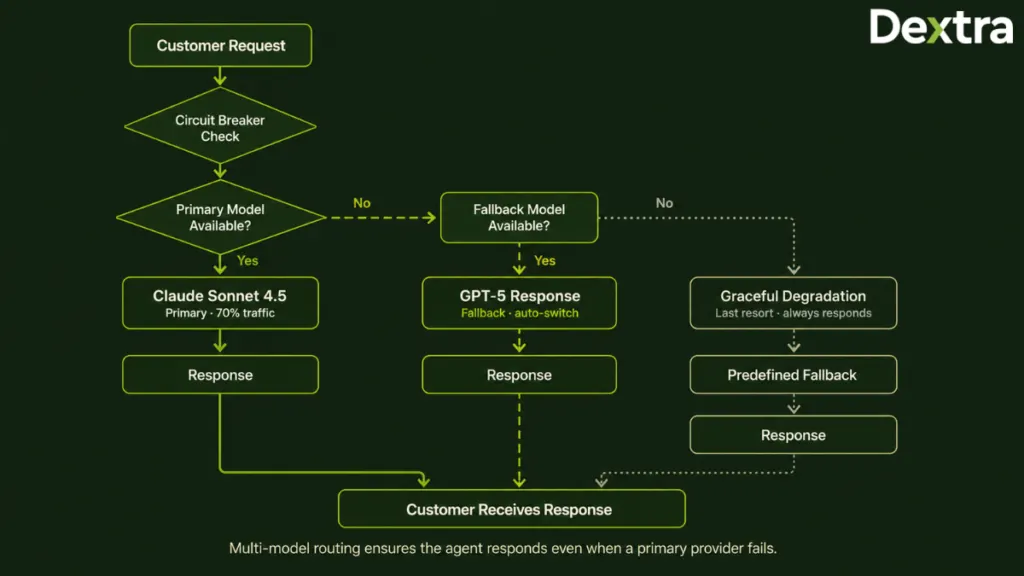
A production-ready architecture avoids this by using multi-model routing. Instead of depending on one model, the system automatically switches between a primary and a backup model whenever needed. This helps maintain availability without disrupting the customer experience.
The code below is a simplified example to illustrate the routing logic. A production implementation would also include logging, metrics, authentication, monitoring, and additional error handling.
python
from anthropic import AsyncAnthropic
from openai import AsyncOpenAI
import asyncio
from tenacity import retry, stop_after_attempt, wait_exponential

class MultiModelRouter:
    def __init__(self):
        self.primary = AsyncAnthropic()  # Claude Sonnet 4.5
        self.fallback = AsyncOpenAI()    # GPT-5
        self.circuit_breaker = CircuitBreaker(
            failure_threshold=5,
            recovery_timeout=60
        )

    @retry(
        stop=stop_after_attempt(2),
        wait=wait_exponential(multiplier=1, min=1, max=4)
    )
    async def get_completion(self, prompt, context):
        # Try primary
        if self.circuit_breaker.can_call("primary"):
            try:
                response = await asyncio.wait_for(
                    self.primary.messages.create(
                        model="claude-sonnet-4-5",
                        max_tokens=1024,
                        messages=[{"role": "user", "content": prompt}]
                    ),
                    timeout=8.0  # P95 target
                )
                self.circuit_breaker.record_success("primary")
                return response, "claude-sonnet-4-5"
            except Exception as e:
                self.circuit_breaker.record_failure("primary")
                # Fall through to fallback

        # Fallback to GPT-5
        if self.circuit_breaker.can_call("fallback"):
            try:
                response = await asyncio.wait_for(
                    self.fallback.chat.completions.create(
                        model="gpt-5",
                        max_tokens=1024,
                        messages=[{"role": "user", "content": prompt}]
                    ),
                    timeout=8.0
                )
                self.circuit_breaker.record_success("fallback")
                return response, "gpt-5"
            except Exception as e:
                self.circuit_breaker.record_failure("fallback")
                raise

        # Both circuits open — graceful degradation
        return self._graceful_degradation_response(context), "fallback-response"
What this implementation does
- Uses a primary model: Sends customer requests to the preferred foundation model during normal operation.
- Monitors model health: Tracks failures and response times using a circuit breaker.
- Automatically retries requests: Attempts temporary failures again using exponential backoff before switching providers.
- Switches to a backup model: Routes requests to a secondary model if the primary model is unavailable.
- Returns a fallback response: If both providers fail, the system still responds with a predefined fallback message instead of leaving the customer waiting.
Graceful Degradation Strategies
Even the most reliable systems can experience outages. What matters is how your 24/7 AI customer service agent responds when parts of the system become unavailable. Instead of failing completely, the agent should gradually reduce functionality while continuing to help customers as much as possible.
A typical degradation strategy looks like this:
- Level 1 – Full capability: All models, RAG pipelines, and business integrations are working normally.
- Level 2 – Fallback model: The primary model is unavailable, so requests are automatically routed to a backup model with minimal impact on the customer experience.
- Level 3 – Cached responses: If AI models are experiencing issues, the system serves pre-approved answers for frequently asked questions.
- Level 4 – Template responses: When AI services are unavailable, customers receive a predefined acknowledgment while their request is prepared for escalation.
- Level 5 – Human handoff: If automated support isn’t possible, every conversation is transferred directly to a human agent.
Customers are usually more understanding of a limitation than unexpected silence. Let them know what’s happening and what to expect next. Clear communication helps maintain trust, even during service disruptions.
Availability Zone and Multi-Region Design
Achieving high availability requires more than deploying your application once. A resilient AI customer service agent architecture spreads workloads across multiple locations so that a failure in one environment doesn’t interrupt customer support.
For organizations targeting 99.99% availability, a production deployment usually includes:
- Multi-Availability Zone (AZ) deployment: Run the application across multiple availability zones within the same region to handle infrastructure failures.
- Multi-region deployment: Maintain a primary region and a secondary failover region with continuous data replication.
- Global load balancing: Automatically direct customers to the nearest healthy region and reroute traffic if an outage occurs.
- Model provider redundancy: Use independent accounts with providers such as Anthropic, OpenAI, and Google to reduce dependency on a single vendor.
Rate Limiting and Load Shedding
Not every customer request has the same business priority. During periods of heavy traffic, the system should protect critical workloads instead of allowing every request to compete equally for resources.
A common prioritization strategy includes:
- Tier 1: Paying customers and business-critical support requests receive the highest priority.
- Tier 2: Standard customer support conversations continue under normal processing.
- Tier 3: Low-priority requests, such as informational queries or chatbot-only interactions, are temporarily limited if the system is under heavy load.
Additionally, circuit breakers should be used for downstream services like helpdesk platforms and CRM APIs. If these services become slow or unavailable, requests can fail quickly instead of causing delays across the entire system.
The goal isn’t to process every request at any cost. It’s to ensure the most important customer conversations continue without interruption during periods of high demand.
The 3 AM Failure Modes
The hardest production issues rarely happen during business hours. They often appear late at night, when traffic patterns change, automated jobs are running, or external services begin to fail. Preparing for these scenarios is a key part of building a reliable 24/7 AI customer service agent.
Some of the most common production failures include:
- Silent model degradation: The model continues responding, but response quality gradually declines. This requires continuous quality evaluation, not just uptime monitoring.
- Retrieval drift: The RAG pipeline starts returning outdated or irrelevant content because the knowledge base isn’t refreshed properly.
- API rate limits: Helpdesk or CRM APIs reject requests during traffic spikes, requiring request queues and backpressure handling.
- Context window overflow: Long conversations exceed the model’s context window, making summarization and context management essential.
- PII leakage: Sensitive customer information appears in model responses, making output filtering and redaction critical.
In the later section, we’ll discuss these failure modes in detail, along with practical strategies for preventing and mitigating them in production.
Escalation and Human Handoff: The Logic That Determines Agent Trust
This section covers how the system decides when to continue the conversation and when it’s better to involve a human support agent.
Escalation Triggers
Instead of relying on one rule, production systems evaluate several factors before deciding to escalate a conversation.
1. Rule-Based Triggers
These are predefined rules that always trigger a human handoff because they involve situations where AI should not make the final decision.
Common triggers include:
- The customer explicitly asks to speak with a human agent.
- The conversation includes legal or regulatory terms.
- High-severity issues such as security incidents, fraud, or service outages are detected.
- The customer belongs to a VIP or high-value account.
- Sentiment analysis detects strong negative emotions.
- Multiple attempts have failed to resolve the issue.
Rule-based triggers are simple, predictable, and easy to audit which makes them an essential part of every AI customer service agent architecture.
2. Confidence-Based Triggers
Not every situation can be covered by fixed rules. Confidence-based triggers use the AI’s own confidence scores to determine whether it should continue or hand the conversation to a human.
Common examples include:
- The RAG system cannot retrieve enough relevant information.
- The model is uncertain about the response it generated.
- Customer intent cannot be identified with sufficient confidence.
- The query is new or falls outside the scenarios the system has been evaluated on.
So, it’s better to escalate an uncertain conversation than risk giving an incorrect answer. Customers are more likely to trust an AI that knows when to ask for help.
3. Time-Based Triggers
Some conversations become lengthy without making meaningful progress. Time-based triggers help enforce service levels by moving these cases to human agents before customers become frustrated.
Typical triggers include:
- The conversation exceeds a predefined duration.
- The issue remains unresolved beyond the target SLA.
- The customer returns after leaving the conversation without a resolution.
The Escalation Policy Object
In a production system, escalation rules shouldn’t be buried inside the application code. Keeping them in a configurable policy makes it easier to update business rules, adjust thresholds, and refine routing decisions without changing the underlying application.
The example below shows how a production escalation policy can be organized:
python
escalation_policy = {
    "rule_based_triggers": {
        "explicit_request_patterns": [
            "talk to (a )?human", "speak to (a )?person",
            "connect me to (an )?agent", "escalate this"
        ],
        "regulatory_keywords": [
            "legal", "lawsuit", "attorney", "compliance",
            "regulatory violation", "GDPR request", "CCPA"
        ],
        "severity_keywords": [
            "outage", "data breach", "security incident",
            "fraud", "chargeback", "hacked"
        ]
    },
    "confidence_thresholds": {
        "retrieval_confidence": 0.60,
        "response_confidence": 0.65,
        "intent_classification": 0.70
    },
    "customer_tier_rules": {
        "enterprise_tier": "always_escalate_on_confidence_below_0.80",
        "vip_customer": "escalate_after_2_turns",
        "standard": "escalate_after_3_turns"
    },
    "sla_triggers": {
        "max_conversation_duration_seconds": 600,
        "max_turns_before_escalation": 5,
        "no_progress_turns_threshold": 3
    },
    "handoff_priority": {
        "critical": ["security", "fraud", "data breach"],
        "high": ["billing_dispute", "cancellation", "escalation_request"],
        "standard": ["confidence_low", "novel_query"]
    }
}
The Handoff Payload
An escalation is only effective if the human agent receives enough context to continue the conversation without starting over. That means understanding the issue, the AI’s actions, and the next best step.
The example below shows a structured payload that is passed to the human agent during a handoff:
json
{
  "conversation_id": "conv_abc123",
  "customer": {
    "customer_id": "cust_xyz789",
    "name": "Sarah Chen",
    "tier": "enterprise",
    "ltv": 45000,
    "sentiment": "frustrated"
  },
  "conversation_summary": "Customer is asking about a refund for order #12345 shipped Nov 15. AI could not verify eligibility due to policy exception (customer is enterprise tier with extended return window).",
  "escalation_reason": "policy_exception_high_value_customer",
  "agent_confidence": 0.42,
  "attempted_resolution": "AI referenced standard 30-day return policy but detected customer's enterprise status may qualify for 90-day return window. Escalating to specialist for policy clarification.",
  "conversation_history": [/* full transcript */],
  "recommended_action": "Verify enterprise tier return window in system, then approve refund if eligible",
  "customer_wait_time_seconds": 45,
  "channel": "web_chat",
  "priority": "high"
}
The Warm Handoff Pattern
A human handoff shouldn’t feel like starting the conversation all over again. The goal is to make the transition seamless so customers feel they’re continuing the same interaction, not being passed between different systems.
A well-designed warm handoff typically includes:
- Clear communication: Let the customer know why they’re being connected to a specialist and what will happen next.
- Context transfer: Share a summary of the customer’s issue along with the steps the AI has already taken, so the human agent has the complete picture.
- Conversation continuity: The human agent continues from where the AI stopped instead of asking the customer to repeat information.
- Continuous learning: Every escalated conversation is reviewed and used to improve future responses, helping refine AI customer service agents’ custom workflows.
Realistic Cost and TCO for 24/7 AI Customer Service Operations
Building a 24/7 AI customer service agent involves much more than model API costs. This section breaks down the major cost components and shows how the total cost of ownership (TCO) changes as conversation volumes grow.
Cost Components
The overall cost of operating an AI customer service agent comes from multiple areas, not just the foundation model.
Key cost components include:
- Foundation model APIs: Charges based on the number of input and output tokens processed during customer conversations.
- Vector database: Costs for storing embeddings and retrieving relevant knowledge during RAG queries.
- Infrastructure: Compute resources, load balancers, redundancy, and networking required to support high availability.
- Observability: Monitoring tools for LLM traces, application performance, and cost tracking.
- Human handoffs: Support agent time spent handling conversations escalated by the AI.
- Ongoing engineering: Continuous maintenance, model improvements, incident response, and new feature development.
Together, these costs determine the long-term economics of running a production AI customer service operation.
Per-Conversation Cost Model
Every customer conversation consumes resources across multiple layers of the architecture. Understanding where those costs come from makes it easier to estimate operating expenses as usage grows.
A typical conversation includes:
| Component | Tokens / Cost | Notes |
| System prompt | ~2,000 tokens | Fixed per conversation |
| RAG context | ~4,000 tokens | Retrieved policies + customer history |
| Conversation history | ~2,000 tokens (avg 4 turns) | Growing with conversation length |
| Response generation | ~500 tokens output | Per-turn response |
| Total per turn (Claude Sonnet 4.5) | ~$0.025 input + $0.008 output = ~$0.033 | Assuming primary model handles turn |
| Total conversation (4 turns avg) | ~$0.13 | Excluding failover cases |
While the cost of an individual conversation may appear low, these expenses increase quickly as conversation volume scales across thousands or millions of customer interactions.
3-Year TCO at Three Conversation Volumes
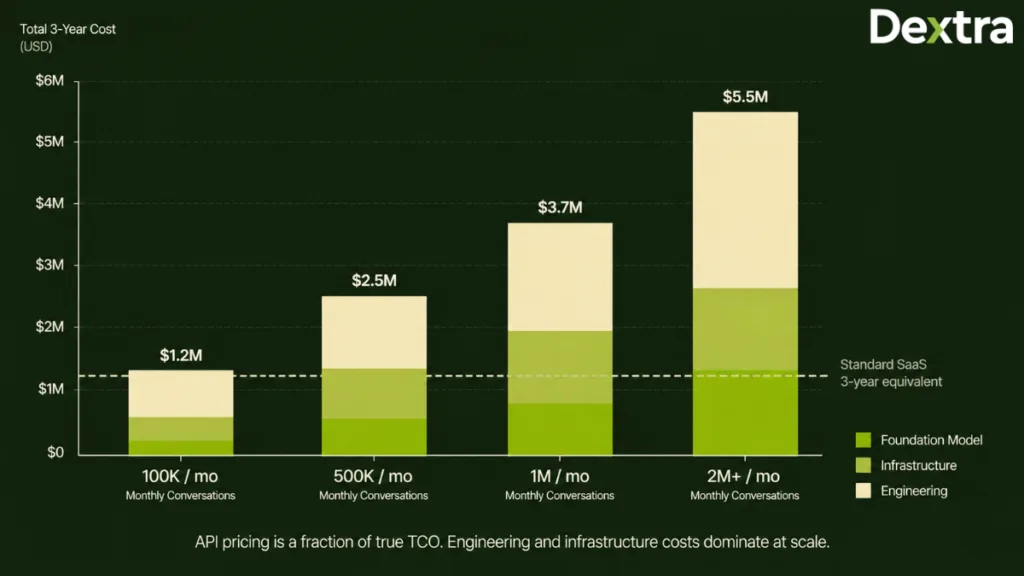
Looking only at API pricing rarely gives an accurate picture of long-term costs. A realistic TCO should account for infrastructure, engineering, monitoring, and operational expenses over the lifetime of the system.
| Monthly Conversations | Foundation Model | Infrastructure | Engineering | 3-Year TCO |
| 100K/month | ~$156K (3yr) | ~$180K (3yr) | ~$900K (3yr) | ~$1.2M-$1.5M total |
| 500K/month | ~$780K (3yr) | ~$360K (3yr) | ~$1.05M (3yr) | ~$2.2M-$2.8M total |
| 1M/month | ~$1.56M (3yr) | ~$540K (3yr) | ~$1.2M (3yr) | ~$3.3M-$4.2M total |
| 2M+/month | ~$3.12M+ (3yr) | ~$720K (3yr) | ~$1.35M (3yr) | ~$5.2M+ total |
Assumptions behind these estimates:
- Foundation model usage assumes approximately 70% primary model and 30% fallback model traffic.
- Infrastructure costs include multi-region deployment and redundancy for continuous availability.
- Engineering costs cover one to two full-time engineers responsible for operations, maintenance, and ongoing improvements.
- Initial development costs are not included in these estimates and should be considered separately when planning the overall investment.
Cost Optimization Strategies
Reducing costs isn’t about choosing the cheapest model. It’s about designing the system so that resources are used efficiently without affecting response quality or customer experience.
Some of the most effective optimization strategies include:
- Route requests by complexity: Send routine queries to smaller, lower-cost models, while reserving more powerful models for complex customer issues.
- Use prompt caching: Cache repeated prompts and context to reduce token usage for recurring conversations.
- Optimize RAG retrieval: Retrieve only the most relevant documents instead of sending unnecessary context with every request.
- Summarize long conversations: Compress older conversation history to keep context windows manageable and reduce token consumption.
- Batch non-urgent workloads: Process tasks such as conversation summaries, reporting, and quality evaluations in batches instead of real time.
- Take advantage of falling model prices: Foundation model costs continue to decline over time, allowing well-designed custom systems to benefit from lower operating costs as pricing evolves.
For enterprises modeling these variables against their specific conversation profile, our full TCO calculator provides sensitivity analysis by conversation complexity, integration depth, and compliance scope.
8 Failure Modes That Break AI Customer Service Agents in Production
The following are the 8 failure modes that determine whether your architecture can support a reliable 24/7 AI customer service agent or simply survive a demo.
Failure Mode 1: Silent Model Degradation
A model can remain online while its response quality quietly declines after an update. Monitor response quality with automated evaluations, test new model versions before deployment, and validate changes through A/B testing.
Failure Mode 2: RAG Retrieval Drift
As your documentation changes, the AI can retrieve outdated information and generate inaccurate responses. Keep embeddings updated, track document freshness, and include citations to improve reliability.
Failure Mode 3: Integration API Rate Limits
AI agents depend on CRMs, helpdesks, payment systems, and other APIs. During traffic spikes, slow integrations can delay responses. Use request queues, circuit breakers, cached data, and clear customer updates to reduce disruption.
Failure Mode 4: Context Window Overflow
Long conversations can exceed the model’s context limit, causing it to lose important details. Summarize older messages, preserve key customer information, and maintain a structured conversation state.
Failure Mode 5: PII Leakage in Responses
AI should never expose sensitive customer information unnecessarily. Protect responses with PII detection, output validation, audit logs, and prompts that discourage unnecessary data repetition.
Failure Mode 6: Hallucination on High-Stakes Queries
Incorrect answers about refunds, payments, contracts, or policies can quickly erode customer trust. Generate responses from verified sources, require citations, validate critical outputs, and escalate uncertain cases.
Failure Mode 7: Prompt Injection Attacks
Malicious or unintended prompts can manipulate the AI into ignoring its instructions. Prevent this with prompt injection detection, stronger system prompts, restricted tool access, and human approval for sensitive actions.
Failure Mode 8: Cost Runaway
Conversation loops, oversized prompts, or unnecessary model calls can rapidly increase costs. Set conversation budgets, monitor token usage, apply rate limits, and regularly audit usage patterns
The Design Principle
Every production issue has an architectural solution. The most reliable AI customer service systems aren’t the ones that never experience failures, they’re the ones designed to detect problems early, recover automatically wherever possible, and involve human agents before customers are affected. That’s the difference between an AI agent that simply works and one that’s truly ready for 24/7 production.
When Custom Development Wins Over Off-the-Shelf AI Customer Service
If your business fits any of the scenarios below, building your own solution is likely to be the better long-term investment.
1. Your Availability Requirements Go Beyond Standard SLAs
Most commercial AI customer service platforms are designed to meet the needs of the majority of businesses, and for many teams, that’s more than enough. But if your operations can’t afford extended downtime, standard availability targets may no longer be sufficient.
Organizations in industries such as financial services, healthcare, or critical infrastructure often need architectures that include multi-model routing, multi-region deployment, automatic failover, and recovery strategies designed specifically for continuous operations.
2. Your Conversation Volume Continues to Grow
Pricing that looks reasonable during the early stages can become difficult to justify as customer conversations increase month after month. At higher volumes, the economics often shift from paying for every interaction to optimizing the entire platform around your own usage patterns.
A custom architecture gives engineering teams much greater control over model routing, infrastructure, and operating costs, making long-term scaling more predictable.
3. Your Business Has Knowledge That Generic Models Don’t Understand
Every business has information that isn’t available in public training data such as internal policies, specialized product catalogs, industry terminology, customer-specific workflows, or proprietary documentation.
Instead of relying on generic retrieval, a custom RAG pipeline is designed around your own knowledge ecosystem, allowing the AI to answer questions using information that reflects how your business actually operates.
4. Your Technology Stack Isn’t Standard
Commercial platforms integrate well with common tools, but enterprise environments are rarely that simple. Years of customization often result in proprietary CRMs, internal ticketing systems, custom APIs, contact center platforms, and business processes that don’t fit predefined integrations.
Custom development gives you complete control over how the AI fits into existing workflows instead of forcing teams to adapt their operations around software limitations.
5. Compliance Is a Core Business Requirement
Some industries operate under regulatory requirements that go beyond what standard SaaS platforms are designed to support. Whether it’s strict data residency, sovereign cloud deployments, HIPAA restrictions, or advanced security controls, compliance often influences every architectural decision.
Building the solution allows security, governance, and audit requirements to be incorporated into the architecture from the beginning rather than added later as workarounds.
6. Single Agent Platforms Aren’t Enough
Many customer journeys involve more than answering a single question. A conversation may require routing between different specialists, consulting multiple internal systems, or coordinating several AI agents before reaching a resolution.
This kind of AI customer service agents custom workflows is difficult to achieve with single-agent platforms. A custom architecture makes it possible to orchestrate multiple agents that work together while maintaining context throughout the customer journey.
The Custom Development Path
If these scenarios reflect your business, a custom AI customer service agent gives you the flexibility to build around your operations instead of adapting your operations to fit a platform.
The architecture covered throughout this guide provides the technical foundation, but every implementation is different. Conversation volume, integration complexity, compliance requirements, and operational goals all influence the final design.
That’s why Dextralabs proceed with a focused discovery and architecture engagement rather than moving directly into development. This initial phase is used to:
- Validate whether custom development is genuinely the right approach.
- Define the architecture based on your business requirements, integrations, and compliance needs.
- Estimate realistic timelines, budgets, and operational costs before major engineering work begins.
Conclusion
Building a 24/7 AI customer service agent is about much more than choosing the right AI model. It requires a well-designed architecture with reliable integrations, scalable RAG pipelines, governance, observability, and resilience to deliver consistent customer experiences at enterprise scale.
While off-the-shelf platforms work well for many organizations, businesses with complex workflows, strict compliance requirements, high conversation volumes, or demanding availability targets often benefit more from a custom-built solution.
If you’re evaluating whether a custom build is right for your support operation, Dextra Labs runs a focused discovery and architecture engagement before any development begins, validating the build-vs-buy decision, defining the architecture against your integrations and compliance scope, and producing realistic timeline and cost estimates. [Talk to our AI agent team →]
Frequently Asked Questions
Q1. How long does it take to build AI customer service agent?
The timeline depends on the complexity of the project, but a production-ready AI customer service agent typically takes 6–8 months to build. If you’re wondering how do I launch AI agent for customer service, the process usually involves several phases such as:
Phase 1: Discovery and requirements gathering (2 weeks)
Phase 2: Foundation model selection and architecture design (4 weeks)
Phase 3: RAG pipeline development (4 weeks)
Phase 4: Agent orchestration and system integrations (8 weeks)
Phase 5: Reliability engineering, observability, and governance (4–6 weeks)
Phase 6: Pilot deployment, testing, and production rollout (6–8 weeks)
Q2. How do I train AI agent for customer service, and what technologies are used in 2026?
A production-ready AI customer service agent commonly includes the following technologies:
Foundation model: Claude Sonnet 4.5 or GPT-5 as the primary model, with the other configured as a fallback
Agent orchestration: LangGraph
Vector database: Pinecone or Weaviate
Embedding model: OpenAI text-embedding-3-large or Cohere embed-v3
Observability: Langfuse or LangSmith
Guardrails: Guardrails AI, NeMo Guardrails, or Lakera Guard for safety and prompt injection protection
Q3. What availability level should I target for a 24/7 AI customer service agent?
For most organizations, 99.9% availability (three nines) is the ideal target for a 24/7 AI customer service agent. It provides the right balance between reliability, customer experience, and implementation cost while meeting the availability requirements of most enterprise customer support operations. Higher targets, such as 99.99%, are generally reserved for business-critical environments where even brief downtime can have significant operational or regulatory consequences.
Q4. How much does it cost to run a 24/7 AI customer service agent?
The cost of running a 24/7 AI customer service agent depends on the deployment model, conversation volume, and underlying technology stack. Small or self-hosted deployments typically cost between $49 and $200 per month, while medium to large enterprise deployments can range from $1,000 to $40,000+ per month. Since AI operates continuously without additional staffing costs, the overall expense is driven by usage, infrastructure, software platforms, and ongoing maintenance rather than the 24/7 availability itself. For organizations handling high conversation volumes, a custom-built solution also provides greater control over infrastructure, model routing, and long-term operating costs, making it easier to optimize expenses as the business grows.
Q5. What is the reference architecture for a 24/7 AI customer service agent?
A production-ready 24/7 AI customer service agent is typically built on an 8-layer reference architecture. This architecture provides a practical AI customer service agent tutorial approach for understanding how different components work together including the foundation model layer, RAG context retrieval layer, orchestration layer, integration layer, reliability engineering layer, governance and audit layer, observability layer, and a human-in-the-loop escalation layer. These layers together ensure the system is reliable, scalable, and ready for enterprise production.
Q6. How do I handle escalation and human handoff in an AI customer service agent?
An effective escalation strategy combines rule-based, confidence-based, and time-based triggers. Conversations are escalated when customers request a human agent, confidence scores fall below defined thresholds, or service-level limits are exceeded. During the handoff, the AI transfers a structured summary, conversation history, escalation reason, and recommended next steps so the human agent can continue the conversation without asking the customer to repeat information.
Q7. Can I build an AI customer service agent on top of Claude, GPT, and Gemini simultaneously?
Yes, modern AI customer service agent architectures commonly use multiple foundation models instead of relying on a single provider. A primary model handles most requests, while fallback models automatically take over during outages or periods of high latency. This improves reliability, reduces provider dependency, and allows organizations to route simple queries to lower-cost models while reserving more capable models for complex customer interactions. This level of multi-model routing and orchestration is one of the biggest advantages of a custom-built AI customer service agent, as it gives organizations complete control over performance, availability, and operating costs.
Q8. What failure modes should I design my AI customer service agent against?
A production-ready AI customer service agent should be designed to handle failures before they affect customers. The most common issues include silent model degradation, outdated RAG results, API rate limits, context window overflow, PII leakage, hallucinations on high-stakes queries, prompt injection attacks, and unexpected cost spikes. Addressing these risks requires safeguards such as automated quality monitoring, fresh knowledge synchronization, circuit breakers, PII redaction, grounded response validation, prompt injection protection, and cost controls to keep the system reliable at scale.
Q9. When should I build a custom AI customer service agent vs. buying off-the-shelf?
A custom AI agent for customer service automation becomes the better choice when your business needs more flexibility, control, and scalability than standard platforms can offer. It’s especially valuable if you need higher availability, handle large conversation volumes, work with proprietary data or internal systems, have strict compliance requirements, or want advanced multi-agent workflows. While off-the-shelf tools are a good fit for standard customer support, custom development gives you the freedom to build an AI solution around your business instead of adapting your business to fit the platform.
Q10. How do I evaluate the quality of an AI customer service agent in production?
Evaluating an AI customer service agent in production means continuously monitoring how it performs in real customer conversations. Focus on three key areas: task completion, factual accuracy, and customer experience. Use LLM observability tools to track conversations, run automated evaluations to measure groundedness and response quality, and monitor metrics such as resolution rate, CSAT, escalation rate, latency, and cost per conversation. Regular reviews and feedback from human agents help identify issues early and continuously improve the agent over time.