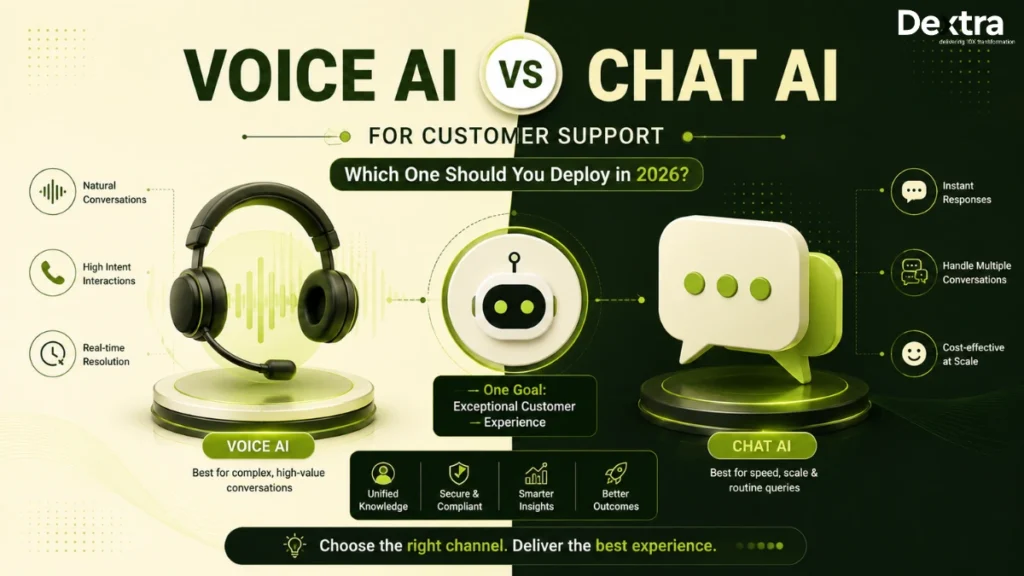
Are you also looking for the right AI channel to automate your customer support but stuck between voice AI vs chatbot? 2026 is making this choice harder because you can now automate support through voice AI, chat AI, or use both, but choosing the right starting point depends on your customers, workflows, budget, and the kind of support experience you want to deliver.
Voice AI is gaining momentum in customer support. IrisAgent reports that production voice AI deployments grew 340% year over year across more than 500 organizations in 2026. However, faster adoption does not automatically make voice the better choice, since chat can still be simpler and more cost-effective for many support workflows. Both are part of the same broader shift, deploying an AI agent for customer services that can actually resolve issues rather than just answer questions, and the channel you choose is one of the first decisions that shapes how well that agent performs.
In this blog, we compare voice AI vs chat AI across cost, implementation, compliance, use cases, customer experience, and ROI. You will see when voice AI or chatbot makes more sense and when using both is the better approach. So, let’s get going!
Voice AI vs Chatbot Decision Matrix: Quick Overview [2026 Updated!]
If you are deciding where to put your first customer support automation budget, look at the channels your customers already use and the kind of problems they bring to you. Voice AI vs chatbot comes down to whether you need real-time conversations, low-cost self-service, or both. Use the matrix below to see where each channel fits best and when running both makes more sense:
| Factor | Voice AI wins when… | Chatbot wins when… | Deploy both when… |
| Channel mix | Phone already accounts for 40% or more of your inbound support, especially when customers rely on calls for urgent or complex issues. | Most of your requests, around 60% or more, already come through digital channels such as website chat, WhatsApp, mobile apps, or social messaging platforms. | Phone and digital channels each account for more than 25% of support volume, making a combined voice and chat setup worthwhile. |
| Customer segment | Your customers include older users, mobile-first customers, or people who are more comfortable explaining an issue by speaking than typing. | Your audience is comfortable with digital tools and prefers handling issues through chat or messaging. | Your customer base includes different age groups, digital habits, and communication preferences, so no single channel works equally well for everyone. |
| Query complexity | Customers regularly need help with multi-step issues, urgent problems, or situations where tone and conversation matter more than anything else. | A large share of requests are repetitive, transactional, and easy to resolve through guided text interactions. | Your support team handles a mix of routine questions and complex issues, allowing chat to handle volume while voice takes on cases that need deeper interaction. |
| Cost sensitivity | Customer experience and resolution quality matter more than minimizing the cost of every individual interaction. | Keeping the cost per interaction low is a major priority and many requests can be resolved without a live conversation. | You can justify both channels through a combination of lower support costs, higher resolution rates, and better customer experience. |
| Compliance environment | You already have the processes needed for call recording, consent, and other voice-specific compliance requirements. | Your workflows involve sensitive PII or other regulated data but do not require the additional controls associated with voice recording and calls. | Your business operates in regulated markets where both digital and voice interactions need coordinated compliance controls. |
| Deployment speed | You can allow roughly 12 to 20 weeks for telephony, speech, integration, testing, and production rollout. | You need to get customer support automation live within roughly 4 to 8 weeks and your workflows are suitable for text-based automation. | You have the time and resources for a broader 20+ week rollout covering both channels and their handoff workflows. |
| Language support | Regional accents, dialects, pronunciation, and natural spoken conversations are important to the customer experience. | You need broad multilingual text support and occasional regional differences are less important. | You operate globally and need strong multilingual support across both spoken and written interactions. |
The practical answer is often not voice AI or chatbot, but voice AI and chatbot working together. When both channels share the same underlying reasoning, customer context, knowledge base, and backend integrations, you can route each interaction to the channel that fits it best. The real decision becomes which channel should come first, where should each one be used, and how should they work together? The sections below give you the reasoning so you can apply it to your own support operation.
What Is Voice AI for Customer Support?
Voice AI for customer support is a software system that holds real-time voice conversations with customers through phone calls or in voice-enabled channels and can resolve support requests without a human agent. It uses speech-to-text to understand what you say, an LLM to reason through the request, and text-to-speech to respond naturally.
One important distinction is that voice AI is not IVR because, instead of moving you through fixed menu options, it can understand your intent, remember the conversation, access CRM and knowledge-base data, and take actions across connected systems, which also highlights the difference between voice AI and chatbot: voice AI is built for real-time spoken conversations while chat AI works through text.
Production-grade voice AI in 2026 uses several specialized components together. Deepgram, AssemblyAI, or OpenAI Whisper can handle speech recognition, while Claude Sonnet 4.5, GPT-5, or Gemini 2.5 Pro handle reasoning and ElevenLabs, Cartesia, or PlayHT generate the voice with orchestration handled through frameworks such as LangGraph, AutoGen, or CrewAI.
For customer support, an AI voice agent can handle calls, after-hours coverage, peak volumes, and outbound conversations. It can manage tasks such as authentication, order tracking, scheduling, refunds, and basic troubleshooting before handing complex issues to a human with the conversation context intact. If phone support is central to how your customers reach you, our guide on AI Voice Agents for Customer Service goes deeper into the architecture, use cases, and enterprise rollout considerations specific to this channel.
What Is Chatbot for Customer Support?
A chatbot for customer support handles real-time text conversations across websites, mobile apps, WhatsApp, SMS, and in-app chat. In 2026, modern chatbots are LLM-powered AI chat agents that can understand requests, retrieve information, and take actions rather than following scripted flows.
Chatbots have moved beyond fixed responses and decision trees. Modern chat AI can now understand ambiguous language, maintain multi-turn context, retrieve information through RAG, and complete tasks such as updating CRM records, processing refunds, or creating support tickets.
Production-grade chat AI uses much of the same technology as voice AI, excluding the speech layers. Claude Sonnet 4.5, GPT-5, or Gemini 2.5 Pro can handle reasoning, while Pinecone, Weaviate, or pgvector support RAG and tools such as Cohere Rerank improve retrieval accuracy. Orchestration uses LangGraph, AutoGen, or CrewAI and guardrails use Guardrails AI, NeMo Guardrails, or Lakera Guard.
For customer support, chat AI works well for high-volume digital requests such as order tracking, password resets, subscription changes, and FAQs. It can also process screenshots and receipts, let customers return to conversations later, and automatically maintain a written record of each interaction by default.
Voice AI vs Chatbot: The Detailed Comparison [2026]
The AI voice agent vs chatbot decision becomes more clear when you compare how each channel performs in real customer support situations. The sections below discuss the areas that matter most from customer experience and speed to cost, compliance, and scalability:
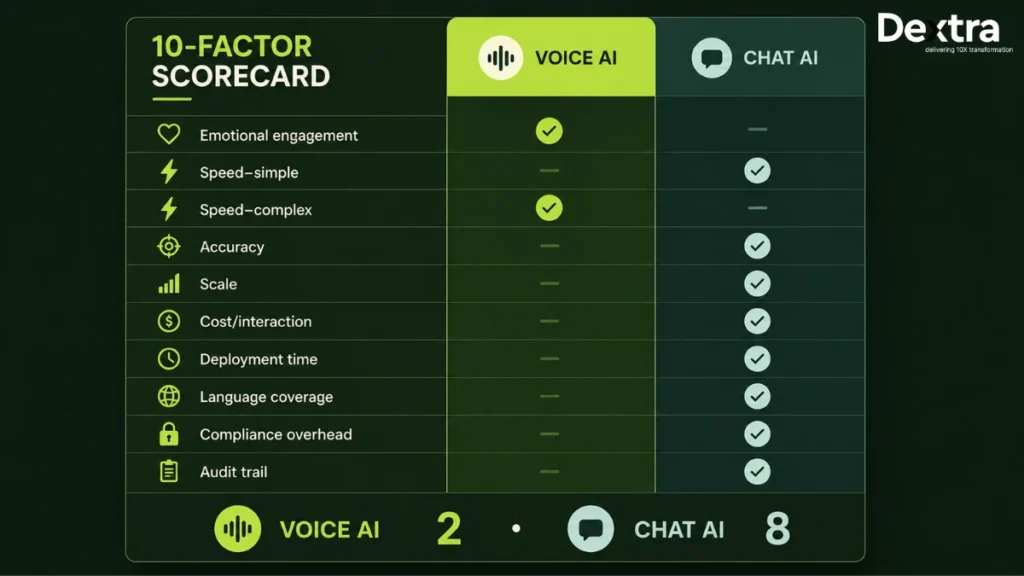
1. User Experience and Emotional Engagement
The better choice here depends on whether your customers need a more human conversation or they just want to get something done quickly.
- Voice AI wins when customers are frustrated, dealing with sensitive issues, or need to explain a problem naturally because tone, pauses, and urgency add context that text cannot capture.
- Chat AI wins when customers want privacy and flexibility, particularly when they prefer typing, multitasking, sharing screenshots, or returning to the conversation later.
Verdict: Voice AI could be better for empathy and real-time interaction whereas chat AI for convenience and control.
2. Speed and Resolution Time
The faster option depends largely on how much customers need to explain before you can resolve their issue. So,
- Voice AI wins when the issue is more involved, requires several steps or is difficult to explain in writing. Customers can simply talk through the problem, ask follow-up questions, and get real-time responses without having to type everything out.
- Chat AI wins when the request is simple and predictable, such as checking an order, resetting a password, answering an FAQ, or changing a subscription. Customers can get quick answers while easily multitasking or referring back to the conversation.
Verdict: Chat AI works better for routine requests, while voice AI is better suited for more complex conversations.
3. Accuracy and Understanding
Both can understand customer intent well, but they deal with very different types of input and the difference comes down to how each one understands your customer:
- Voice AI wins when spoken context matters because an AI voice agent can use tone, hesitation, urgency, and conversational cues alongside the actual words.
- Chat AI wins when you need cleaner and more predictable input because text reaches the model directly without an ASR layer that can be affected by accents, noise, or poor call quality.
Verdict: Chat AI is a better option for predictable input, whereas voice AI is for richer conversational context.
4. Scale and Concurrent Conversations
At high volumes, voice and chat need very different resources to keep up, so it helps to look at where each channel works best:
- Voice AI wins when you need to automate a large number of phone conversations while maintaining a real-time, one-to-one experience.
- Chat AI wins when digital support volume is very high because chat can scale without provisioning telephony, streaming audio, ASR, and TTS for every active conversation.
Verdict: For massive digital volumes, chat AI scales comparatively more easily, while voice AI works well for high-volume phone engagement.
5. Cost per Interaction
The cheaper option is usually clear, but the real question is what you pay for each resolved issue. Here’s how they compare:
- Voice AI wins when a higher voice AI cost can be justified by resolving complex calls that would otherwise require human intervention.
- Chat AI wins when keeping the cost of every interaction low is the priority because chatbot cost does not include telephony, ASR, or TTS.
Verdict: Chat AI keeps interaction costs lower, while voice AI can justify the additional spend when it resolves higher-value issues.
6. Deployment Complexity and Time
The difference between voice AI and chatbot becomes especially noticeable when you move from testing to production:
- Voice AI wins when phone support is central to your operation and you can accommodate the additional work around telephony, latency, call routing, interruptions, escalation, and compliance.
- Chat AI wins when you need to launch quickly because chatbot implementation can usually connect to existing digital channels and backend systems with fewer infrastructure requirements.
Verdict: Chat AI is easier to deploy quickly, whereas voice AI makes sense when deeper phone automation is worth the added engineering effort.
7. Multilingual and Accessibility Support
When language and accessibility matter, the better channel depends on whether your priority is broader coverage or a more natural spoken experience:
- Voice AI wins when customers are more comfortable speaking than typing, need hands-free support, or communicate through different accents and speaking styles. It can make conversations feel more natural, especially when customers need to explain an issue in their own words rather than fit it into a text-based interaction.
- Chat AI wins when written multilingual support is easier to manage across your customer base because it avoids the additional speech-recognition and pronunciation challenges that come with voice.
Verdict: Chat AI offers broader language coverage, while voice AI has an advantage when spoken accessibility and regional speech matter more.
8. Compliance and Data Handling
The voice AI vs chatbot decision also changes once sensitive customer information and regional regulations enter the scenario; then:
- Voice AI wins when you have the right controls for call recording, consent, PII, PHI, PCI data, voice data, retention, and redaction.
- Chat AI wins when you want to avoid the additional compliance considerations associated with recorded calls while still maintaining strong privacy and security controls.
Verdict: Chat AI generally carries a lighter channel-specific compliance burden, while voice AI works well when the necessary controls are already part of your architecture.
9. Integration Depth With Backend Systems
The underlying AI architecture can be similar, but voice adds telephony and real-time audio to the integration mix:
- Voice AI wins when your support workflows depend heavily on phone calls and the agent needs to access CRM, ticketing, order systems, knowledge bases, and telephony tools during the conversation.
- Chat AI wins when your workflows are already digital because an AI chat agent can connect directly with your website, app, CRM, knowledge base, and backend tools.
Verdict: Chat AI involves simpler integrations; on the other hand, voice AI is a better fit when phone-based workflows are central to your support operation.
10. Documentation and Audit Trail
It also matters what happens to the conversation once the customer hangs up or closes the chat:
- Voice AI wins when you have a strong transcription pipeline that can turn calls into searchable, reviewable, and auditable records without losing important details.
- Chat AI wins when documentation is a priority because every interaction is already available as text and can be searched, reviewed, analyzed, and retained immediately.
Verdict: Chat AI can create automatic documentation, while voice AI works well when you have a reliable transcription pipeline for documentation and audits.
After looking at each factor separately, you can now see the trade-offs at a glance. The table below compares where voice AI and chat AI each have the stronger fit:
| Dimension | Voice AI | Chat AI | Winner |
| Emotional engagement | Strong | Weak | Voice AI |
| Speed on simple queries | Slower | Faster | Chat AI |
| Speed on complex queries | Faster | Slower | Voice AI |
| Accuracy | Depends on ASR and audio quality | More predictable text input | Chat AI |
| Scale | Moderate | High | Chat AI |
| Cost per interaction | Higher infrastructure costs | Lower interaction costs | Chat AI |
| Deployment time | More infrastructure and testing required | Generally faster to implement | Chat AI |
| Language coverage | Strong for spoken interaction and regional speech | Strong for broad written support | Chat AI |
| Compliance overhead | Heavy | Moderate | Chat AI |
| Audit trail | Requires transcription | Automatic | Chat AI |
When Should You Choose Voice AI First?
Here’s when you should start with voice AI, especially if phone is still your main support channel and customers need a real conversation to resolve their issues:
1. When most urgent customer issues come through phone calls: If customers call about fraud alerts, account freezes, disputes, or other high-stakes issues, voice AI can handle more of that volume without adding agents.
2. When your healthcare customers already rely on calls: Voice AI fits well for eligibility checks, claims questions, prior authorization updates, and appointment scheduling where phone support is already part of the workflow.
3. When your customers prefer talking over typing: If older or less tech-comfortable customers are more likely to call than use a chat widget, voice AI gives them a channel they already understand.
4. When your contact center gets busy after hours: Voice AI can handle calls outside business hours and during sudden volume spikes, reducing the need to hire extra staff for peak demand.
5. When your customers prefer voice in local markets: If you serve regions where people commonly prefer calling, voice AI can make multilingual support feel more natural across languages, accents, and dialects.
6. When you are combining multiple contact centers: If you are moving from several regional centers to one operation, voice AI can handle additional call volume without requiring the same increase in staffing.
If you’re evaluating this in a specific vertical, AI Agents for Automotive Customer Service walks through how dealerships and service centers apply this same voice-first logic to appointment scheduling and parts inquiries.
When Should You Choose Chatbot?
Here’s when you should start with chat AI, especially if your customers already prefer digital channels and most requests are frequent and easy to resolve through text:
1. When customers already use your website or app for support: If people come through your website, mobile app, or in-product chat, chat AI fits naturally into the channels they already use.
2. When most questions are simple and repetitive: For order tracking, password resets, subscription changes, and refund updates, chat AI can resolve high volumes without the cost of a phone conversation.
3. When you need to launch quickly: If you want your first AI support deployment live within a few months, chatbot implementation is generally simpler and faster than building a production voice AI system.
4. When you support customers across different time zones: Chat AI lets customers ask questions whenever they need help without waiting for a phone line or requiring a live call.
5. When most of your customers prefer messaging: If your audience is comfortable with texting, messaging apps, and in-app chat, chat AI matches how they already prefer to get support.
6. When you already use chat and messaging channels: If you already support customers through WhatsApp, Messenger, or in-app chat, adding an AI chat agent is a natural next step before expanding into voice.
Once you’ve settled on voice, chat, or both, the next question is who actually builds it. Our breakdown of the Best AI Agent Builder for Customer Service compares vendors and delivery partners against the same criteria, compliance, integration depth, and control, that shaped the voice-vs-chat matrix above.
Hybrid Model: When You Can Deploy Both Chatbot and AI Voice Agent
In 2026, you do not always have to choose between voice AI and chat AI. If your customers use both, you can run them on shared architecture with coordinated handoffs, letting each channel handle what it does best.
What the hybrid architecture actually looks like
A hybrid setup lets you use the same AI agent across both voice and chat, with shared reasoning, knowledge, orchestration, and backend integrations. One agent, two modality stacks is the basic idea of hybrid architecture.
Voice adds ASR and TTS, while chat works directly with text. Your customers can switch channels without losing context, while the underlying AI remains the same.
When the hybrid earns the investment
Using both makes sense when your customers already split their support between phone and digital channels. Here are four situations where using both channels can make the most sense:
- Diverse channel mix: If both voice and digital channels contribute more than 25% of your support volume, supporting both can give customers a better way to reach you.
- Cross-channel escalation: You can let chat handle initial triage and move complex cases to a voice callback without making customers repeat the issue.
- Peak and off-peak balancing: You can use chat for routine digital requests while voice handles urgent calls and after-hours demand.
- Global operations: You can keep one core AI agent while adapting voice and chat to customer preferences across different markets.
What hybrid deployments outperform on
When you combine both channels, the gains can show up in resolution, handle time, customer experience, and overall support efficiency:
- Customer experience: A hybrid setup lets you keep routine digital requests in chat while moving complex or urgent cases to voice, so you can apply these efficiencies without forcing every customer into the same channel.
- Resolution efficiency: Routine requests can stay in chat while complex issues move to voice which helps avoid using the more expensive channel for simple tasks.
- Handling time: The right channel for each request can reduce unnecessary back-and-forth and speed up resolution.
- Cost efficiency: You can keep lower-cost interactions in chat while reserving voice AI for cases where a real-time conversation adds more value.
The Cost Comparison of Chatbot vs Voice AI Agent: What You Actually Pay?
The cost gap between voice AI and chat AI becomes easier to understand when you look at what you are actually paying for in each channel.
Cost per interaction breakdown:
Here’s what typically makes up the cost of a single interaction across both channels:
| Cost component | Chat AI (per interaction) | Voice AI (per interaction) |
| LLM tokens (reasoning) | $0.01 to $0.03 | $0.02 to $0.05 (longer sessions) |
| RAG / retrieval | $0.005 to $0.01 | $0.005 to $0.01 |
| ASR (speech-to-text) | Not applicable | $0.03 to $0.08 |
| TTS (text-to-speech) | Not applicable | $0.05 to $0.15 |
| Telephony (per-minute charges) | Not applicable | $0.05 to $0.20 (varies by region) |
| Orchestration and observability | $0.005 | $0.01 |
| All-in per resolved interaction | $0.04 to $0.08 | $0.20 to $0.60 |
Deployment and operating cost breakdown:
Once you move beyond individual interactions, the difference shows up in what it takes to build, run, and maintain each system:
| Cost component | Chat AI (typical) | Voice AI (typical) |
| Initial build (Phase 1 scoping + Phase 2 build) | $150K to $400K | $500K to $1.5M |
| Annual operating cost (5,000 conversations/day) | $80K to $150K | $250K to $500K |
| Deployment time to production | 4 to 8 weeks | 12 to 20 weeks |
| Break-even against fully-loaded human agent cost | 8 to 14 months | 12 to 18 months |
The cost calculation that actually matters is not what you pay per interaction, but what you pay to fully resolve the issue. For example, if your voice AI resolves 60% of calls end to end while chat AI resolves 75% of chats, the actual cost gap becomes much smaller than the headline interaction costs suggest. Looking only at the cheaper channel can therefore give you a misleading idea of your actual support costs.
Chatbot vs AI Voice Agent: The Compliance and Security Comparison
If you are deploying AI for customer support, voice usually brings more compliance work. Chat AI has compliance requirements too, but some voice-specific risks simply do not exist in a text-only interaction.
Below are the five specific compliance overheads that apply to voice AI but not (or less) to chat AI:
- Call recording consent: If you record customer calls, laws in some U.S. states require you to provide appropriate notice or obtain consent. Your voice AI workflow therefore needs consent prompts, recording controls, and region-aware call handling.
- Voice biometrics: If your AI uses voiceprints to identify customers, you are dealing with biometric data rather than ordinary conversation data. That means you need clear policies around collection, purpose, storage, retention, and deletion.
- Recording and access controls: Voice recordings can contain large amounts of PII and sensitive information. You need encrypted storage, retention policies, role-based access, audit logs, and controls for transcription data. Chat transcripts require similar safeguards, but are generally simpler to manage.
- HIPAA requirements: If you use voice AI in healthcare, the AI, telephony, transcription, and storage providers involved in handling PHI need to fit your HIPAA compliance architecture. This can also mean reviewing Business Associate Agreements across the technology stack.
- PCI-DSS and payments: Taking card details through a voice conversation can expand your PCI scope, particularly if payment information enters recordings or transcripts. With chat, you can instead direct customers to a secure payment form and keep card data outside the conversation.
For a production deployment, Dextra Labs treats these controls as part of the architecture rather than something to add after launch. As AI Agent Builders, we design custom voice and chat AI agents around your data flows, authentication, access controls, retention policies, and industry-specific compliance requirements.
The 2026 Tech Stack for Chatbot and AI Voice Agents
Both voice AI and chat AI use the same core reasoning, knowledge, and orchestration layers. The main difference is in how customers interact with the agent and the infrastructure each channel needs.
Shared components across both channels
You can build both channels around the same core stack:
- LLM reasoning: Claude Sonnet 4.5, GPT-5, or Gemini 2.5 Pro.
- RAG and vector databases: Pinecone, Weaviate, or pgvector with Cohere Rerank.
- Orchestration: LangGraph, AutoGen, or CrewAI.
- Guardrails: Guardrails AI, NeMo Guardrails, or Lakera Guard.
- Evaluation and observability: Langfuse, LangSmith, or Ragas.
- Integration: Model Context Protocol (MCP) for connecting backend systems.
- Model portability: BYOK deployments when you need greater control over model providers.
Voice-specific additions
Voice AI adds the speech and telephony layers needed for real-time conversations:
- Speech-to-text: Deepgram Nova-3, AssemblyAI Universal-2, or OpenAI Whisper Large-v3.
- Text-to-speech: ElevenLabs, Cartesia Sonic, or PlayHT.
- Telephony: Twilio, Genesys, Amazon Connect, RingCentral, or Aircall.
Integrating these components into a reliable production system requires careful orchestration, latency optimization, and telephony integration. Businesses can use AI voice agent development services to build custom voice solutions that connect speech technologies with their existing customer support workflows and backend systems.
Chat-specific additions
Chat AI skips the speech stack and connects directly to the digital channels your customers already use:
- Messaging: WhatsApp Business API, Facebook Messenger, SMS via Twilio, or in-app SDKs.
- Web chat: Custom-built or embedded chat widgets.
At Dextra Labs, our AI Agent developers use this shared architecture to build voice and chat agents around your channels, integrations, compliance needs, and workflows. If you’re mapping out the full build, not just the channel decision, our guide on how to build a 24/7 AI customer service agent walks through the end-to-end implementation, from architecture through production rollout.
How Dextra Labs Builds Custom Voice AI and Chat AI Agents for Customer Support
The shift most support teams are making isn’t from one channel to the other, it’s toward a setup where chat handles the routine volume and voice steps in for the conversations that actually need a real-time back-and-forth, with both running on the same underlying reasoning and knowledge base.
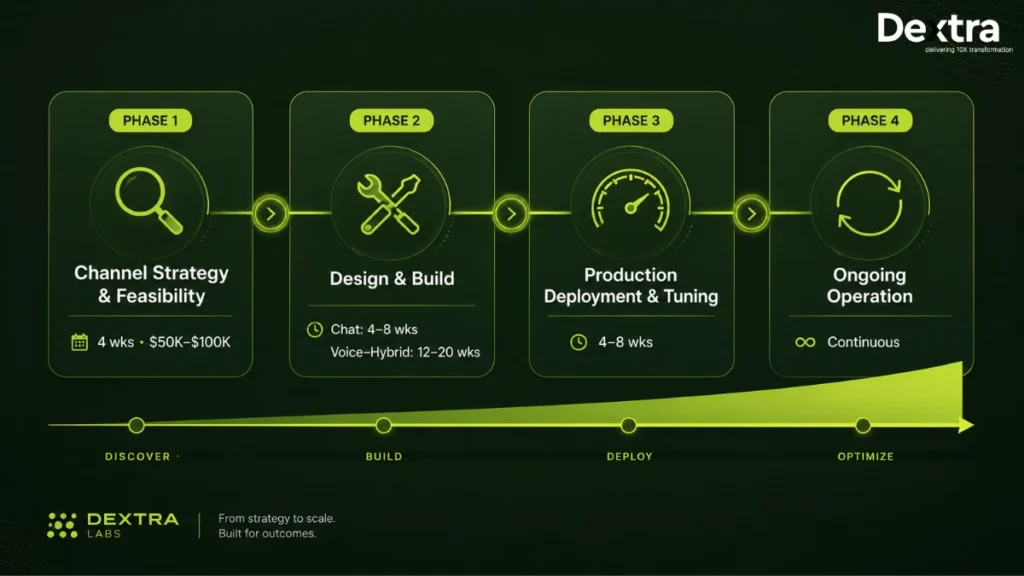
Getting there usually starts with a short feasibility phase: mapping your current channel mix, telephony, CRM, and knowledge systems against where voice, chat, or a hybrid setup would actually move the numbers, before committing to a full build. From there, chat implementations typically take 4–8 weeks and voice or hybrid builds run 12–20 weeks, followed by a production tuning phase where latency, escalation flows, and conversation quality get validated before scaling further.
This is the kind of engagement our ai agent development services in USA are built around, particularly for financial services, healthcare, insurance, and ecommerce teams where compliance and integration depth matter as much as the channel decision itself. If you’re weighing voice, chat, or a hybrid rollout, a feasibility review is usually enough to tell you which one actually fits your volume and workflows before any commitment to a full build.
The unified engagement model of Dextra Labs:
Dextra Labs starts by understanding how you support customers today and what you want the AI agent to handle, then build the solution around that. Here are the four phases we follow:
Phase 1: Channel strategy and feasibility (4 weeks)
We review your channel mix, workflows, existing telephony, CRM, and knowledge systems with your key teams. We then map the right voice, chat, or hybrid architecture and estimate ROI before you decide whether to move ahead. The investment for this phase is around $50K-$100K.
Phase 2: Design and build
We build the shared reasoning agent, RAG pipeline, guardrails, integrations, and escalation flows. For voice, we add telephony, ASR/TTS, and latency tuning; for chat, we connect your messaging channels and web interfaces. This takes around 4 to 8 weeks for chat and 12 to 20 weeks for voice or hybrid.
Phase 3: Production deployment and tuning
At Dextra Labs, we load-test your agent, optimize latency, review real conversations, monitor quality, and validate escalation flows before scaling it further. This usually takes 4 to 8 weeks.
Phase 4: Ongoing operation
Once your agent is live, we continuously evaluate performance, update models, expand workflows, and optimize your operating costs as your needs change.
Where Dextra Labs specializes
Dextra Labs focuses on custom voice and chat AI agents when off-the-shelf solutions fall short on compliance, integrations, control, or performance. This includes financial services, healthcare, insurance, ecommerce, and multilingual operations as well as enterprises handling 200K+ conversations per month that need greater control over their AI stack and economics.
When to talk to us
If you are deciding between voice AI, chat AI, or a hybrid setup, Dextra Labs can review your channel mix, workflows, and architecture options and help you determine the right approach without any obligation.
Conclusion
The difference between voice AI and chatbot in 2026 is less about which one is better and more about where each one better fits. We covered their user experience, speed, accuracy, scale, cost, deployment, multilingual support, compliance, integrations, and audit trails, along with when to choose voice, chat, or both. For most businesses using both channels, a shared hybrid architecture can give you the flexibility to use each where it works best.
If you are still deciding which setup makes sense for you, Dextra Labs can help you assess your channel mix, workflows, integrations, and compliance requirements and build the right custom solution around them. And if the open question isn’t which channel but who should build it, our Build vs Buy AI Customer Service Agent guide walks through that decision separately, comparing in-house builds, a development partner, and off-the-shelf platforms.
Frequently Asked Questions
1. What is the difference between voice AI and chatbot for customer support?
The difference between voice AI and chatbot shows mainly in how you interact with them. Voice AI listens to your speech, understands the request, and responds in real time, while a chatbot communicates through typed messages, buttons, and other text-based interactions. Both use the same underlying large language models for reasoning, but voice AI adds speech-to-text and text-to-speech, while chatbots work directly with text.
2. Is voice AI or chatbot cheaper to deploy?
If you need deeper integrations or specific workflows, a custom chatbot can give you more control over where your budget goes. Chatbots are generally cheaper to deploy than voice AI because they work directly with text and do not need speech-to-text, text-to-speech, or telephony infrastructure. Moreover, chatbot for customer support usually means lower setup and operating costs, while voice AI costs more because of its additional real-time speech and telephony layers.
3. Which resolves customer issues faster: voice AI or chatbot?
A voice AI agent can resolve complex, multi-step issues faster because customers can explain the problem naturally and easily without typing everything out. A chatbot is often faster for simple requests such as order tracking, password resets, or quick lookups. So, in an AI voice agent vs chatbot comparison, the faster option depends more on the type of issue than the technology itself.
4. Can voice AI and chatbot work together in the same deployment?
Yes, you can use a voice AI agent and chatbot together in the same customer support setup. Both can share the same AI model, knowledge base, and backend systems, while voice adds speech tools and chat works through text. This makes the AI voice agent vs chatbot choice less about choosing just one and more about using each where it works best. Dextra Labs can connect both channels to your existing systems and workflows, so customers can move between voice and chat without losing context.
5. When should I choose voice AI over chatbot?
You can choose voice AI over a chatbot when your customers prefer phone support, need to explain complex issues by speaking, or your business depends heavily on real-time conversations. This makes voice AI use cases especially relevant for healthcare, financial services, contact centers, and other support environments where a natural conversation matters. Choose a chatbot when most customers already use digital channels and need quick, simple support.
6. Do voice AI and chatbot use the same technology underneath?
Yes, voice AI and chatbots use much of the same technology underneath. Both can use models such as GPT-5, Claude Sonnet 4.5, or Gemini 2.5 Pro to understand requests and generate responses, along with RAG and tools like Pinecone or Weaviate. Voice AI adds speech-to-text and text-to-speech, while chatbots work directly with text. If you need a setup tailored to your specific workflows and systems, Dextra Labs can build the shared architecture around your specific support needs.